

CaseLines, now rebranded as Case Center, has emerged as a pivotal tool for managing court cases. This cloud-based evidence management platform is designed to streamline the preparation, sharing, and presentation of case materials, replacing traditional paper-based bundles with secure electronic bundles. In this article, we delve into the functionality, accessibility, and benefits of CaseLines while providing a step-by-step guide for registration and login.
What is CaseLines?
CaseLines, developed by Thomson Reuters, is a secure digital platform used by courts worldwide to manage evidence and case materials. The system enables legal professionals to upload, organize, and present documents in a centralized online environment.
It supports various file formats, including PDFs, Word documents, audio files, and videos, making it a versatile solution for modern legal proceedings. As of July 2024, the platform has been rebranded as Case Center in Ontario courts to reflect its broader capabilities and enhanced features.
Key Features of CaseLines
CaseLines offers a suite of features aimed at improving efficiency in case management:
- Centralized Evidence Management: Users can upload all case-related documents into a single platform, creating fully searchable and indexed bundles.
- Collaboration Tools: Legal teams can invite participants to access case files and collaborate in real time.
- Advanced Search Capabilities: Boolean and natural language searches enable users to locate specific information quickly.
- Presentation-Ready Bundles: The platform allows seamless navigation during hearings, ensuring confidence in court presentations.
- Redaction and Annotation Tools: Users can redact sensitive information and add notes or hyperlinks to documents for easier navigation.
Why Courts Are Adopting CaseLines
The adoption of CaseLines by courts globally signifies a shift toward digital-first strategies in legal proceedings.
This transition is driven by several factors:
- Efficiency: CaseLines eliminates the need for physical documentation, reducing administrative overheads.
- Accessibility: Legal professionals can access case files from any device with an internet connection.
- Security: The platform employs robust encryption protocols to safeguard sensitive information.
- Environmental Impact: By digitizing case materials, courts significantly reduce paper consumption.
How to Register on CaseLines
To access CaseLines (or Case Center), users must first register on the platform. Follow these steps for a seamless registration process:
- Visit the official Case Center website (e.g., https://ontariocourts.casecenter.thomsonreuters.com/).
- Click on the “Register” button located at the top right corner of the homepage.
- Fill out the registration form with your details, including your email address.
- Check your email inbox for a verification link sent by Case Center (ensure it doesn’t land in your spam folder).
- Click on the verification link to activate your account.
How to Log In to CaseLines
Once registered, logging into CaseLines is straightforward:
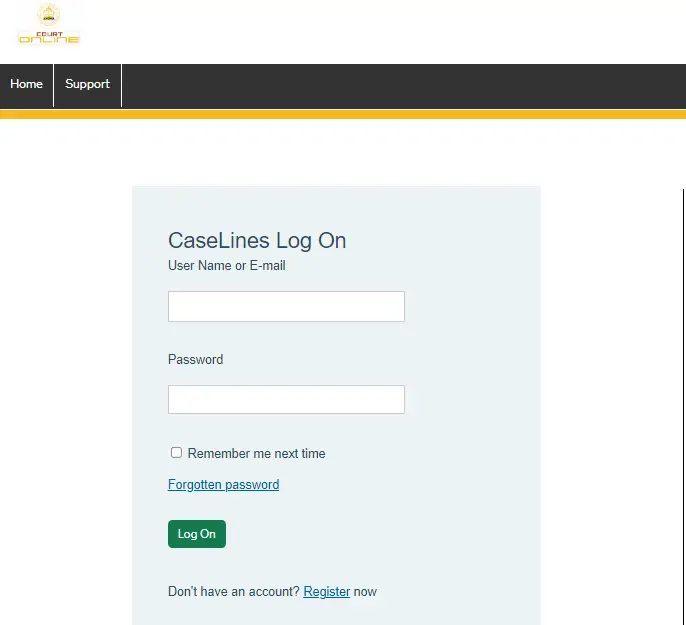
- Go to the Case Center login page.
- Enter your username (or email address) and password created during registration.
- Click “Log On” to access your account.
- Navigate to “View Case List” to see all cases associated with your account.
Navigating Your Cases
After logging in, users can easily locate their cases using the “Case Filter” feature:
- Use the “Hearing Date From/To” fields to search for cases within specific date ranges.
- Enter keywords or party names in the “Case Name/Reference” field for targeted searches.
- Select the relevant case from the filtered list and click “Review” to access its details.
Uploading Documents to CaseLines
Uploading evidence or documents is a critical function within CaseLines. Here’s how you can do it:
- Log into your account and select the relevant case from the “View Case List.”
- Click on “Update Case” followed by “Sections.”
- Choose an existing section or create a new one where you want to upload documents.
- Click on “Upload File(s)” or drag-and-drop files directly into the designated area.
- Ensure that uploaded documents are properly named and organized for easy navigation during hearings.
Support and Training Resources
For users who encounter challenges while using CaseLines, comprehensive support resources are available:
- Helpdesk assistance via email or phone ensures timely resolution of technical issues.
- Training videos and user guides provide step-by-step instructions for navigating the platform effectively.
The Future of Digital Courtrooms
The integration of platforms like CaseLines into judicial systems marks a significant step toward modernizing court operations. By enhancing efficiency, accessibility, and security, these tools empower legal professionals to focus on substantive matters rather than administrative tasks.As legal systems worldwide continue to embrace digital transformation, platforms like CaseLines will play an increasingly central role in shaping the future of litigation.
What is Caselines
https://sajustice.caselines.com/
CaseLines is a user-friendly cloud-based document sharing and storage e-hearing platform for remote and in-person court proceedings.
caselines login
https://sajustice.caselines.com/
Go to the caselines login link https://sajustice.caselines.com/ Then enter username & password. Click on the “login” button.
CaseLines UK
https://uk.caselines.com/
Case Center, formerly CaseLines, streamlines the way you prepare, manage, and present digital cases with a centralised cloud-based solution.
CaseLines Canada
https://ontariocourts.caselines.com/
CaseLines for Domestic Family Matters in the Ontario Court of Justice notice (May 2022); CaseLines Hearings Tips for Counsel and Self-represented.
CaseLines Thomson Reuters
https://www.thomsonreuters.com/en/press-releases/2020/august/thomson-reuters-acquires-caselines.html
The acquisition of CaseLines enhances Thomson Reuters offerings in the courts administration space and furthers the company’s strategic approach.
CaseLines FAQ
https://www.ontariocourts.ca/scj/notices-and-orders-covid-19/supplementary-notice-september-2-2020/faq-caselines/
Please find below frequently asked questions and answers about using CaseLines in the Ontario Superior Court of Justice.
CaseLines Toronto
https://www.ontariocourts.ca/scj/notices-and-orders-covid-19/supplementary-notice-september-2-2020/caseline-tips/
Criminal documents for pre-trial motions in Toronto are to be uploaded the Thursday prior to the week the motion is set to be argued.
CaseLines demo
https://www.ontariocourts.ca/scj/notices-and-orders-covid-19/supplementary-notice-september-2-2020/faq-caselines/
You’ve received an email from CaseLines advising you to upload documents for your upcoming hearing into CaseLines.
caselines family
https://uk.caselines.com/Account/LogOn
CaseLines is a user-friendly, cloud-based document sharing and e-hearing platform for both in-person and virtual court appearances developed
caselines dcs
https://crowncourtdcs.caselines.co.uk/
Defence and prosecution Certificates of Readiness. A link to the Training Materials including Quick Reference Guides and videos.
Conclusion
Whether you are a lawyer preparing for a hearing or a judge reviewing case materials, mastering tools like CaseLines is essential in today’s fast-evolving legal landscape. The platform not only simplifies complex processes but also sets new standards for transparency and collaboration in judicial proceedings.























