


Finding a life partner online should not stall at the sign-in screen. Our team tested the anuroop login flow, the registration form, and the password recovery path on Anuroop Wiwaha, and we mapped every step below so you can get into your account on the first try.
Key Takeaways
- Anuroop Wiwaha lets you sign in with your email address or Profile ID plus a password, which the Sanstha sends via email, mobile, or WhatsApp.
- New members register through a free online form, but full access requires a paid plan. App Store prices start at ₹4,999 for a Basic plan.
- The Android and iOS apps offer the same core features, though user reviews flag frequent loading errors and crashes.
What is Anuroop Wiwaha?
Anuroop Wiwaha is a matrimonial service built for the Marathi and Gujarati-speaking communities. It runs as Anuroop Wiwaha Private Limited and is headquartered in Sadashiv Peth, Pune, Maharashtra 411030.
The platform claims 48 years of experience and more than 100,000 happy marriages. It also reports over 1,000 matrimony events held worldwide.
If you’ve been following India’s regional matrimony market, this won’t come as a surprise. Community-focused platforms have held their ground against national giants by keeping profile quality high and offering personal guidance.
Our analysis suggests Anuroop’s main selling point is trust over volume. Its own listing states, “We prefer quality over quantity,” and promises only trusted and genuine profiles.
Who can register on Anuroop Wiwaha?
Anyone aged 18 or older can register. The form asks you to confirm your date of birth to verify age before the account is created.
The religion field currently lists Hindu, Jain, and Buddhist options. The mother tongue menu covers Marathi and Gujarati first, followed by more than two dozen other Indian languages.
Members outside India can sign up too. The mobile number field includes country codes for the United States, United Kingdom, Canada, Australia, and many more.
How do you sign up for a new Anuroop account?
Signing up takes about five minutes on the official registration page. You need a valid email ID, a working mobile number, and basic personal details.
Our team observed that every field is mandatory, so gather your information before you start.
Step-by-step signup guide
| Step | Instructions |
|---|---|
| 1 | Open the registration page. Visit https://www.anuroopwiwaha.com/Registration.aspx in your browser. |
| 2 | Select your gender. Choose Male or Female. |
| 3 | Enter your name. Type the bride’s or groom’s name in the Var / Vadhu Name field. |
| 4 | Add your date of birth. Use the dd-mm-yyyy format, such as 15-08-1996. |
| 5 | Type your email ID. Use an address you check often, because your password and alerts go there. |
| 6 | Choose your marital status. Pick from Never Married, Divorced, Widow/Widower, Awaiting Divorce/Legally Separated, or Annulled. |
| 7 | Enter your mobile number. Select your country first, then add the number. |
| 8 | Fill in your location. Type your current city or town. |
| 9 | Select religion, mother tongue, and caste. Each field uses a dropdown menu with preset options. |
| 10 | Complete the reCAPTCHA. Tick the “I’m not a robot” box. |
| 11 | Accept the Terms & Conditions. Check the “I Agree” box after reading the terms. |
| 12 | Submit the form. Wait for your login credentials to arrive via email, mobile, or WhatsApp. |
Do some members need to submit documents?
Yes. If you are divorced, widowed, separated, or annulled, you must upload a supporting document within 8 days of registering.
- Divorced: Divorce Decree
- Widow/Widower: Death Certificate of the deceased spouse
- Awaiting Divorce/Legally Separated: Valid Exhibit document or legal separation order
- Annulled: Valid Decree of Annulment
Miss that deadline and your website access can be interrupted. Keep a scanned copy ready before you hit submit.
How does the Anuroop login process work?
The process uses two credentials: your Email or Profile ID and a password. Anuroop Wiwaha Sanstha provides the password after registration through email, mobile, or WhatsApp.
A Profile ID is the unique code assigned to your profile. You can use it instead of your email on the sign-in screen.
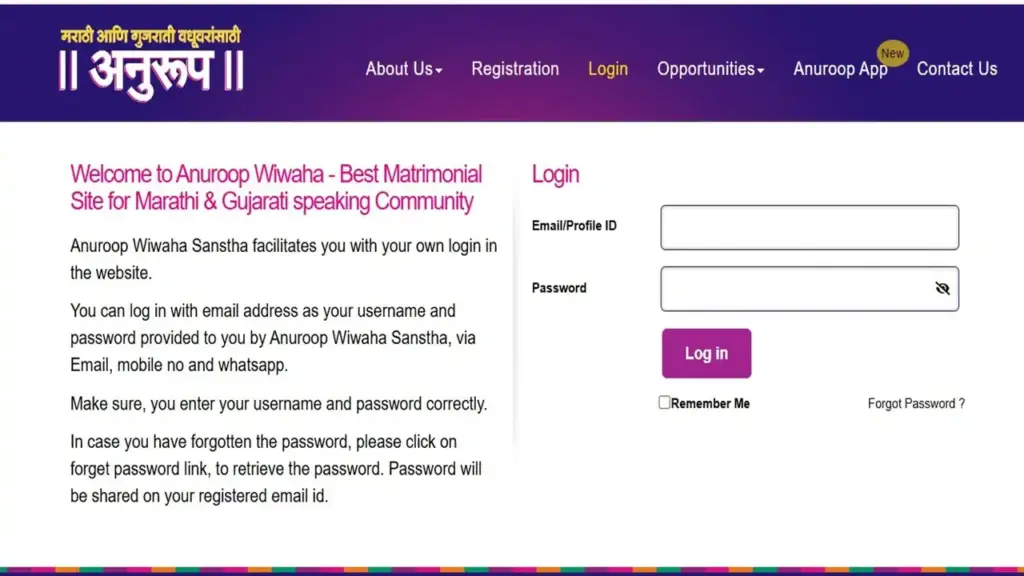
Step-by-step login guide
| Step | Instructions |
|---|---|
| 1 | Go to the official login page. Open https://www.anuroopwiwaha.com/Login.aspx. |
| 2 | Enter your Email or Profile ID. Type it exactly as registered, with no extra spaces. |
| 3 | Type your password. Use the password sent by Anuroop or the one you set later. |
| 4 | Tick “Remember Me” (optional). This keeps you signed in on a personal device only. |
| 5 | Click the Login button. Wait for the “Please Wait…” message to clear. |
| 6 | Check your dashboard. You should now see your matches, interests, and messages. |
We found that most failed attempts come from typos or copied passwords that pick up hidden spaces. Type the password manually if your first anuroop login attempt fails.
What should you do if you forget your password?
You can reset it from the login page in under two minutes. Anuroop sends the recovered password to your registered email ID.
Step-by-step forgot password guide
| Step | Instructions |
|---|---|
| 1 | Open the login page. Go to https://www.anuroopwiwaha.com/Login.aspx. |
| 2 | Click “Forgot Password?” You’ll find the link just below the Remember Me option. |
| 3 | Enter your registered details. Provide the email ID tied to your account. |
| 4 | Submit the request. Follow any on-screen prompts to confirm. |
| 5 | Check your inbox. Look for the password email, and check your spam folder too. |
| 6 | Sign in again. Return to the login page and use the recovered password. |
Your recovery email only goes to the address on file. If you no longer use that inbox, write to info@anuroopwiwaha.com with your Profile ID for help.
Is there an Anuroop mobile app?
Yes. Anuroop offers official apps for Android and iOS, both published by Anuroop Wiwaha Pvt. Ltd. The apps use the same credentials as the website.
Android app (Google Play)
- Download link: https://play.google.com/store/apps/details?id=com.app.anuroop&hl=en_IN
- Downloads: 5 lakh+
- Rating: 3.5 stars from about 15.5K reviews
- Content rating: Mature 17+
- Last updated: 13 October 2026
- Data safety: No data shared with third parties, data encrypted in transit, and deletion requests supported
iOS app (App Store)
- Download link: https://apps.apple.com/in/app/anuroop/id1189015020
- Rating: 3.9 stars from 3.4K ratings
- Size: 192.8 MB
- Compatibility: Requires iOS 15.6 or later
- Age rating: 18+
- Price: Free, with in-app purchases
Industry insiders are noting that frequent updates signal active maintenance. The iOS app shipped version 17.7.3 just days ago, following several bug-fix releases in October alone.
What features do members get?
Anuroop combines search tools, messaging, and compatibility checks in one account. The feature set below comes from the official website and app store listings.
Search and matching
- Advanced filter settings to narrow your matches
- View and search profiles
- Search through different “Matches” categories
- Save Search functionality
- Kundali Matching and Compatibility Matching
Interaction tools
- Express Interest in profiles you like
- Respond to pending requests and incoming interest
- Messaging to chat directly with candidates
- See who added you to Favourites
- See who viewed your profile and contacts
Profile management
- Edit your profile from the app
- Upload your photo
- Horoscope matching facility
Membership perks
- Unlimited profiles for 12 months
- Matrimonial meetup events worldwide
- Special personal guidance sessions
- Programs designed for parents
How much does Anuroop Wiwaha membership cost?
Membership is paid, and prices vary by community category and plan tier. We pulled the figures below from the App Store India in-app purchase list.
Brahmin/Maratha plans
- Basic: ₹4,999
- Premium: ₹6,900
- Premium Plus: ₹8,900
Other plan variants listed
- Brahmin/Maratha “Dis” Premium: ₹6,900
- Brahmin/Maratha “Dis” Premium Plus: ₹7,900
- Other Premium: ₹5,900
- Other “Dis” Premium: ₹4,999
- Other “Dis” Premium Plus: ₹6,900
Upgrade options
- Basic to Premium Plus: ₹2,999
- Premium to Premium Plus: ₹1,299
The App Store does not explain what the “Dis” label stands for. Confirm which plan fits your profile with Anuroop support before you pay.
Our analysis suggests these prices sit at the higher end for regional matrimony services. One iOS reviewer specifically mentioned paying a “4k plus subscription fee,” which lines up with the Basic tier pricing.
What are users saying about the app?
Feedback is mixed. The platform’s community focus wins praise, but app stability draws consistent complaints.
Our team observed these recurring issues across Google Play and App Store reviews:
- Loading errors: Some users report the app needs multiple restarts to open.
- Crashes: Several reviewers mention random crashes during searches.
- Message glitches: Messages occasionally send more than once.
- Interest counters: The pending count sometimes fails to update after you respond.
- Text formatting: The About Me section strips line breaks and special characters.
- Privacy concerns: One Premium Plus member said their contact number stayed visible despite paying for privacy.
The developer responds to many reviews. Its standard reply asks users to email info@anuroopwiwaha.com with their contact number for personal help.
That responsiveness matters. Still, if the app keeps failing, the website login page remains the more stable option based on user reports.
Why does your Anuroop login keep failing?
Most failures trace back to three causes: wrong credentials, an outdated app, or temporary server load. Each one has a quick fix.
Quick troubleshooting checklist
| Step | Instructions |
|---|---|
| 1 | Check your email case. One iOS reviewer reported the app capitalizing every letter in the email field, so retype it in lowercase if needed. |
| 2 | Try your Profile ID. Use it instead of your email if the email keeps failing. |
| 3 | Update the app. Install the latest version from Google Play or the App Store. |
| 4 | Clear the app cache. On Android, go to Settings > Apps > Anuroop > Storage. |
| 5 | Switch to the website. Sign in at the official login page on a browser. |
| 6 | Reset your password. Use the Forgot Password link if nothing else works. |
| 7 | Contact support. Email info@anuroopwiwaha.com with your Profile ID and a screenshot of the error. |
If an anuroop login attempt fails on the app but works on the website, the issue sits with the app, not your account. Report it to support with a screen recording, which the developer has specifically asked users to share.
Frequently Asked Questions
Is the Anuroop login free?
Signing in costs nothing, and registration is free to start. Full access to profiles and contact features requires a paid membership.
Can I sign in with my Profile ID instead of my email?
Yes. The login page accepts either your Email ID or your Profile ID in the same field.
Where do I get my Anuroop password?
Anuroop Wiwaha Sanstha sends your password after registration. It arrives through email, mobile, or WhatsApp.
How long do I have to submit my divorce or death certificate?
You get 8 days from your registration date. Missing the window can interrupt your access to the Anuroop website.
Does Anuroop Wiwaha only serve Marathi users?
No. The platform serves both Marathi and Gujarati-speaking communities. Its mother tongue list also includes Hindi, Kannada, Tamil, Telugu, and many others.
Can NRIs register on Anuroop?
Yes. The mobile number field supports international country codes, including the US, UK, Canada, and Australia.
Is my data safe on the Anuroop app?
The Google Play listing states no data is shared with third parties and data is encrypted in transit. You can also request data deletion.
How do I contact Anuroop customer support?
Email info@anuroopwiwaha.com. Include your Profile ID and a clear description of the issue for a faster response.
What’s the bottom line?
Anuroop Wiwaha offers a trusted, community-first matrimony service with nearly five decades behind it. The website sign-in works reliably, while the mobile apps still carry stability complaints worth knowing about.
Your next step is simple. Open the official registration page, keep your documents ready, and save the support email in case you need help.


