


Parents, students, and instructors often hit the same wall: several different sign-in pages, each built for a different user. We tested every official WizKlub login page, the WizKlub Futurz School LMS, and the admin gateway to show you which one you need and how to use it.
Key Takeaways
- WizKlub runs separate sign-in portals for students and parents, school LMS users, and teachers and staff.
- Public signup is disabled on the LMS. Accounts are created after batch allotment and take up to 48 hours to activate.
- Every portal offers a password reset option. For anything else, email support@infinitylearn.com.
What is WizKlub, and why does access matter?
WizKlub Futurz is a future-skills learning program for children. It is described on its admin pages as an Infinity Learn initiative.
If you’ve been following Indian edtech, this won’t come as a surprise. Infinity Learn is the edtech platform backed by the Sri Chaitanya education group, which explains why so many school families search for WizKlub through Sri Chaitanya.
The official site at wizklub.com lists three core programs for ages 6 to 15:
- Robotics & Coding Program (Grades 1 to 9): built into the school curriculum with hands-on projects.
- Young Product Designer Program (YPDP) (Grades 3 to 9): coding, design, and robotics with a dedicated Hardware Kit and block-based coding platform.
- Higher Order Thinking Skills (HOTS) (Grades 1 to 8): critical thinking, logical reasoning, and problem-solving.
The platform reports 1 lakh+ students and 1000+ certified instructors. With numbers like that, a smooth sign-in matters.
Bookmark the homepage first. Every other portal is easier to find from there.
Which WizKlub portal should you use?
The right portal depends on who you are. Our team checked each link on the date of publication, and all five are working.
| Portal | Who It’s For | Link |
|---|---|---|
| Main Login | Students and parents | wizklub.com/cognito/login/ |
| School LMS | School-enrolled learners | lms.wizklub.com/login |
| Apps Gateway | Staff and partners | admin.wizklub.com |
| Teachers Portal | Instructors | admin.wizklub.com/wizklub-testimonials/ |
| Official Site | Everyone | wizklub.com |
Our analysis suggests most failed WizKlub login attempts come from one simple mistake: using the wrong portal. A student’s credentials will not work on the Teachers Portal, and an instructor ID won’t open the LMS.
Match your role to the table above before you type a single password.
How do you sign up for a WizKlub account?
Signup happens on the main login page at wizklub.com/cognito/login/. The page includes a registration form for new learners.
Follow these steps:
| Step | Instructions |
|---|---|
| 1 | Open the login page. Go to wizklub.com/cognito/login/ in your browser. |
| 2 | Choose the registration option. Look for the new account form on the page. |
| 3 | Enter the student’s name. Type the Student Name exactly as you want it to appear on certificates. |
| 4 | Select a grade. Pick the child’s current Grade from the dropdown. |
| 5 | Add the parent’s name. This field helps WizKlub link the account to a guardian. |
| 6 | Create a username. Choose a Username that’s easy to remember. |
| 7 | Enter an email or phone number. This is where your verification code will go. |
| 8 | Set a password. Type it in the Password field, then repeat it in Confirm Password. |
| 9 | Click “Verify and Proceed.” Complete the OTP verification to finish setup.+ |
One key detail: school-based learners usually don’t self-register. Their schools and WizKlub set up accounts through batch allotment instead.
Not sure which group you belong to? Ask your school coordinator before creating a duplicate account.
How do you complete the WizKlub login with a password or OTP?
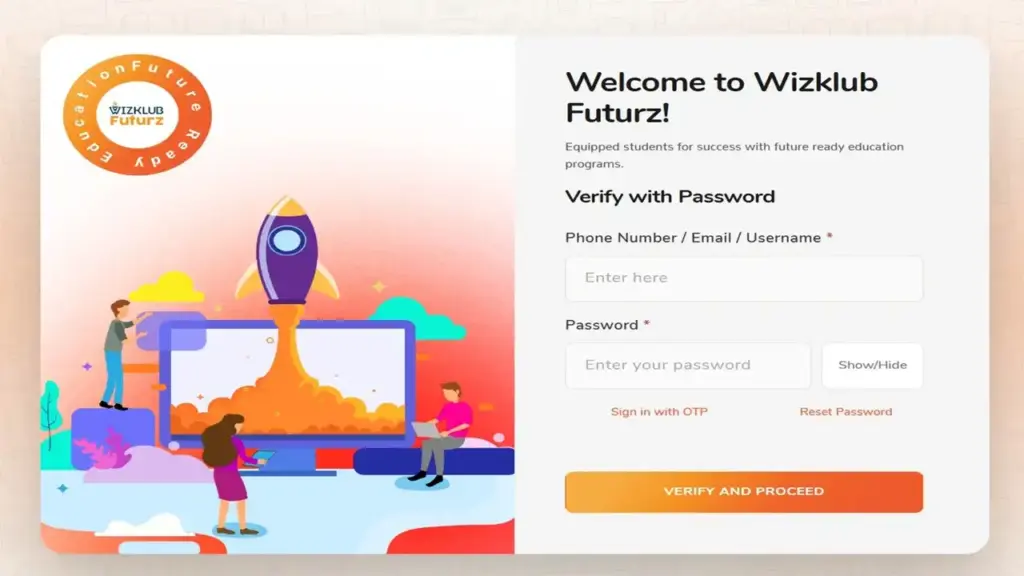
The main WizKlub login page supports two sign-in methods: a password or a one-time password (OTP), a short code sent to your email or phone.
Method 1: Login with a password
| Step | Instructions |
|---|---|
| 1 | Visit the login page. Open wizklub.com/cognito/login/. |
| 2 | Enter your identifier. Type your Phone Number, Email, or Username in the first field. |
| 3 | Fill in school details if prompted. School-linked users may see School, Batch, and Username fields. |
| 4 | Type your password. Use the Show/Hide toggle to check for typos. |
| 5 | Sign in. Submit the form to reach your dashboard. |
Method 2: Login with an OTP
| Step | Instructions |
|---|---|
| 1 | Click “Sign in with OTP.” You’ll find it below the password field. |
| 2 | Check your inbox or messages. The OTP goes to your registered email or phone number. |
| 3 | Enter the code. Type it into the OTP field on screen. |
| 4 | Request a new code if needed. The Resend OTP link unlocks after 60 seconds. |
| 5 | Switch back anytime. Click “Login with Password” to return to Method 1. |
We found OTP login is the fastest fix when you’ve forgotten your password but still have access to your phone or email.
Save your username in a secure password manager so you’re never guessing on class day.
How do you log in to the WizKlub Futurz School LMS?
The WizKlub Futurz School LMS (Learning Management System, the platform that hosts lessons and modules) lives at lms.wizklub.com/login. It uses email-based sign-in.
| Step | Instructions |
|---|---|
| 1 | Open the LMS page. Go to lms.wizklub.com/login. |
| 2 | Enter your email. Use the email address your school or WizKlub registered for you. |
| 3 | Enter your password. Click Show to confirm what you typed. |
| 4 | Click “Login.” Your course dashboard should load. |
| 5 | Use the email link option instead. Click “Login with Email Link”, then “Send login link” to get a password-free sign-in link in your inbox. |
Can you create a new LMS account yourself?
No. The LMS signup page states plainly: “Signups have been disabled for this website.”
Accounts are created after batch allotment. According to the official WizKlub FAQ, it takes 48 hours to activate an account and grant access.
If 48 hours have passed, post a message in the WhatsApp group assigned to your batch. That’s the fastest route, per WizKlub’s own guidance.
How does the WizKlub admin gateway work?
The admin gateway at admin.wizklub.com is an internal tools hub. It describes itself as “one sign-in gateway” for parent orientation, teacher tools, and kit operations.
Industry insiders are noting a clear trend here: edtech brands are moving staff tools under one shared entry point. WizKlub’s gateway follows that model.
The gateway lists three apps:
- Parent Orientation (PMO · Speaker · Sales Admin): plans sessions, tracks speaker updates, and manages orientation analytics.
- WizKlub Teachers Portal: handles student review media, analytics, and school inventory.
- Kit Inventory: lets admins and account managers manage dispatches, warehouse stock, and audits.
To use it:
| Step | Instructions |
|---|---|
| 1 | Open the gateway. Visit admin.wizklub.com. |
| 2 | Choose your application. Click the app tile that matches your role. |
| 3 | Sign in with your staff credentials. Use the user ID issued by WizKlub. |
Parents and students don’t need this page. It’s built for staff, speakers, and operations teams.
How do teachers access the WizKlub Teachers Portal?
The Teachers Portal lets instructors upload student testimonials, track coverage, and manage school kits from any device.
| Step | Instructions |
|---|---|
| 1 | Go to the portal. Open admin.wizklub.com/wizklub-testimonials/. |
| 2 | Enter your User ID. This is your WizKlub user ID, not your personal email unless WizKlub set it that way. |
| 3 | Enter your password. Use the same credentials as the WizKlub instructor app. |
| 4 | Tick “Keep me signed in.” Do this only on a personal device. |
| 5 | Click “Login.” Your dashboard opens. |
The portal’s own advice is direct: trouble signing in? Contact your WizKlub coordinator.
How do you reset a forgotten WizKlub password?
Every portal has a reset path. The official FAQ confirms you can use the “forgot password” option on the portal or ask the support team to reset it.
Reset on the main login page
| Step | Instructions |
|---|---|
| 1 | Open the login page. Go to wizklub.com/cognito/login/. |
| 2 | Click “Reset Password.” It sits next to Sign in with OTP. |
| 3 | Enter your username, email, or phone. Use the contact detail linked to your account. |
| 4 | Enter the OTP. Check your email or phone for the code. |
| 5 | Create a new password. Type it in Password and Confirm Password. |
| 6 | Sign in again. Use your new credentials right away. |
Reset on the LMS
| Step | Instructions |
|---|---|
| 1 | Visit the LMS login page. Open lms.wizklub.com/login. |
| 2 | Click “Forgot Password?” It appears under the password field. |
| 3 | Enter your registered email. Use the email on file. |
| 4 | Click “Reset Password.” Watch your inbox for a reset message. |
| 5 | Return to login. Click “Back to Login” and sign in with your new password. |
Reset on the Teachers Portal
The Teachers Portal shows no self-service reset link. Contact your WizKlub coordinator to restore access.
Still locked out? Email support@infinitylearn.com with your student name, grade, and registered contact.
What about WizKlub Futurz login password issues?
Searches for WizKlub Futurz login password usually point to one of two problems: a forgotten password or an account that isn’t active yet.
Our team observed a simple rule. If you’ve never signed in, the issue is likely activation, not your password.
- New account? Wait the full 48 hours after batch allotment.
- Returning user? Use Reset Password or OTP login.
- Teacher? Your password matches the instructor app.
Check your activation timeline first. It saves you a support ticket.
How does WizKlub Login Sri Chaitanya access work?
Many families search for WizKlub Login Sri Chaitanya because their child studies at a Sri Chaitanya school where WizKlub is part of the timetable.
Those students typically sign in through credentials provided by the school and WizKlub. They don’t need a fresh public account.
What about Sri Chaitanya WizKlub login registration?
Sri Chaitanya WizKlub login registration happens through the school’s enrollment process. Accounts are set up after batch allotment, and the LMS blocks public signups.
| Step | Instructions |
|---|---|
| 1 | Confirm enrollment. Ask the school whether your child is in a WizKlub batch. |
| 2 | Collect credentials. Get the username or registered email from the school or WizKlub team. |
| 3 | Wait for activation. Allow 48 hours after allotment. |
| 4 | Sign in. Use the main login or LMS, depending on your instructions. |
Your class teacher or WizKlub coordinator is the right first contact.
Is there a WizKlub app or Olympiad login?
The WizKlub app question comes up often. Our checks confirmed one app by name: the WizKlub instructor app, which shares credentials with the Teachers Portal.
We did not find a separate student app link on the official pages we reviewed. Students and parents should use the web portals listed above, which work on mobile browsers.
WizKlub Olympiad login searches raise a similar issue. None of the official portals we tested shows a standalone Olympiad sign-in page.
If your school has enrolled your child in a WizKlub assessment or Olympiad-style event, ask the school which portal and credentials to use. Avoid third-party sites that claim to offer Olympiad access.
What should you do if login still fails?
Most problems trace back to a handful of causes. Work through this checklist:
- Check the portal. Students, LMS users, and teachers each have different pages.
- Check your identifier. The main page accepts phone, email, or username; the LMS accepts email only.
- Check activation. New accounts need 48 hours after batch allotment.
- Clear your browser cache. Old data can break login forms.
- Try OTP or an email link. Both bypass a forgotten password.
- Contact support. Email support@infinitylearn.com or post in your batch WhatsApp group.
A clean, correct WizKlub login comes down to three things: the right portal, the right identifier, and an active account.
FAQs
Why can’t I log in to access my course?
After batch allotment, it takes 48 hours to activate your account. You can also post in the WhatsApp group assigned to your batch.
What should I do if I forget my password?
Use the “forgot password” or Reset Password option on your portal. You can also ask the support team to reset it.
How do I contact WizKlub support?
Write directly to support@infinitylearn.com. Include your registered email or phone number for faster help.
Which age group can join WizKlub programs?
The FAQ lists ages 6 to 14, while the homepage shows ages 6 to 15. Specific programs cover Grades 1 to 9.
How long is each WizKlub session?
The standard session runs 45 minutes. In exceptional cases, classes may extend by 10 to 15 minutes.
How many students are in each batch?
Batches have 3 to 5 kids. That small size allows more one-on-one attention.
Can I change my child’s batch timing?
Yes. You can choose a weekend or weekday batch and switch batches based on your child’s availability.
Do students get certificates?
Yes. WizKlub provides certification at the end of the course.
Can I still access modules after finishing a program?
Yes. Module access continues after program completion.
Do parents need to attend classes?
No. A parent’s presence is not mandatory. Mentors and instructors stay in touch about your child’s progress.
Can students use WizKlub at home?
Yes. Any paid WizKlub customer can use the product at home.


