


Every bank exam or SSC aspirant reaches the same point: you need real exam practice, and you need it on a platform you can access without friction. We tested the full smartkeeda login process on the official Testzone portal and mapped every step, from creating an account to resetting a forgotten password.
Our team observed that the process is simple once you know where each option sits. This article walks you through it, along with what you actually get after you sign in.
Key Takeaways
- Smartkeeda login uses your registered email ID and password, or a Google account, on the official sign-in page at testzone.smartkeeda.com/signin.
- One account gives you access to full-length mock tests, CA Mock Drills, Speed Drills, and a free mock test for almost every exam.
- Your login works on both the website and the Android app, and plans bought on one carry over to the other, except for descriptive tests.
What Is Smartkeeda, and Why Does the Login Matter?
Smartkeeda is an online test series platform for Indian government exams. It covers Banking, Insurance, SSC, Railways, CLAT, and more, all under one account.
The login matters because nearly everything useful sits behind it. Even the free mock tests require you to sign up first on the website or app.
If you’ve been following government exam prep, this won’t come as a surprise. Platforms like Smartkeeda gate their performance analysis and topper comparisons behind an account, because those tools depend on tracking your attempts over time.
Your first step is to bookmark the official portal at https://testzone.smartkeeda.com/.
Which Smartkeeda Website Should You Use: Testzone or the Main Site?
Smartkeeda runs two connected websites. Each serves a different purpose, and knowing the difference saves time.
- Testzone (https://testzone.smartkeeda.com/) — the test series portal, where you log in, attempt mock tests, and view your analysis.
- Main site (https://www.smartkeeda.com/) — the practice and content hub, with 5,000+ free quizzes and PDFs, topic questions, and links to Speed Drills, SmartRead, and SmartCourse.
We confirmed that both links are live and working. The sign-in form itself sits on Testzone, which is why every account action in this article points there.
Start on Testzone whenever your goal is to take a test rather than browse free quizzes.
How Do You Sign Up for a New Smartkeeda Account?
Signing up takes only a few clicks. You have two options: email registration or Google sign-up.
Option A: Sign Up With Your Email
| Step | Instructions |
|---|---|
| 1 | Open the sign-in page at https://testzone.smartkeeda.com/signin. |
| 2 | Find the prompt that reads “Don’t Have An Account? SignUp Now” below the login button. |
| 3 | Click “SignUp Now” to open the registration form. |
| 4 | Enter the details requested, such as your name, a working email address, and a strong password. |
| 5 | Submit the form to create your account. |
| 6 | Check your inbox for any confirmation message from Smartkeeda, and follow it if one arrives. |
| 7 | Return to the sign-in page and log in with your new credentials. |
Option B: Sign Up With Google
| Step | Instructions |
|---|---|
| 1 | Go to https://testzone.smartkeeda.com/signin. |
| 2 | Click “Sign Up with Google” under the login form. |
| 3 | Choose your Google account from the pop-up window. |
| 4 | Approve the permissions Google asks for. |
| 5 | Land on your dashboard, already signed in. |
Our analysis suggests Google sign-up is the faster route for most mobile users. Pick the email you check daily either way, because that address becomes your account ID across web and app.
How Do You Complete the Smartkeeda Login Step by Step?
The smartkeeda login form asks for two things only: your email ID and password. Here is the exact sequence we followed.
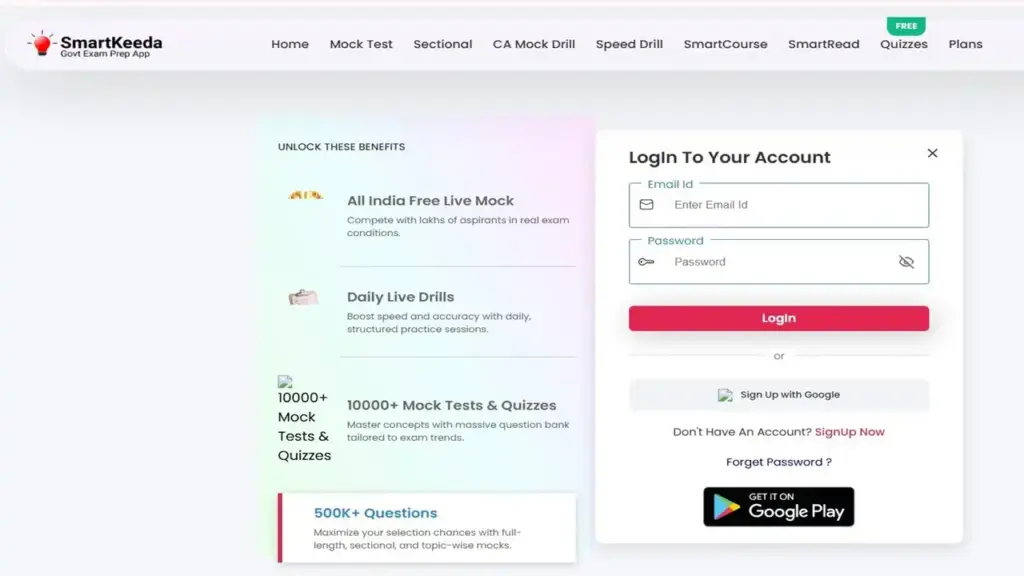
| Step | Instructions |
|---|---|
| 1 | Visit the official page at https://testzone.smartkeeda.com/signin. |
| 2 | Type your registered email in the “Email Id” field. |
| 3 | Enter your password in the “Password” field. |
| 4 | Click “LogIn” to access your account. |
| 5 | Wait for the dashboard to load, where you’ll see Mock Test, CA Mock Drill, Speed Drill, and other menu options. |
Signed up with Google? Skip steps 2 and 3. Click “Sign Up with Google” again, and the same button signs you back in.
We noticed the homepage at testzone.smartkeeda.com also shows a login box directly on the page. Use whichever is closer, because both forms lead to the same account.
Once you’re in, open the Mock Test tab and pick your target exam.
Can You Complete Smartkeeda Login With a Mobile Number?
No — the official sign-in page does not offer a mobile number option. We checked the form directly: it shows only an Email Id field, a Password field, and the Google sign-up button.
Industry insiders are noting a common search trend around “Smartkeeda login with mobile number.” That demand exists, but the platform has not built the feature into its web login.
The official FAQ backs this up. It states that you can attempt mocks on the app and website “by logging into your account using your registered email id.”
Use your email address as your login ID, and store it somewhere safe.
How Do You Reset a Forgotten Smartkeeda Password?
A forgotten password is a quick fix. The reset link sits right on the sign-in page.
| Step | Instructions |
|---|---|
| 1 | Open https://testzone.smartkeeda.com/signin. |
| 2 | Click “Forget Password ?” below the login form. |
| 3 | Enter your registered email ID in the field provided. |
| 4 | Submit the request. |
| 5 | Check your inbox for reset instructions, including your spam or promotions folder. |
| 6 | Follow the link in the email and create a new password. |
| 7 | Return to the sign-in page and log in with your updated password. |
Did you originally sign up with Google? Then you likely don’t have a separate Smartkeeda password at all. Simply click “Sign Up with Google” to get back in.
Still stuck? Contact the team through the Contact Us page linked in the Testzone footer.
What Do You Get After the Smartkeeda Login?
Your account opens the full Testzone dashboard. The sign-in page itself lists the headline numbers.
- 10,000+ mock tests and quizzes built around current exam trends
- 500K+ questions across full-length, sectional, and topic-wise mocks
- All India Free Live Mock tests, where you compete with lakhs of aspirants
- Daily Live Drills for structured speed and accuracy practice
Our team observed that the dashboard menu is clean and easy to scan. Home, Mock Test, CA Mock Drill, Speed Drill, SmartCourse, SmartRead, Quizzes, and Plans all sit in one sidebar.
Your next move is to attempt one free full-length mock to benchmark your current level.
How Do Smartkeeda Mock Tests for Bank and Insurance Work?
Smartkeeda mock tests simulate the real exam. They match the pattern, difficulty, and interface of the actual test.
The dedicated page at https://testzone.smartkeeda.com/dashboard/mock-test-for-bank-and-insurance lists the 2026 full-length series. It covers more than 20 banking exams, including:
- SBI PO and SBI Clerk
- IBPS PO, IBPS Clerk, and IBPS SO
- IBPS RRB PO and RRB Clerk
- RBI Assistant and RBI Grade B
- EPFO SSA, NABARD Development Assistant, and several LBO exams
Insurance aspirants are covered too. The series includes LIC Assistant, LIC AAO, ESIC UDC, NIACL Assistant, and NIACL AO.
What types of tests are available?
Smartkeeda splits practice into three levels. Each one targets a different gap.
- Full-length tests — cover every section, with Smart Analysis breaking down your performance graphically.
- Sectional tests — focus on one area, such as Reasoning, Quant, English, Computer awareness, or Hindi.
- Topic tests — target single topics like simplification, data interpretation, or puzzles, moving from basic to advanced.
The platform also offers unlimited re-attempts on every mock. That matters, because revisiting a failed test is where real learning happens.
Pick one sectional test in your weakest subject after your first full mock.
What Is the Smartkeeda CA Mock Drill, and How Do You Log In to It?
The CA Mock Drill (Current Affairs Mock Drill) is Smartkeeda’s dedicated general awareness product. It uses the same account, so your regular smartkeeda login gives you access.
After signing in, click “CA Mock Drill” in the dashboard sidebar. There is no separate login for the drill.
According to the Testzone homepage, CA Mock Drills include:
- Monthly and weekly current affairs quizzes
- Updates aligned with the latest exam trends
- Topic-wise coverage for Banking and SSC exams
- Detailed explanations with references
Pricing for CA Mock Drills starts from ₹249. Check the Plans page for the current options.
Why do aspirants rate the CA Mock Drill so highly?
The CA Mock Drill shows up again and again in Smartkeeda’s published success stories. Hanamant S H, selected in IBPS RRB PO 2024, credited the drills with a “very important role” in his final selection.
Aarti Gupta, now an IBPS Clerk in Indian Bank, said she regularly missed the GA sectional cutoff before using the drills. After that, she cleared it with a good margin.
If general awareness drags your score down, open the CA Mock Drill tab first.
Are Smartkeeda Mock Tests Really Free?
Yes, partly. Smartkeeda offers a free mock test for almost every exam, plus free quizzes on the website and app.
The catch is simple: you must sign up first to attempt the free mocks. The main site at https://www.smartkeeda.com/ also lists 5,000+ free quizzes and PDFs and free unlimited live tests.
Paid plans add depth. Here is the starting pricing listed on Testzone:
- SmartCourse — starts from ₹99
- Speed Drills — starts from ₹199
- SmartRead — starts from ₹199
- CA Mock Drills — starts from ₹249
Test series plans come in 6-month and 12-month durations, plus exam-specific and combo plans (prelims plus mains at a discounted price). The official FAQ says listed prices are inclusive of all taxes, with no hidden fees.
Try one free mock before you spend anything. It tells you more than any review can.
Does the Smartkeeda Login Work on the Mobile App?
It does. The Smartkeeda Android app on Google Play uses the same account as the website.
The official FAQ confirms you can attempt every mock on the app and website after purchasing from either one. The only exception is descriptive tests.
The app page highlights features like:
- Unlimited retakes
- Human-powered doubt support
- A SmartTimer for offline practice
- Smart performance analysis
According to Smartkeeda, the app is rated 4.6★ by 800K+ learners. Note one limit: the mock tests themselves need an internet connection and cannot be taken offline.
Download the app from Google Play and sign in with the same email you used on Testzone.
What Should You Do If the Smartkeeda Login Fails?
Most login failures come from three simple causes. Run through this checklist before contacting support.
- Check your email spelling — one wrong letter blocks access.
- Confirm your sign-up method — Google users should click “Sign Up with Google,” not type a password.
- Reset your password using the “Forget Password ?” link if you’re unsure.
- Clear your browser cache or try a different browser.
- Check your internet connection, since Testzone runs fully online.
Our analysis suggests the Google-versus-email mix-up causes the most confusion. Aspirants often forget which method they used months earlier.
If none of these steps work, reach the support team through the Contact Us page on Testzone.
FAQs
What is the official Smartkeeda login page?
The official page is https://testzone.smartkeeda.com/signin. You can also log in from the Testzone homepage, which has a built-in login form.
Can I log in to Smartkeeda with my mobile number?
No. The official sign-in page supports only email ID and password or Google sign-in.
Is there a separate login for the CA Mock Drill?
No. Your regular Smartkeeda account opens the CA Mock Drill from the dashboard sidebar.
Are Smartkeeda mock tests free?
Smartkeeda offers a free mock test for almost every exam after you sign up. It also provides free quizzes and PDFs on its main website.
Can I use the same account on the app and website?
Yes. Plans purchased on either platform work on both, except for descriptive tests.
How do I reset my Smartkeeda password?
Click “Forget Password ?” on the sign-in page and enter your registered email. Then follow the reset instructions sent to your inbox.
Can I attempt Smartkeeda mock tests offline?
No. The mock tests require an internet connection to run.
Are Smartkeeda mock tests available in Hindi?
Yes. Smartkeeda offers bilingual mock tests for almost every exam, and you can switch languages at any time.
Can I get a refund on a Smartkeeda plan?
Yes, but only within 48 hours of subscribing. After that window, refund requests are not accepted.
What payment methods does Smartkeeda accept?
Smartkeeda accepts debit and credit cards, net banking, and digital wallets.
What Is Our Final Verdict on Smartkeeda Login?
The smartkeeda login process is straightforward and reliable. Email or Google access gets you into mock tests, CA Mock Drills, and Speed Drills in one place.
The one gap is the lack of mobile number login, which some aspirants expect. Beyond that, the flow works as it should.
Head to https://testzone.smartkeeda.com/signin, create your account, and take your first free mock today.


