


Thousands of students at Invertis University in Bareilly start their academic day with one task: the Invertis ERP login. We tested every official link students rely on and found that only one address takes you straight to the student sign-in screen.
Here is what works, what doesn’t, and how to get into your account without wasting a morning.
Key Takeaways
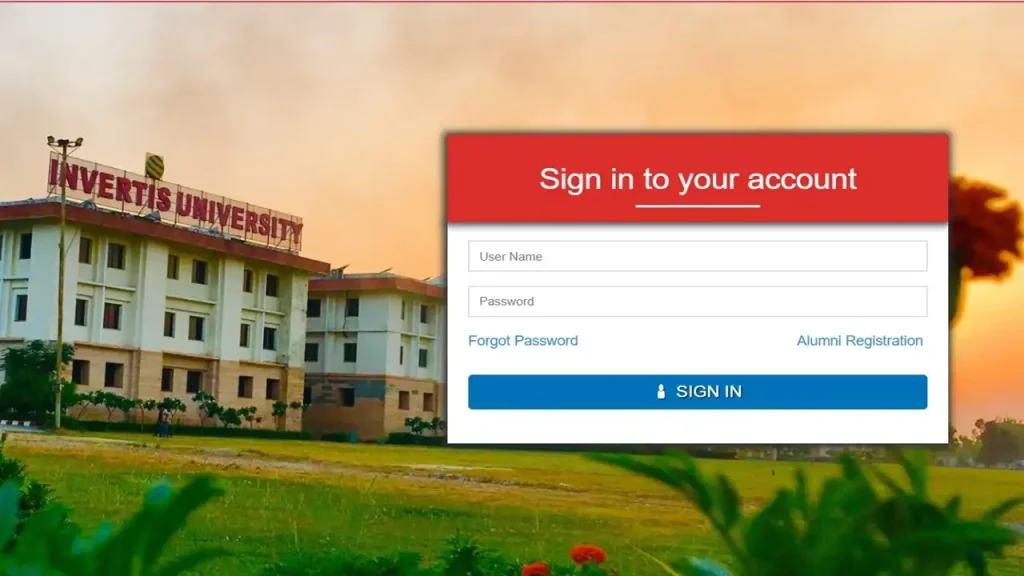
- The official ERP portal is live at erp.invertisuniversity.ac.in and shows only three options: Sign in, Forgot Password and Alumni Registration.
- New applicants do not sign up on the ERP. They register on the admissions portal, which supports password or OTP login.
- Invertis University reports 14,000+ students and 80+ programmes, so keeping your ERP credentials secure matters more than ever.
What Is the Invertis ERP Portal?
The ERP (Enterprise Resource Planning) portal is the university’s central student system. It connects your academic, administrative and financial records in one secure dashboard.
Our team observed that the portal runs on its own subdomain, erp.invertisuniversity.ac.in. The sign-in page carries the university address — Invertis Village, Bareilly-Lucknow National Highway, NH-24, Bareilly-243123 — which confirms it is the genuine portal.
If you’ve been following university portals in Uttar Pradesh, this setup won’t come as a surprise. Most private universities now separate admissions from enrolled-student systems, and Invertis follows the same model.
Bookmark the official address before you go further: https://erp.invertisuniversity.ac.in/
Which Link Should You Actually Use?
Use the ERP subdomain for every student login. Other pages can look official but lead nowhere useful.
We checked the main website’s /login page during our review. It showed a “Login” heading and navigation menus, but no visible sign-in form appeared in our check.
Save these four links in one browser folder so you never need to search for them again.
How Do New Students Sign Up?
New students sign up through the admissions portal, not the ERP. The ERP page offers no student signup button — only Alumni Registration.
The admissions portal shows a “Register Now” tab for the 2026–27 session. Sessions listed on the form include Jan 2026–2027 and Jul 2026–2027.
Signup Steps (New Admission Portal)
| Step | Instructions |
|---|---|
| 1 | Open the admissions portal at https://admissions.invertisuniversity.ac.in/. |
| 2 | Click “Register Now” on the registration panel. |
| 3 | Enter your contact details, including your mobile number with the correct country code (India uses +91). |
| 4 | Select your state and district from the drop-down menus. |
| 5 | Choose your programme — options include Agriculture, Computer Applications, Design, Education, Engineering, Journalism and Mass Communication, Law, Management, Pharmacy and Science. |
| 6 | Pick your course and session from the next two menus. |
| 7 | Tick the consent box that reads “I agree to receive notifications.” |
| 8 | Submit the form and keep your registered email or mobile number handy for future logins. |
Our analysis suggests one simple habit saves the most trouble: use an email and phone number you will still own after graduation.
Once admission is confirmed, contact the university for your ERP credentials — the helpline numbers appear in the FAQ section below.
How Do You Complete the Invertis ERP Login?
The Invertis ERP login takes under a minute once you have your university-issued credentials. The sign-in screen is deliberately minimal, so there is little room for confusion.
Login Steps (ERP Student Portal)
| Step | Instructions |
|---|---|
| 1 | Go to https://erp.invertisuniversity.ac.in/ — type the address directly rather than clicking random search ads. |
| 2 | Find the “Sign in to your account” panel on the page. |
| 3 | Enter the username and password issued to you by Invertis University. |
| 4 | Click “Sign in” to reach your student dashboard. |
| 5 | Log out after each session, especially on shared computers in labs or cyber cafés. |
Login Steps (Admissions Portal for Applicants)
| Step | Instructions |
|---|---|
| 1 | Open the admissions portal and select “Login Now.” |
| 2 | Enter your email or mobile number — without the country code, as the form instructs. |
| 3 | Choose your method: “Using Password” or “Using OTP.” |
| 4 | Click “Send OTP” if you picked the OTP route, then enter the code you receive. |
| 5 | Click “Sign In” to view your application status. |
Test your login a few days before fee deadlines or exams so any problem surfaces early.
What If You Forget Your Password?
Both portals include a “Forgot Password” link. You do not need to visit campus for a basic reset.
Forgot Password Steps (ERP Portal)
| Step | Instructions |
|---|---|
| 1 | Visit https://erp.invertisuniversity.ac.in/. |
| 2 | Click “Forgot Password” below the sign-in panel. |
| 3 | Enter the registered details the page asks for — usually the ID linked to your account. |
| 4 | Follow the on-screen instructions to create a new password. |
| 5 | Sign in again with your new password and store it in a trusted password manager. |
Forgot Password Steps (Admissions Portal)
| Step | Instructions |
|---|---|
| 1 | Open the “Login Now” tab on the admissions portal. |
| 2 | Click “Forgot Password” — or skip the reset entirely and choose “Using OTP.” |
| 3 | Enter your registered email or mobile number and complete the steps shown. |
OTP login is the fastest workaround for applicants who lose their password. For ERP access issues the reset can’t fix, call the student helpline listed below
What Can an Invertis ERP Student Manage Online?
An Invertis ERP student account serves as the entry point to academic and administrative services. Module names can vary by programme, so always check your own dashboard for the exact menu.
Here is what students typically look for, alongside where the official information lives:
- Invertis ERP fees: Track payments and dues. The Fee Structure and Payment Procedure pages sit under Admissions on the main website.
- Invertis ERP hostel: Check accommodation details. Official campus facilities information appears on the university website.
- Invertis ERP notice: Stay on top of announcements. The main site runs a dedicated Announcements page under Happenings.
- Invertis Library: Find study material and reading resources. The E-Content section lists digital resources for students.
- Invertis prep: Prepare for exams with official material. The website links to previous question papers and the academic calendar.
- Alumni access: Stay connected after graduation through the Alumni Registration link on the ERP page.
We found the E-Content page especially useful. It sits alongside the Brochure, List of Holidays, Newsletter and Question Papers links — a compact hub for Invertis prep.
Open the E-Content page this week and save the resources for your current semester.
How Do Scholarships Affect Invertis ERP Fees?
Scholarships reduce tuition, not total academic fees. This detail trips up many families.
The admissions portal states that tuition is 60% of the academic fees. Scholarships apply only to that tuition portion.
Key rules published by the university:
- First-year only: Scholarships are valid for the first year of the course.
- No stacking: Two or more scholarships cannot be combined. The higher reward applies if you qualify for several.
- Pharmacy exception: IUCET-based scholarships do not apply to B.Pharm. and D.Pharm. students.
- Merit tiers: UG and diploma students with 90% and above in the qualifying exam can receive 100% of tuition.
Check your fee breakdown on the ERP dashboard after admission to confirm the scholarship has been applied correctly.
Why Is Invertis University Drawing Attention in 2026?
Invertis University is a private university in Bareilly, Uttar Pradesh. Its official website lists 80+ academic programmes, 14,000+ enrolled students and a 70+ acre campus.
The university holds approvals and recognition from bodies including the University Grants Commission (UGC), the National Assessment and Accreditation Council (NAAC) and the State Government of Uttar Pradesh. Programme-specific recognition includes the Bar Council of India, Pharmacy Council of India and National Council for Teacher Education.
Here are the numbers the university publishes:
- Highest package: 41.17 LPA in the last placement season
- Placement offers: 97%, according to the admissions portal
- Research output: 5,000+ papers, 490+ ongoing projects and 255 research-oriented facilities
- Departments: 14, spanning engineering, law, pharmacy, agriculture, management and more
- Foreign collaborations: Partners in Poland, South Africa, the United States, Canada, Turkey, Nepal, Croatia and the Czech Republic
The homepage also promotes the university as “Region’s 1st & India’s 5th” Google Agentic AI University, powered by Gemini Enterprise for Education and Google Cloud Digital Campus.
Recent campus news adds context. On 29 October 2026, the university celebrated Internship Day 2026, marking 4,200+ internship opportunities secured by students. A day later, it hosted its 13th International Conference on AI-enabled biotechnology.
Who Leads Student Administration?
Mr. Santosh Kumar serves as Registrar of Invertis University. In his official message, he promises students a “transparent and supportive administration.”
The Registrar’s office oversees core administrative functions, so it is the right escalation point when routine helpdesk channels don’t resolve an issue.
Why Do Login Problems Happen — and How Do You Fix Them?
Most login failures come from small, fixable mistakes. Our team observed the same handful of causes again and again with university portals.
Run through this checklist before calling support:
- Wrong portal: Applicants often try the ERP, and enrolled students sometimes try the admissions site. Match the portal to your status.
- Country code error: The admissions login wants your mobile number without the country code. Typing +91 can cause a failed attempt.
- Caps Lock: Passwords are case-sensitive. Check your keyboard before retrying.
- Old browser data: Clear your cache or try an incognito window.
- Fake links: Only use the addresses in this article. Phishing pages copy university branding closely.
If the Invertis ERP login still fails after these checks, contact the university directly rather than resetting your password repeatedly.
Frequently Asked Questions
What is the official Invertis ERP login website?
The official portal is erp.invertisuniversity.ac.in. We verified that it is live and shows the Sign in, Forgot Password and Alumni Registration options.
Can I create an ERP account myself?
No — the ERP page has no student signup option. New applicants register on the admissions portal, and enrolled students receive credentials from the university.
How do I reset my ERP password?
Click “Forgot Password” on the ERP sign-in page and follow the on-screen steps. If the reset doesn’t work, call the student helpline for help.
Can I log in with an OTP instead of a password?
Yes, on the admissions portal. Select “Using OTP,” enter your email or mobile number, and click “Send OTP.”
Where can I check Invertis ERP fees and the fee structure?
Enrolled students check dues on their ERP dashboard. The official fee structure and payment procedure appear under Admissions on the main university website.
Where do I find Invertis ERP notices and announcements?
Check your ERP dashboard and the Announcements page under Happenings on the main website. Both are worth checking weekly during the semester.
Does the Invertis Library offer digital resources?
Yes. The E-Content section on the university website provides digital study resources, alongside links to question papers and the academic calendar.
Who do I contact for ERP or admission help?
Use these official contacts:
- Student Helpline: 08035018484
- Toll-Free: 1800 274 5252
- General Helpline: +91 96909-55511
- WhatsApp: +91 96909-55599
- Email: info@invertis.org (general) or admission@invertis.org (admissions)
Can alumni still use the ERP portal?
Yes, through the Alumni Registration link. It appears directly beside “Forgot Password” on the ERP sign-in page.
What Should You Do Next?
The Invertis ERP login is simple once you use the right portal for your status. Applicants belong on the admissions site; enrolled students belong on the ERP.
Open https://erp.invertisuniversity.ac.in/ today, sign in once to confirm your credentials work, and bookmark the page before your next fee deadline.


