


Your attendance, internal marks and fee dues all sit behind one screen, so a failed ETLab login can stall your whole day. We checked the official portals to show you which ones work, how to sign in and how to recover a lost password.
Key Takeaways
- ETLab is a campus management system built by Etuwa Concepts Pvt. Ltd., and each college runs its own separate portal.
- There is no public signup: your institution creates your account and issues your username.
- Password resets use an OTP flow that asks for your Email, Username and a Captcha, but some college portals don’t show a reset link at all.
What Is ETLab, and Why Does Your College Use It?
ETLab is a campus ERP (enterprise resource planning software that runs a college’s daily operations from one system). It connects students, faculty, office staff, administrators and parents through role-based logins.
The system comes from Etuwa Concepts Pvt. Ltd., a software firm in Kannur, Kerala, with 12+ years of experience. If you’ve been following campus ERP rollouts across Kerala’s engineering colleges, the name won’t come as a surprise.
Our analysis suggests ETLab’s biggest strength is its user-specific login system. Every user gets a unique account, and what you see depends on your role at the institution.
You can read the developer’s own overview on the Etuwa About Us page.
How Does the ETLab Login Process Work?
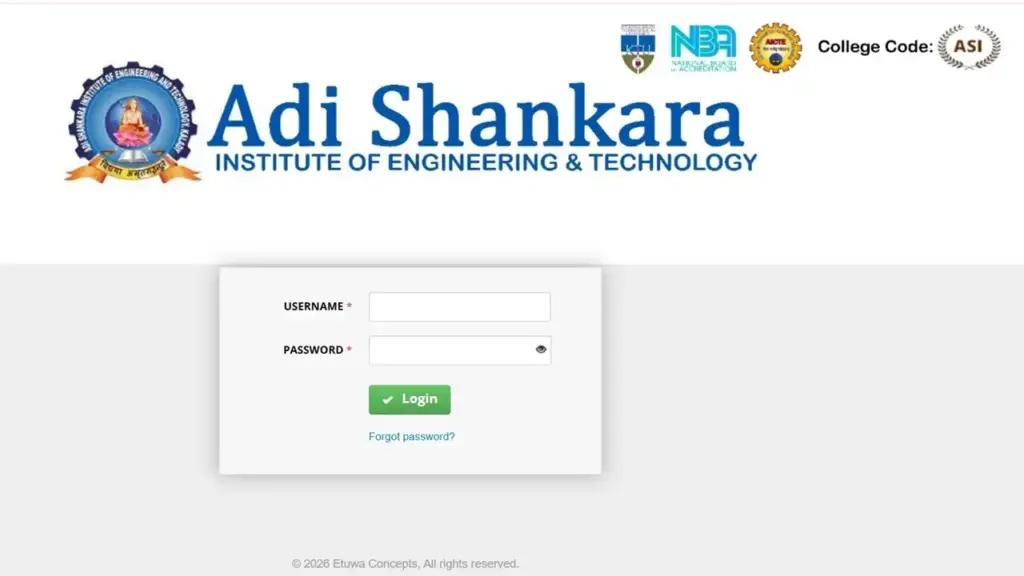
The ETLab login process uses just two fields: a Username and a Password. We found the same clean layout on every working portal we tested.
One detail matters more than any other. Each college has its own portal address, so you must use your institution’s specific URL.
How Do You Log In to ETLab Step by Step?
| Step | Instructions |
|---|---|
| 1 | Open your college’s portal. Use the exact URL your institution gave you, such as VJEC ETLab or MITS ETLab. |
| 2 | Enter your username. Type the username your college issued, exactly as provided. |
| 3 | Enter your password. Check that Caps Lock is off before you type. |
| 4 | Click “Login.” Your dashboard loads with tools matched to your role. |
| 5 | Bookmark the page. Save the correct portal URL so you never land on a broken or fake copy. |
Our team observed that most login trouble comes from one mistake: using another college’s portal. Credentials only work on your own institution’s subdomain.
Can You Sign Up for an ETLab Account Yourself?
No: ETLab has no public registration page. Your college administration creates your account and hands you the login details.
This setup follows from the role-based design. Etuwa says each student and staff member gets a unique login, so accounts are issued, not self-created.
How Do You Get Your ETLab Account Activated?
| Step | Instructions |
|---|---|
| 1 | Finish your admission or joining formalities. Your student or staff record must exist in the college system before an account can be made. |
| 2 | Contact your department or college office. Ask the ETLab coordinator or admin office for your login details. |
| 3 | Collect your username and initial password. Colleges often share these during orientation or by email. |
| 4 | Register your email with the college. A valid email on file is required for password resets later. |
| 5 | Log in and change your password. Choose a strong, unique password right after your first sign-in. |
Parents follow the same path. Ask the college office whether parent access is enabled at your institution.
How Do You Reset a Forgotten ETLab Password?
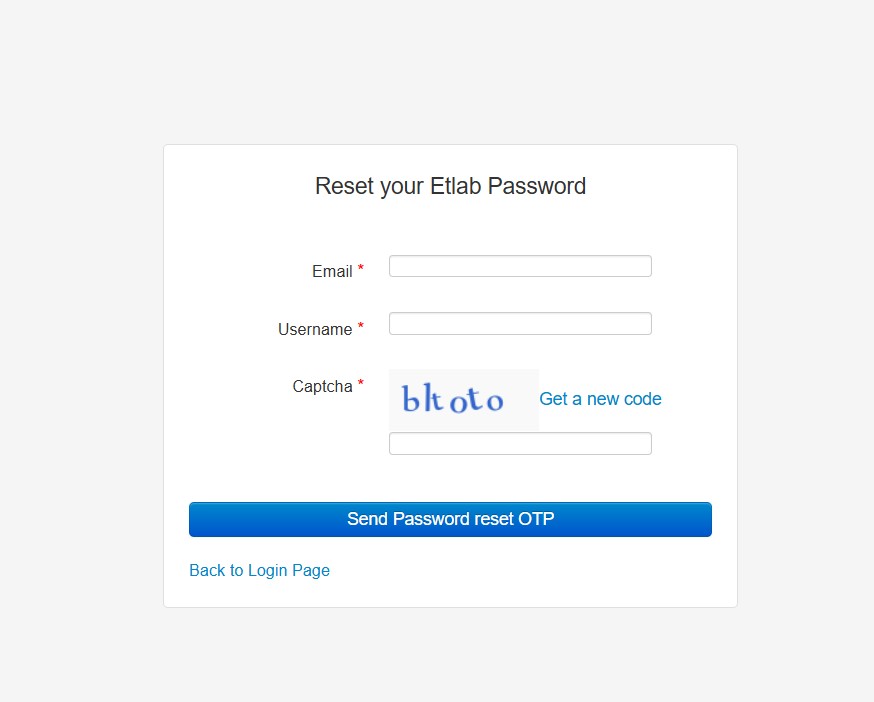
ETLab resets passwords through an OTP (one-time password, a short code sent to verify your identity). We confirmed this flow on the live MITS reset page.
The form asks for three things: your Email, your Username and a Captcha. All three must match your account records.
What Are the Forgot Password Steps?
| Step | Instructions |
|---|---|
| 1 | Go to your college’s login page. For example, open the MITS ETLab login. |
| 2 | Click “Forgot password?” This opens the “Reset your Etlab Password” form, such as the MITS reset page. |
| 3 | Enter your registered email. Use the email your college has on file, not just any address you own. |
| 4 | Enter your username. Type your ETLab username exactly as issued. |
| 5 | Fill in the Captcha. Copy the characters shown carefully, since letters can look alike. |
| 6 | Click “Send Password reset OTP.” Check your inbox and spam folder for the code. |
| 7 | Follow the OTP instructions. Enter the code and set a new password as prompted. |
Not every portal shows a reset link. We found no “Forgot password?” option on the MIT Kannur portal, so users there should contact the college office directly.
Which Colleges Use ETLab, and How Do You Find Their Portals?
Many engineering colleges across Kerala run ETLab, each on its own address. The URL usually includes the college’s short name, but always confirm it on your college’s official website.
Which ETLab Portals Did We Verify as Working?
We tested these links in October 2026:
- VJEC (Vimal Jyothi Engineering College): vjec.etlab.app, working, with a password reset link.
- MITS (Muthoot Institute of Technology and Science): mits.etlab.app/user/login, working, with a password reset link.
- MIT Kannur: etlab.mitkannur.ac.in/user/login, working, but no reset link shown.
Use the full login path for MITS. The bare mits.etlab.app homepage returned a database error during our check, while /user/login loaded normally.
What About CET, RIT, SBCE, ASIET, GECT, UKF, MACE and TKMCE?
Students often search for these college portals by name. We couldn’t verify a stable public link for each, so we’re not listing unconfirmed URLs.
- CET (College of Engineering Trivandrum): Get the portal link from the official college website or your department.
- RIT (Rajiv Gandhi Institute of Technology, Kottayam): Ask your class coordinator for the current ETLab address.
- SBCE (Sree Buddha College of Engineering): Check the college website’s student section for the login link.
- ASIET (Adi Shankara Institute of Engineering and Technology): The portal returned a database error when we tested it. Try again later or contact the college office.
- GECT (Government Engineering College Thrissur): Confirm the official URL with the college administration.
- UKF (UKF College of Engineering and Technology): Use the link shared at orientation or on the college website.
- MACE (Mar Athanasius College of Engineering): Ask the department office for the verified portal link.
- TKMCE (TKM College of Engineering): Find the ETLab link on the official college site.
Why the caution? Fake login pages copy campus portals to steal passwords, so only trust links from your college.
What Features Does the ETLab Campus Management System Offer?
ETLab covers academics, administration and campus services in one platform. These features come straight from Etuwa’s official description.
- Role-based logins: Each student, faculty member, staff member, administrator and parent gets a unique account with its own permissions.
- Academic tracking: Faculty record attendance, assignments, series exams and extracurricular activities.
- Administration tools: Staff allocation, duty assignments, timetables and payroll management.
- Fee management: Tracks fee transactions and pending dues.
- Inventory and assets: An inventory manager and asset register for labs and workshops.
- Hostel and transport: Room allocation, mess billing and transport booking.
- Library management: Search, find and reserve books remotely, with renewal and return tracking.
- SMS alerts: Reminders for deadlines and urgent updates.
- Security measures: User-specific privileges plus biometric and barcode-based authentication.
Our analysis suggests students use attendance and marks the most. Check those sections weekly to catch attendance shortages before exams.
Is There an ETLab Mobile App?
Yes: the official Etlab app is on Google Play, published by Etuwa Concepts Pvt Ltd. It brings the campus portal to your phone.
Here’s what we found on the Etlab Google Play listing:
- Downloads: 1 lakh+ (100,000+) installs.
- Last updated: 15 October 2026, so it’s actively maintained.
- Content rating: Everyone.
- Data safety: The developer states no data is collected and no data is shared with third parties.
- Developer address: ETLAB INFOTECH PRIVATE LIMITED, Pallikkunnu, Kannur, Kerala.
Install only from the official listing. Copycat apps can request your credentials, so check that the developer is Etuwa Concepts Pvt Ltd before you download.
Why Is Your ETLab Login Failing?
A failed ETLab login almost always traces back to one of a few fixable causes. Work through this list before you call the office.
- Wrong portal: You’re on another college’s subdomain. Use your own institution’s URL.
- Typing errors: Caps Lock or an extra space in the username.
- Database error page: A “CDbException” message means the server is down, not that your password is wrong. Wait and try again.
- Unregistered email: The reset OTP only goes to the email on your college record.
- Deactivated account: Graduated students or staff who have left may lose access.
Still stuck? Contact your college’s ETLab coordinator first, since only your institution can reset or reactivate accounts.
How Can You Contact Etuwa Concepts?
Etuwa Concepts builds and maintains ETLab, but your college manages your account. Reach out to the developer only for platform-level questions.
- Email: info@etlab.in
- Phone: +91 811 3040 003
- Location: Kannur, Kerala, India
FAQs
What is ETLab?
ETLab is a campus management system built by Etuwa Concepts Pvt. Ltd. It handles attendance, marks, fees, hostels, library and administration for colleges.
How do I complete my ETLab login for the first time?
Get your username and password from your college office, then enter them on your institution’s portal. Change your password right after signing in.
Can I create an ETLab account online?
No. There’s no public signup. Your college creates accounts for students, staff and parents.
What do I need to reset my ETLab password?
You need your registered email, your username and the Captcha. An OTP is then sent so you can set a new password.
Why don’t I see a “Forgot password?” link?
Some portals don’t show one, such as the MIT Kannur page we tested. Contact your college administration for a manual reset.
What does a “CDbException” error mean?
It means the portal couldn’t connect to its database. This is a server issue, so wait and try again later.
Is the ETLab app safe to use?
The official Etlab app on Google Play lists no data collected or shared. Download it only from the Etuwa Concepts Pvt Ltd listing.
Can parents use the ETLab login?
ETLab supports parent accounts, but each college decides whether to enable them. Ask your college office for parent credentials.
What Should You Do Next?
A smooth ETLab login starts with the right portal and a registered email. Bookmark your college’s verified URL today and confirm your email with the office before you ever need a reset.


