


We tested the poshan abhiyaan gov in login page this week, and it is live and working. Our team observed a clean Data Entry Login screen that asks for only a username and password.
That simplicity hides a large system. The national Jan Andolan dashboard behind this portal has logged more than 10.69 crore activities since September 9, 2026.
Key Takeaways
- The official Data Entry Login at poshanabhiyaan.gov.in/login is working, but there is no public signup. Accounts are pre-assigned to ministries and departments.
- Forgotten passwords are reset by a higher-level authorized user, not through an email link. After a reset, your username becomes your temporary password.
- Field workers use the separate Poshan Tracker app (1Cr+ downloads), while NIN/ICMR e-learning runs on its own portal with a self-service password reset.
What Is the Poshan Abhiyaan Portal, and Why Does It Matter?
POSHAN Abhiyaan is India’s flagship programme to improve nutrition for children, adolescents, pregnant women, and lactating mothers. It relies on technology, targeted outreach, and coordination across many ministries.
The portal at poshanabhiyaan.gov.in is the public face of the Jan Andolan, or people’s movement. It shows live, real-time activity counts from across the country.
If you’ve been following Poshan Maah campaigns, this won’t come as a surprise. Each September, the activity counter climbs at a remarkable pace.
What Does the Public Dashboard Show Right Now?
Our analysis of the homepage found 6 themes and 10,69,13,587 activities recorded. The count is cumulative since September 9, 2026.
Participation is close to universal. 785 of 788 districts have reported activities, leaving only three districts silent.
Here are the theme-wise totals we recorded:
- Dietary Diversity & Adequate Protein: 2,52,02,407 activities
- Fresh Hot Cooked Meals at Anganwadi Centers: 2,50,73,547 activities
- Community Ownership & Accountability: 2,40,63,153 activities
- Nutrition, Early Stimulation and Education for Childhood Development: 2,13,27,347 activities
- PMMVY (Cash Transfers for Maternal Health): 83,72,434 activities
- Others: 28,74,699 activities
Which States and Ministries Are Leading?
Bihar tops the state chart with 1,34,97,620 activities. Maharashtra follows with 1,24,20,652.
Madhya Pradesh (98,02,238) and Uttar Pradesh (90,95,483) round out the top four. Smaller regions like Ladakh and Lakshadweep report only a few hundred each.
On the ministry side, the Ministry of Women and Child Development (MoWCD) dominates with over 10.6 crore entries. The Ministry of Rural Development and the Ministry of Health and Family Welfare sit far behind in second and third.
Who Can Use the Poshan Abhiyaan Gov In Login?
This is where many readers get confused. The poshan abhiyaan gov in login is not a citizen portal.
It is built for officials and nodal staff who report Poshan activities. Beneficiaries do not log in here to check benefits or status.
What User Levels Exist?
The system works across five levels. Each user can only enter data for their own level or below.
- National – central ministry users
- State – state department users
- District – district-level officials
- Block – block-level staff
- Village/AWC – activities at village or Anganwadi Centre level
A district user, for example, can enter data for the district, any block in it, or a village. They cannot enter data for the state or the Centre.
How Are Usernames Formatted?
Industry insiders are noting that most login failures come from username formatting errors. The format has two parts: a ministry identifier and a location identifier.
- MoWCD-PATNA – Ministry of Women and Child Development, Patna district level
- MoWCD-BIHAR – the same ministry at Bihar state level
- mowcd-102010 – a block-level ID using the block code, written fully in lowercase
Keep these rules in mind:
- State and district names must be in UPPER CASE.
- Block usernames, including the ministry name, must be in lowercase.
- Blocks use codes, not names.
- If a state or district name has a space, keep that space in both the username and password.
How Do You Get an Account? (Signup Explained)
We want to be clear here. There is no public signup or self-registration on the Poshan Abhiyaan data entry portal.
User accounts are created centrally and shared separately with each ministry and each state. You cannot create one yourself online.
Steps to Take If You Need Access
| 1 | Confirm your role. Only officials from participating ministries or departments get accounts. |
| 2 | Contact your supervisor or nodal officer. They hold the assigned credentials for your level. |
| 3 | Receive your username and password. Write them down exactly as shared. |
| 4 | Log in for the first time. A profile page opens automatically. |
| 5 | Complete your profile. Grey fields are pre-filled and locked. White fields are editable. |
| 6 | Add your details. Enter a new password, your phone number, email address, and physical address. |
| 7 | Save and continue. Your account is now ready for data entry. |
How Do You Log In to the Poshan Abhiyaan Portal?
The official Data Entry Login page is at https://poshanabhiyaan.gov.in/login. We confirmed it is active and loading normally.
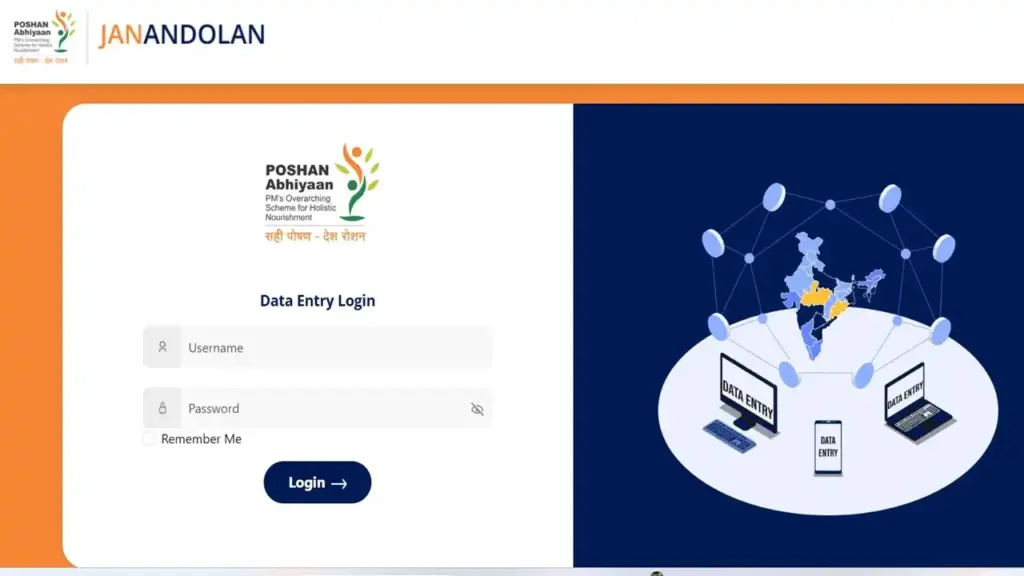
Step-by-Step Login Process
| 1 | Open your browser and go to poshanabhiyaan.gov.in. |
| 2 | Click “Data Entry” in the top-right corner of the dashboard. You can also open the login link directly. |
| 3 | Enter your username in the first field. Check upper and lower case carefully. |
| 4 | Type your password in the second field. |
| 5 | Use the eye icon to show your password and spot typos before submitting. |
| 6 | Tick “Remember Me” if you use a personal, secure device. |
| 7 | Click “Login.” The data entry screen opens right away. |
Quick Login Tips From Our Team
- Never share credentials on WhatsApp groups. Each ID maps to an exact location and department.
- Use a stable internet connection. A weak signal often causes failed submissions.
- Log out after every session on shared office computers.
What Should You Do If You Forget Your Password?
This process works differently from most websites. There is no email reset link on the Jan Andolan data entry portal.
Instead, a higher-level authorized user resets your password. The system is designed around this chain of authority.
Step-by-Step Forgot Password Process
| 1 | Visit the login page at poshanabhiyaan.gov.in/login. |
| 2 | Check the forgot password information. It tells you which level of authorized user to contact. |
| 3 | Contact your higher-level user. A block user contacts the district, and a district user contacts the state. |
| 4 | The authorized user logs in and opens the Reset Password module. |
| 5 | They search for your username and click the key icon next to it. |
| 6 | Your password is reset. Your username now works as your password. |
| 7 | Log in with your username in both fields. Then change your password immediately. |
How Do You Change Your Password After a Reset?
| 1 | Log in to the data entry portal. |
| 2 | Click “Change Password” in the top-right corner. |
| 3 | Enter your current password. |
| 4 | Type a new password and confirm it. |
| 5 | Save. Your new password takes effect right away. |
How Does the Data Entry Process Work?
Once you’re through the poshan abhiyaan gov in login, you land on the Activity Participation Form. Our team walked through the official user guide to map each step accurately.
Steps to Enter an Activity
| 1 | Select Activity from the drop-down. If your activity isn’t listed, choose “Other” and describe it. |
| 2 | Select Theme(s). One activity can cover multiple themes. |
| 3 | Select Level. This refers to where the activity happened, not your own user level. |
| 4 | Select Organizers. Your ministry is auto-selected, but you can add other organizers. |
| 5 | Select Group if the activity is related to a special day or week, such as National Nutrition Month. |
| 6 | Select Date. The start date cannot be more than 5 days before today. |
| 7 | Enter Total Participants. The maximum allowed is 50,000 participants per entry. |
| 8 | Add the participant breakdown for adult male, adult female, child male, and child female. Leave fields blank if you don’t know the numbers. |
| 9 | Upload a photo. The file size must be under 2 MB. |
| 10 | Add a description explaining what happened and how the community responded. |
| 11 | Review all details and click “Submit.” Remember that submitted data cannot be edited later. |
Important: A photo is mandatory if total participation is more than 1,000.
What Happens After You Submit?
A pop-up confirms success and offers three choices. You can add another activity, view all data entered, or log out.
What Limits Apply to Data Entry?
Our analysis suggests these rules exist to protect data quality. Knowing them saves you a lot of frustration.
Key Restrictions at a Glance
- Session timeout: You are logged out automatically after 10 minutes of inactivity. Save your work quickly.
- Daily entry limit: 10 activities per Anganwadi Centre per day. A block with 300 AWCs can report up to 3,000 activities daily.
- Restricted entry window: Data entry is closed from 12 am to 5 am every day for system maintenance.
- Back-dated entries: Up to 5 days during Poshan Maah or Poshan Pakhwada, and up to 2 weeks at other times.
- Duplicate entries: Matching details for the same activity, level, and date trigger a duplicate warning. Higher-level users are notified automatically.
What Extra Tools Do Senior Users Get?
National, State, and District users have access to additional modules:
- Reset Password for users below them
- Advance Filter to search by ministry, theme, date, state, or district, with Excel export
- Duplicate Data Entry Attempts to track and clean up repeats
- Top 50 Users reporting the highest participation
- Top 5 Ministries and Bottom 5 Ministries by participation, shown month by month
How Is the Poshan Tracker App Different?
Many people mix up the web portal and the Poshan Tracker app. They serve different users.
The Poshan Tracker app on Google Play is built for Anganwadi Workers (AWWs) and supervisors. It offers a 360-degree view of Anganwadi Centre activities and beneficiary management.
Poshan Tracker Feature List
- Real-time monitoring of AWCs, AWWs, and beneficiaries
- Beneficiary management for pregnant women, lactating mothers, children aged 0–6, and adolescent girls
- Service delivery tracking for home visits and daily operations
- Face recognition (FRS) capture for attendance and verification
What Do the App’s Numbers Tell Us?
The app is developed by the National eGovernance Division, Government of India. It has 1Cr+ downloads and a 3.9-star rating from about 1.67 lakh reviews.
We noted the listing was updated on October 1, 2026. The app may collect location data, which is encrypted in transit.
What Are Users Complaining About?
Recent reviews mention FRS photo capture failures and lagging videos during home visits. One worker reported the app showing her centre as 2.5 km away while she sat inside it.
The support team responds publicly. They invite users to a POSHAN VC on Google Meet, Monday to Friday, 4:15 pm to 5:15 pm.
Support email: support-poshantrackr@gov.in
What Is the NIN/ICMR E-Learning Portal?
There is a third Poshan-linked login you should know about. The ICMR–National Institute of Nutrition (NIN) runs an e-learning portal for training modules.
We confirmed the NIN e-learning login page is working. It has its own username and password fields, separate from the data entry portal.
How Do You Log In to the NIN Portal?
| 1 | Open poshan-abhiyaan.nin.res.in and go to the Login page. |
| 2 | Enter your username and password. |
| 3 | Tick “Remember Me” if you’re using a personal device. |
| 4 | Click the “Login” button. |
How Do You Reset Your NIN Portal Password?
Unlike the data entry portal, this one has a self-service reset. That’s a welcome difference.
| 1 | Go to the NIN login page. |
| 2 | Click the “reset it” link under the login fields. |
| 3 | Follow the on-screen instructions to request a password reset. |
| 4 | Set your new password and log back in. |
Why Do Logins Fail, and How Can You Fix Them?
Our team compiled the most common problems from the official troubleshooting notes.
- Wrong case in username: State and district names need CAPITALS. Blocks need lowercase.
- Using block name instead of code: Always enter the block code. Names won’t work.
- Missing spaces: If your district has a space in its name, keep it in the username and password.
- Page not loading: Check your internet connection first. Hardware and browser issues aren’t handled by the helpdesk.
- Block or district missing from the form: Inform your supervisor. Don’t create a workaround entry.
- Photo won’t upload: Compress it to under 2 MB.
- Submit button gives an error: Fill every field marked with a red asterisk (*).
Frequently Asked Questions
Is the Poshan Abhiyaan gov in login page working?
Yes. We tested poshanabhiyaan.gov.in/login and found it fully functional, showing the Data Entry Login screen.
Can I sign up for a new account online?
No. There is no self-registration. Accounts are pre-created for ministries and departments, so contact your supervisor or nodal officer.
What is my password after a reset?
After a higher-level user resets it, your username becomes your password. Change it right after logging in.
Why was I logged out suddenly?
The portal has a 10-minute idle timeout. Any unsaved data is lost, so submit entries promptly.
Can I edit an entry after submitting it?
No. Submitted data cannot be changed. Check every detail before clicking Submit, and tell your supervisor about any mistakes.
Why can’t I log in at night?
Data entry is closed from 12 am to 5 am for maintenance. Try again after 5 am.
Is the Poshan Tracker app the same as the data entry portal?
No. Poshan Tracker is a mobile app for Anganwadi service delivery. The web portal records Jan Andolan activities.
Do beneficiaries need to use this login?
No. The poshan abhiyaan gov in login is meant for officials. Beneficiaries get services through their local Anganwadi Centre.
What’s the Bottom Line?
The Poshan Abhiyaan login system is simpler than it looks. Most problems come down to username format, timing, or not knowing who handles resets.
We found that once you understand the chain of authority, the portal works smoothly. Bookmark the official links, keep your credentials safe, and your next Poshan Maah report will go through without a hitch.


