


We found that most people searching for eroad login help want one thing: to reach the MyEROAD dashboard quickly, without guessing which portal is the right one.
So our team checked every official EROAD sign-in page, the password reset flow, and the mobile app listing. Below, we explain exactly what works right now.
Key Takeaways
- There is no public self-signup. Access to MyEROAD comes through your company’s EROAD account, so your fleet admin or EROAD sets up your username.
- North American users sign in at my.eroad.com/login, while New Zealand users have a separate portal at my.eroad.co.nz/login.
- Forgot your password? The reset page asks only for your username, then emails you a secure reset link.
What Is EROAD, and Why Does the Login Matter So Much?
EROAD is a fleet management technology company that connects vehicles, assets, and operations for business fleets. It works across New Zealand, Australia, and North America.
If you’ve been following fleet management technology, this won’t come as a surprise. EROAD has been around longer than many of its rivals, and it built its name on compliance.
Here’s a quick snapshot of the company, based on its official About page:
- Headquarters: Auckland, New Zealand
- Other offices: Sydney, Australia; Manila, Philippines; and San Diego, USA
- Stock listing: Dual-listed on the NZX and ASX under the ticker ERD
- Scale: More than 250,000 contracted units worldwide, a milestone passed in 2025
- Big first: In 2009, EROAD launched the world’s first nationwide electronic Road User Charging (RUC) system in New Zealand
Our analysis suggests the login matters because the portal is where everything lives. Drivers, managers, and compliance teams all depend on MyEROAD for daily work.
A locked-out manager can’t view vehicle locations, review dashcam footage, or check Hours of Service data. That’s a real operational problem, not just an annoyance.
You can read more about the company’s history on the EROAD About page.
How Did EROAD Grow Into a Global Fleet Platform?
EROAD’s timeline shows steady, deliberate growth. We pulled the milestones that matter most to everyday users.
- 2009: Launched electronic RUC in New Zealand
- 2019: Reached 100,000 contracted units and won Company of the Year at the NZ Export Awards
- 2020: Listed on the ASX, launched the Core360 platform, and introduced the EROAD Clarity dashcam
- 2021: Acquired Coretex, a telematics firm with deep roots in Australia and North America
- 2023: Signed a five-year deal covering 500+ milk tankers with Fonterra
- 2025: Passed 250,000 contracted units and signed Cleanaway for over 3,250 vehicles
Industry insiders are noting that the Coretex acquisition is why some customers see two platform names. If your company came from the Coretex side, you may use Core360 instead of MyEROAD.
That detail trips up a lot of users. Always confirm with your fleet admin which platform your company runs on.
Where Is the Official EROAD Login Page?
This is the question we hear most often. The answer depends on where your fleet operates.
We tested each portal ourselves. Here’s what we found:
- North America: my.eroad.com/login — working when we checked
- New Zealand: my.eroad.co.nz/login — working when we checked
- Installer portal: installer.eroad.com/s/login — this page showed a CSS error during our test, so we’re listing it as text only
Both main portals look nearly identical. Each shows a simple Username field, a Password field, and a Sign in button.
The difference is the region. Your account is tied to a specific regional system, so using the wrong portal will usually cause a failed sign-in.
How Do You Sign Up for an EROAD Account?
Here’s the part that surprises most first-time visitors. There is no “Create Account” button on the MyEROAD sign-in page.
Our team observed that the page offers only Username, Password, and a Forgot your password? link. That’s because MyEROAD is a business platform, not a consumer app.
Access starts at the company level. Here’s how to get set up:
Step-by-Step: How to Get MyEROAD Access
| 1 | Check if your company already uses EROAD. Ask your fleet manager, dispatcher, or IT team first. |
| 2 | If your company is an EROAD customer, request a user account from your internal EROAD administrator. |
| 3 | Wait for your credentials. Your administrator will provide your username and initial password, or setup instructions. |
| 4 | If your company is not a customer yet, visit the EROAD Contact Us page. |
| 5 | Complete the sales form with your name, company, email, phone number, state, and fleet size. |
| 6 | Book a demo so an EROAD specialist can explain the available pricing and features. |
| 7 | Once your contract is active, EROAD will set up your company account, and your administrator can add individual users. |
One important note: what you see after signing in depends on your permissions. A driver won’t see the same tools as a fleet manager.
How Do You Log In to MyEROAD Step by Step?
Once you have your username and password, the sign-in process is quick. We walked through it on the North American portal.
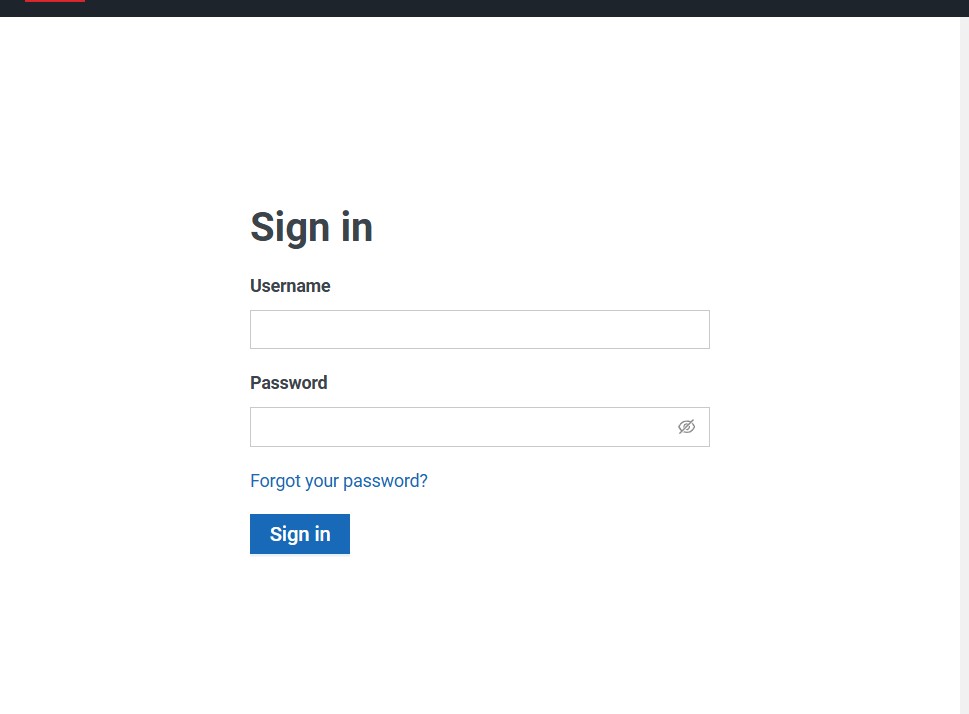
Step-by-Step: How to Sign In
| 1 | Open your browser and go to my.eroad.com/login. |
| 2 | New Zealand users should instead go to my.eroad.co.nz/login. |
| 3 | Enter your username in the Username field. |
| 4 | Enter your password in the Password field. Make sure Caps Lock is turned off. |
| 5 | Click “Sign in.” |
| 6 | Wait for the dashboard to load. You will see the tools and features available for your user role. |
We found that the sign-in page also displays a banner promoting products like video telematics or the Clarity Edge Multicam. That’s normal, so don’t mistake it for a pop-up error.
Use of the site is governed by EROAD’s Terms and Conditions, which are linked at the bottom of each sign-in page.
What Should You Do If You Forget Your Password?
It happens to everyone. Thankfully, the reset flow is simple and only needs your username.
We tested the page at my.eroad.com/forgot-password, and it was working at the time of our check.
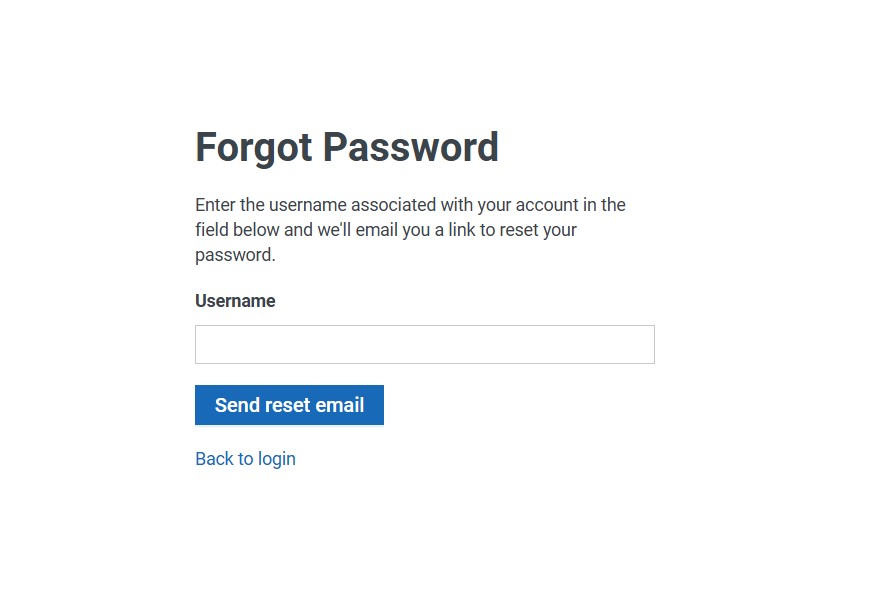
Step-by-Step: How to Reset Your Password
| 1 | Go to the sign-in page at my.eroad.com/login. |
| 2 | Click “Forgot your password?” below the password field. |
| 3 | Enter your username — not your email address — in the provided field. |
| 4 | Click “Send reset email.” |
| 5 | Check your inbox for a password reset link from EROAD. Also check your spam or junk folder if you don’t see it. |
| 6 | Click the reset link and create a new, strong password. |
| 7 | Return to the sign-in page and log in using your new password. |
New Zealand users can find the same Forgot your password? link on the my.eroad.co.nz sign-in page.
Don’t remember your username either? Your fleet administrator is the fastest help, since they manage user accounts.
Why Does the EROAD Login Sometimes Fail?
Our analysis suggests most sign-in problems come from a few common causes. Here’s what we’d check first.
- Wrong regional portal: A New Zealand account won’t work on the North American site, and vice versa.
- Wrong platform: Some former Coretex customers use Core360, not MyEROAD.
- Typos or Caps Lock: Passwords are case-sensitive, so one wrong key breaks the attempt.
- Too many attempts: Repeated failures may lock your account for a period of time.
- Deactivated user: If you’ve changed roles, your admin may have removed your access.
- Browser cache: Old saved data can cause strange loading issues. Try a private window.
We also noticed feedback from app reviewers worth sharing. Some users reported intermittent sign-in failures, and one said the app locked them out after two password attempts.
Our advice? If a password reset is required, slow down and get it right the first time.
Is There a MyEROAD Mobile App?
Yes. The MyEROAD app lets you view and monitor your vehicles in real time from your phone.
It’s available on Google Play, and there’s also an iOS version on the Apple App Store.
Your eroad login details for the web portal are the same ones you use in the app. There’s no separate app account to create.
What Can You Do in the MyEROAD App?
- Fleet Management: Live maps, current vehicle location, journeys, and ETAs
- Messaging and geofencing: Send messages and set geofence boundaries
- Driver Management: See driver location and Hours of Service data (North America)
- Safety and Compliance: View and manage camera footage
- RUC tools: Manage Road User Charges (New Zealand only)
Here’s the fine print: features vary by country and by your permissions. You may not see every tool listed above.
When we checked, the Android app showed 10K+ downloads and a 3.3-star rating from 26 reviews. The most recent update listed “minor enhancements to the login experience.”
What Features Does the MyEROAD Platform Offer?
Once you’re signed in, the platform covers far more than basic tracking. We grouped the core tools into four main areas.
How Does EROAD Help With Compliance?
- Electronic RUC for New Zealand fleets, NZTA-approved
- ELD and Hours of Service tools for North American carriers
- Fuel tax compliance in North America
- Fuel tax credit management in Australia
What Safety Tools Are Included?
- Driver behavior monitoring and speed alerts
- Electronic logbooks and incident detection
- Dashcam video through the Clarity product line
What Productivity Tools Can Fleet Managers Use?
- GPS tracking and geofencing
- Fleet maintenance and fuel management
- Asset utilization for trailers and non-powered equipment
How Does EROAD Support Sustainability Goals?
- Emissions measurement for your entire fleet
- Fuel reduction and idling management
- Tools to build a credible path toward net zero targets
How Does EROAD’s Video Telematics Fit In?
Video is where EROAD has invested heavily in recent years. Its dashcams combine GPS tracking and AI-powered video in one platform.
You can explore the full lineup on the EROAD video telematics page. Here’s a quick breakdown:
- Clarity Dashcam: An all-in-one GPS dashcam that records during harsh braking, sharp cornering, or fast acceleration
- Clarity Edge AI Dashcam: Detects and alerts drivers to distraction, tailgating, and phone use
- Clarity Edge 360 Dashcam: Adds up to three external cameras to reduce blind spots
Footage is reviewed through Replay, EROAD’s video portal. It includes smart tags, filters, workflows, and a gallery view of every camera angle.
Industry insiders are noting that video evidence is becoming essential for defending drivers against false claims. That’s one big reason managers sign in daily.
Who Uses the EROAD Installer Portal?
The installer portal is meant for technicians and third-party installers who fit EROAD hardware into vehicles.
It sits at installer.eroad.com/s/login. During our check, though, the page showed a CSS error before loading the sign-in fields, so we’re not linking to it directly.If you’re an installer and can’t reach it, contact EROAD technical support using the details below.
How Can You Contact EROAD Support?
When self-service fixes fail, real people can help. Here’s the verified contact information from EROAD’s North American contact page.
- Phone: 1-855-503-7623
- Tech support email: tech.support@eroad.com
- General email: info@eroad.com
- Address: 15110 Avenue of Science, Suite 100, San Diego, CA 92128
For New Zealand users, the app developer listing shows support@eroad.com and +64 9 927 4702, with an office at 260 Oteha Valley Road, Albany, Auckland.
You can also reach the sales team through the EROAD Contact Us page.
What’s Our Final Take on Accessing MyEROAD?
After testing every portal, we found the process straightforward once you know which region you belong to and who manages your account.
The biggest mistake? Hunting for a signup button that doesn’t exist. Start with your fleet admin, and you’ll save a lot of time.
FAQs
Can I create my own EROAD account online?
No. There’s no public signup option. Your company must be an EROAD customer, and your admin creates your user account.
Which website should I use for my eroad login?
North American users go to my.eroad.com/login. New Zealand users should use my.eroad.co.nz/login.
What do I need to reset my password?
Only your username. Enter it on the forgot password page, and EROAD will email you a reset link.
I didn’t get the reset email. What now?
Check your spam or junk folder first. If it’s still missing, contact your fleet admin or EROAD support at 1-855-503-7623.
Does the MyEROAD app use the same password?
Yes. The app uses your existing MyEROAD username and password, so there’s nothing new to set up.
Why can’t I see all the features in MyEROAD?
Your access level controls what you see. Features also vary by country, so ask your admin if something is missing.
What is Core360, and is it the same as MyEROAD?
Core360 is a platform linked to EROAD’s Coretex acquisition. Some fleets use it instead of MyEROAD, so confirm with your admin.
How do I contact EROAD technical support?
Call 1-855-503-7623 or email tech.support@eroad.com. The team handles sign-in issues, hardware, and installation questions.


