


If you’ve been searching for a clear answer on how the ZIMSEC portal login actually works, you’re in the right place. Our team spent time checking the official Zimbabwe School Examinations Council systems directly, and we found that a lot of the advice floating around online is outdated or simply wrong. This report breaks down what’s real, what’s working right now, and what you should ignore.
ZIMSEC runs Zimbabwe’s national exams, and its online portals matter to thousands of families every results season. So we verified each link ourselves before publishing.
Critical Highlights
- There are two separate portals: one for schools/centres (crsz.zimsec.co.zw) and one for candidate results (results.zimsec.co.zw).
- The candidate results portal is currently closed and only opens during official results-release windows.
- The Centre Login page is live, but it’s meant for school heads and administrators — not individual students.
What Is ZIMSEC and Why Does the Portal Matter?
Let’s start with the basics. ZIMSEC stands for the Zimbabwe School Examinations Council, and it was established in 1994.
It operates as a parastatal under the Ministry of Primary and Secondary Education. That means it’s an official government body, not a private service.
Here’s something many people don’t realize. ZIMSEC is internationally accredited, and its syllabuses were evaluated as equivalent to the UK GCE standard.
So when you complete a Grade 7, O-Level, or A-Level exam through ZIMSEC, that qualification carries real weight abroad. This is exactly why the ZIMSEC portal login gets so much traffic each year.
Which ZIMSEC Portals Actually Exist?
This is where most confusion begins. Our analysis suggests people assume there’s one single login for everything — but that’s not the case.
We found two distinct systems, each with a different purpose. Mixing them up is the number one reason people fail to log in.
- Centre Login portal — crsz.zimsec.co.zw — for school heads and centre administrators.
- Candidate Results portal — results.zimsec.co.zw — for students checking exam results during release windows.
The Centre Login page is live right now. The results portal, however, is a different story.
Is the ZIMSEC Results Portal Open Right Now?
We’ll be honest with you here, because accuracy matters more than hype. When our team checked results.zimsec.co.zw, the page displayed a clear message: “Results Portal Is Now Closed.”
The site also stated that the online access window has ended, and it advised candidates to proceed to their centre to collect results. So if you’re trying a ZIMSEC portal login for results today and it isn’t working, you’re not doing anything wrong.
The portal simply opens during official results-release periods and closes afterward. If you’ve been following exam-season updates, this won’t come as a surprise.
Our advice is simple. Bookmark the official results page and wait for ZIMSEC to announce the next opening window.
Register for a ZIMSEC Centre Account?
The Centre Login system includes a registration path for school heads. This is not for individual candidates — it’s an important distinction.
If you’re a school administrator, here’s the process based on what we observed on the live login page.
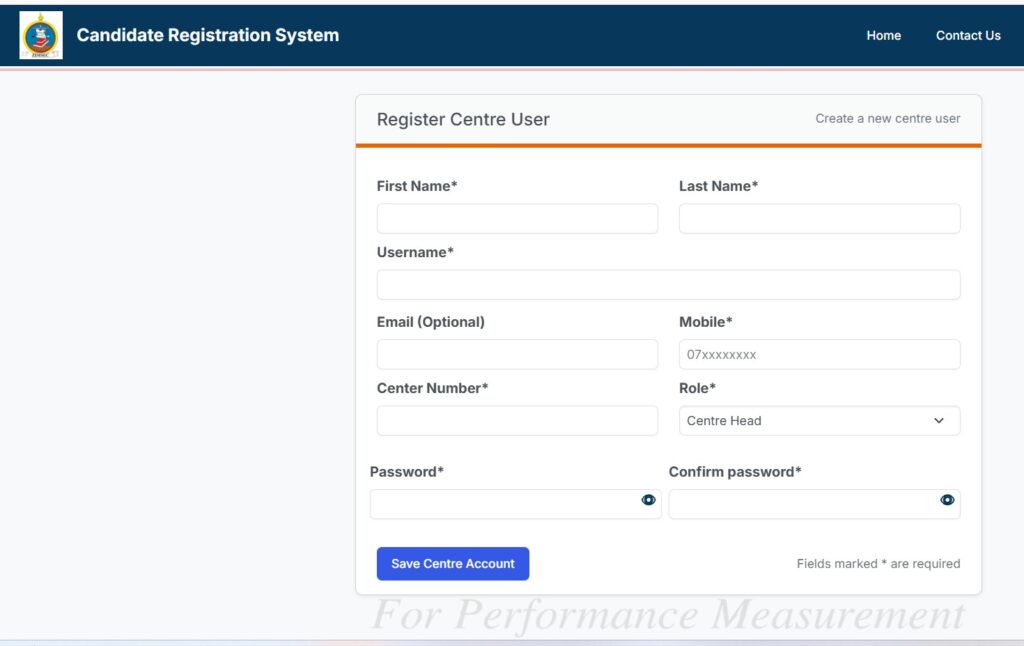
| 1 | Open the official Centre Login page at crsz.zimsec.co.zw. |
| 2 | Use a modern browser like Chrome or Firefox — the system warns that Internet Explorer is no longer supported. |
| 3 | Look for the link labelled “Click here for School Head Account Registration.” |
| 4 | Follow the on-screen prompts to create your School Head account with the required details. |
| 5 | Save your username and password somewhere secure once registration is confirmed. |
A quick note we think is worth repeating. If you’re a results capturer, you don’t self-register — you contact your centre admin instead.
ZIMSEC Portal Login?
Once your account exists, the actual ZIMSEC portal login is refreshingly simple. Our team walked through the live page to confirm each field.
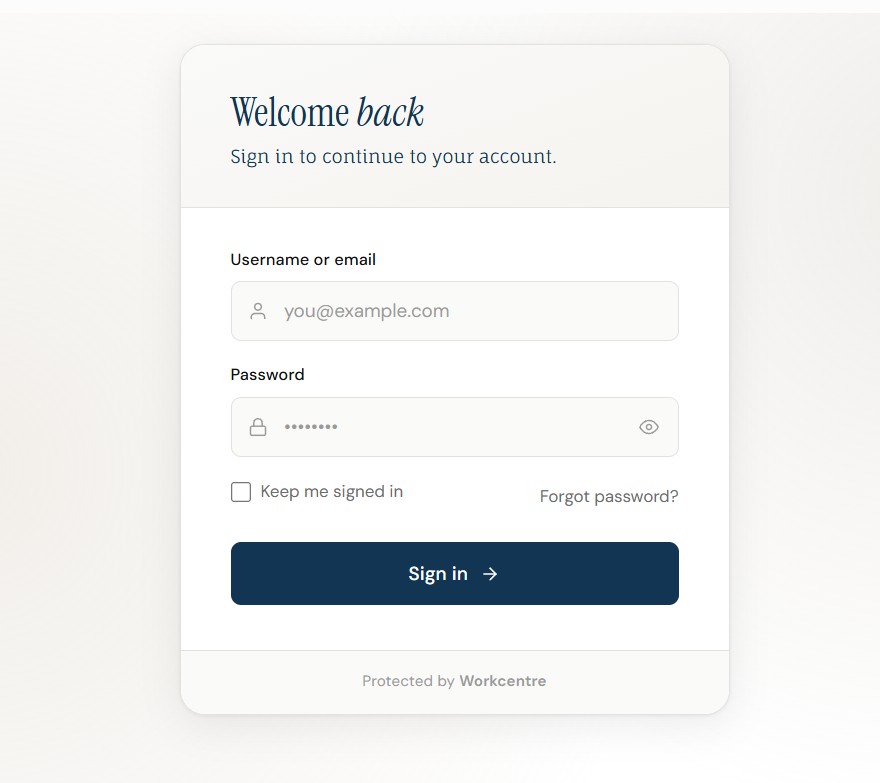
| 1 | Visit the Centre Login page at crsz.zimsec.co.zw. |
| 2 | Enter your Username in the first field. |
| 3 | Enter your Password in the second field. |
| 4 | Click the “Log in” button to access the secure dashboard. |
That’s the full flow for the centre-side ZIMSEC portal login. There are no extra hidden steps on the current page.
For the candidate results portal, the login normally asks for your registration details when it’s open. Since that portal is closed at the moment, we won’t pretend to describe screens that aren’t currently visible.
What If You Forget Your ZIMSEC Password? (Forgot Password)
Password trouble is the most common complaint we hear about any exam portal. Here’s how to handle a ZIMSEC portal login issue sensibly.
| 1 | Return to the official Centre Login page and double-check your username first. |
| 2 | Confirm you’re using a supported browser, since an outdated one can block the page entirely. |
| 3 | If you’re a capturer, reach out to your centre admin — they manage your access. |
| 4 | If you’re a school head locked out, contact ZIMSEC directly using the official details below. |
We want to be transparent here. The live login page does not currently display a public “reset password” button, so the safest route is direct contact rather than third-party tools.
Check Grade 7, O-Level, or A-Level Results?
The candidate results portal covers Grade 7, O-Level, and A-Level national exams. When it’s open, the process is designed to be quick.
According to the official Exam Results Information page, you typically register an account, log in, and open the “Candidate Results” section. You can read the full details on the ZIMSEC Exam Results Information page.
ZIMSEC also publishes an official Online Results Distribution Manual. You can download that PDF from the same results information page for a proper step-by-step reference.
Industry insiders are noting that official manuals like this are far more reliable than random blog screenshots. We agree completely.
What Are the Official ZIMSEC Contact Details?
If any ZIMSEC portal login problem can’t be solved online, go straight to the source. Our team confirmed these details on the official ZIMSEC website.
- Website: www5.zimsec.co.zw
- Address: 1 Upper East Road, Mount Pleasant, Harare, Zimbabwe
- Phone: 08644065278-81
- Email: pr.infor@zimsec.co.zw
Keep these handy during results season. They’re the fastest verified way to reach the council.
Our Honest Take on the ZIMSEC Portal Experience
We’ll give you our observation plainly. The ZIMSEC portal login setup is functional but split across two systems, which trips people up.
The centre side works reliably, and the results side is seasonal by design. Once you understand that split, the whole thing makes far more sense.
Our biggest tip? Always start from the official ZIMSEC website and avoid unofficial “portal” pages that ask for your details. Your exam data is worth protecting.
FAQs
Is there one single ZIMSEC portal login for everything?
No. There’s a Centre Login for schools and a separate candidate results portal, and they serve different users.
Why is the ZIMSEC results portal showing as closed?
The results portal only opens during official release windows. Outside those periods, it displays a “Now Closed” message and directs you to your centre.
Can students register their own account on the Centre Login?
No. That registration is for school heads, while capturers must contact their centre admin for access.
Which browser should I use for the ZIMSEC portal login?
Use a modern browser such as Chrome or Firefox. The system specifically warns that Internet Explorer is no longer supported.
Where can I find an official step-by-step results guide?
Download the Online Results Distribution Manual from the Exam Results Information page.
What exams can I check through the results portal?
The portal covers Grade 7, O-Level, and A-Level national examinations once results are released.
Who do I contact if my login still fails?
Reach ZIMSEC directly by phone at 08644065278-81 or email at pr.infor@zimsec.co.zw.


