

Thousands of people search for the eehhaaa login page each month, hoping to sign in and start earning by watching ads. Most of them want one thing: a working way into their account so they can view balances and daily ad tasks. Before you type your credentials, there is a more important question to settle first.
Is your money and your time actually safe here? We looked at how the eehhaaa login works, and we looked at what the platform asks from users before it pays anything out.
Key Takeaways
- Eehhaaa is marketed as a JAA Lifestyle ads-viewing platform where users earn per click by watching advertisements each day.
- At the time of our review, eehhaaa.com and app.eehhaaa.com were inaccessible, which is a serious concern for a site that holds user funds.
- A pay-to-join earning model carries real risk. Treat the login process and the money decision as two separate questions.
What Is Eehhaaa and Who Uses the Login Page?
Eehhaaa is presented online as an ads-watching platform connected to the JAA Lifestyle brand. The pitch is simple: register, watch a set number of ads daily, and earn a small amount per click.
The eehhaaa login page is the entry point to that dashboard. From there, users report seeing ad tasks, wallet balances, and referral tools.
Our analysis suggests most people reach the sign-in screen expecting a routine login. They want to check earnings and complete the day’s ad quota.
Here is what matters most. A login page tells you nothing about whether the platform will pay you. Those are different things, and confusing them is a common mistake with earning apps.
Is the Eehhaaa Login Page Working Right Now?
This is where we ask you to slow down. When our team checked the platform, the main site and the app login path did not load.
We attempted to reach eehhaaa.com and app.eehhaaa.com, and both were inaccessible during our review. For a site that holds deposits and promises payouts, downtime like this is not a small technical detail.
If you have been following ads-earning platforms, this won’t come as a surprise. Sites in this category often go offline for stretches, and users report being locked out during exactly those windows.
We are not making an accusation. We are reporting what we observed directly: the official access points were down when we tried them.
How Does the Eehhaaa Earning Model Actually Work?
The model is built around daily ad viewing. You are given a set number of ads, and each viewed ad adds a small credit to your account.
Industry insiders are noting a familiar structure behind these apps. Earnings usually depend on your membership tier, and higher tiers often require an upfront payment to join.
Here is the part users overlook. The payout depends entirely on the platform staying online and choosing to release funds. When a site holds your join fee and your daily earnings together, both are exposed to the same risk.
A high daily return on a small task is a warning sign, not a feature. Real advertising budgets rarely support the kind of per-click payouts these apps advertise.
How Do You Sign Up for an Eehhaaa Account?
If you still choose to register after reading the warnings above, the general flow is straightforward. Do not pay any join fee you cannot afford to lose.
Here is the typical process:
| 1 | Open the official Eehhaaa registration page or app. |
| 2 | Select the Register or Sign Up option. |
| 3 | Enter your personal details, such as your name, email, and phone number. |
| 4 | Some users report being asked for a referral or sponsor ID at this step. |
| 5 | Create a password you will remember, since it becomes part of your eehhaaa login credentials. |
| 6 | Submit the form and verify your email or phone to activate the account. |
One honest caveat. Registration is designed to be quick. Ease of signup is common to almost every earning app, legitimate or not, so it proves very little on its own.
How Do You Complete the Eehhaaa Login Step by Step?
Once your account exists, the sign-in itself is direct. You use the email or phone and password tied to your account.
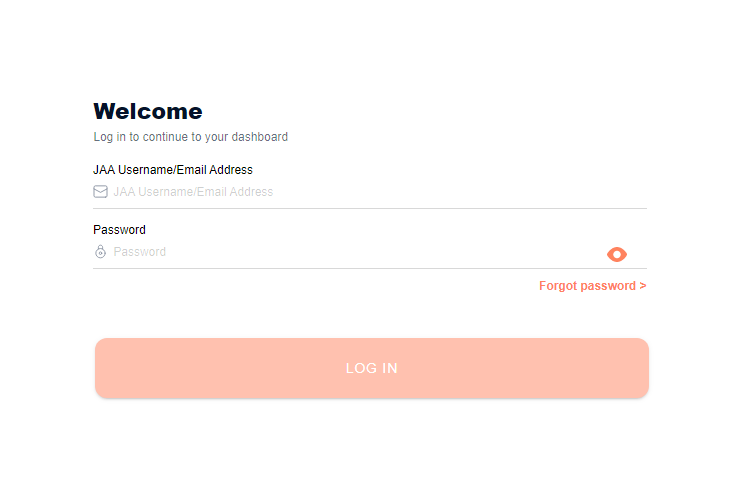
Follow these steps:
| 1 | Go to the official Eehhaaa login page or open the app. |
| 2 | Select the Login option. |
| 3 | Enter your registered email or phone number. |
| 4 | Type your password carefully. |
| 5 | Submit to reach your dashboard and daily ad tasks. |
Our team observed that some users also report a Facebook or Google sign-in option. If the eehhaaa login button does nothing, the platform may simply be down, as it was during our checks.
A practical note. Confirm the exact web address before entering credentials, and be wary of copycat pages that appear when the real site is offline.
How Do You Reset a Forgotten Eehhaaa Password?
Most earning platforms include a password recovery option built into the login screen. It usually runs through an email or SMS verification code.
Here is the general process:
| 1 | Open the login page and choose the Forgot Password link. |
| 2 | Enter your registered email address or phone number. |
| 3 | Request the verification code or reset link. |
| 4 | Enter the code from your email or SMS to confirm the request. |
| 5 | Create and confirm a new password, then save it. |
| 6 | Return to the login page and sign in with your new credentials. |
One realistic limitation. If the site is offline, the reset email may never send, and there is nothing on your end that fixes that. We also suggest checking your spam folder, since reset codes are frequently filtered.
What Features Sit Behind the Eehhaaa Login?
Once inside, users report a standard earning dashboard. The layout centers on ads and referrals.
Common sections include:
- Ad tasks for the day’s viewing quota.
- Wallet for tracking credited earnings.
- Withdrawal for requesting payouts.
- Referral tools for inviting others and earning commissions.
- Membership tiers that may require a paid upgrade.
We should be clear here. The withdrawal step is where earning apps most often break down. Credits accumulate easily on screen, while cash-outs stall, add conditions, or require more referrals first.
What Is Our Honest Take on the Eehhaaa Login and Platform?
The concept is easy to understand. Watch ads, earn a little, invite friends. That simplicity is the appeal, and it is deliberate.
The harder truth is the risk. The official access points were down when we checked, the model leans heavily on referrals and paid tiers, and payouts depend on a platform you cannot fully verify.
Our advice is direct. Treat any pay-to-join, earn-per-click app with strong skepticism, never deposit funds you cannot afford to lose, and keep records of every transaction and screen you see.
If a platform promises steady returns for watching ads and makes withdrawals difficult, that is a warning sign, not a temporary glitch.
FAQs
What is the official Eehhaaa login page?
Eehhaaa is accessed through its website and app under the JAA Lifestyle brand. At the time of our review, the main site and app login path were inaccessible, so we could not confirm a working link.
Is Eehhaaa safe to use?
We cannot call it safe. The platform uses a pay-to-join, referral-heavy earning model, and the official pages were down during our checks. Avoid depositing money you cannot afford to lose.
Does a working eehhaaa login mean the platform is legitimate?
No. A functional login is not proof of legitimacy. Many earning apps run smooth sign-in systems while payouts remain unreliable.
How do I reset my Eehhaaa password?
Open the login page, choose Forgot Password, enter your email or phone, request a code, verify it, and set a new password. If the site is offline, the reset email may not arrive.
Why can’t I withdraw my earnings?
Withdrawal problems are a commonly reported red flag on ads-earning apps. If cash-outs stall or demand extra referrals or upgrades, treat that as a serious warning.
What should I do if I already paid a join fee?
Stop adding funds, document every transaction and message, attempt a withdrawal, and report the platform to your bank and local cyber-crime authorities if payouts fail.
If your access or your money is stuck, save the exact error messages and your payment records. That single habit matters most when you need to report a platform or dispute a charge.


