


Every semester, students at Kwara State University hit the same wall. The kwasu portal login page is where you check results, pay fees, and register courses, but the sign-in step is where many students stall before the academic work even begins.
We looked at how the portal actually works, where the friction shows up, and how to get in without a needless password reset.
Key Takeaways
- The official kwasu portal login runs at portal.kwasu.edu.ng, with a separate user login page at kwasu.edu.ng/user-login/.
- KWASU is Kwara State University, Malete, a Nigerian institution established in 2009, and portal access is tied to your student credentials.
- Most kwasu portal login failures trace back to two issues: a wrong username or password and landing on a page that is not the official portal.
Check Also: MyWellSpan Login: Access Guide Most People Get Wrong
What Is the KWASU Portal and Who Uses It?
The KWASU portal is the university’s online system for student services. It handles course registration, result checking, fee payments, and admission processing.
Access is not open to the public. The login is tied to a student account, created when you gain admission or begin an application.
Our analysis suggests most confusion starts before the password field. Students often mix up the main portal and the general user login page, then wonder why their details are rejected.
If you have been following university portals in Nigeria, this won’t come as a surprise. A single institution frequently runs more than one entry point, and KWASU is no exception.
Is the KWASU Portal Login Page Genuine?
We checked the sign-in addresses, and the working portal sits at https://portal.kwasu.edu.ng/. The page shows a username field, a password field, and a Forgot Password link.
There is a second official route at https://kwasu.edu.ng/user-login/. This page lives on the main university website rather than the dedicated portal domain.
Here is the point worth flagging. The two addresses serve different entry needs, and confusing them is a common cause of failed sign-ins.
The practical rule is simple. Type the address yourself or use a saved bookmark, and confirm the kwasu.edu.ng domain before entering your kwasu portal login details.
Check also: E-Kickoff Login And Volunteers Actually Access
How Do You Register or Set Up a KWASU Account?
Registration comes before login, and this is where new students often stall. You cannot sign in until an account exists, and that account usually starts with your admission or application status.
The general process looks like this:
- Open the official portal at portal.kwasu.edu.ng.
- Locate the application or registration option relevant to your stage, such as Post-UTME or undergraduate admissions.
- Enter your personal details, including your name, email, and application or matriculation number.
- Provide your admission or examination reference where the system asks for it.
- Create a password you will remember, since this becomes part of your kwasu portal login credentials.
- Review the details and submit to complete registration.
One honest caveat. Registration steps can differ by student category, so the exact fields you see as a fresh applicant may not match those for a returning student.
Complete the KWASU Portal Login Step by Step?
Once your account exists, the kwasu portal login itself is direct. You sign in with the username and password linked to your student record.
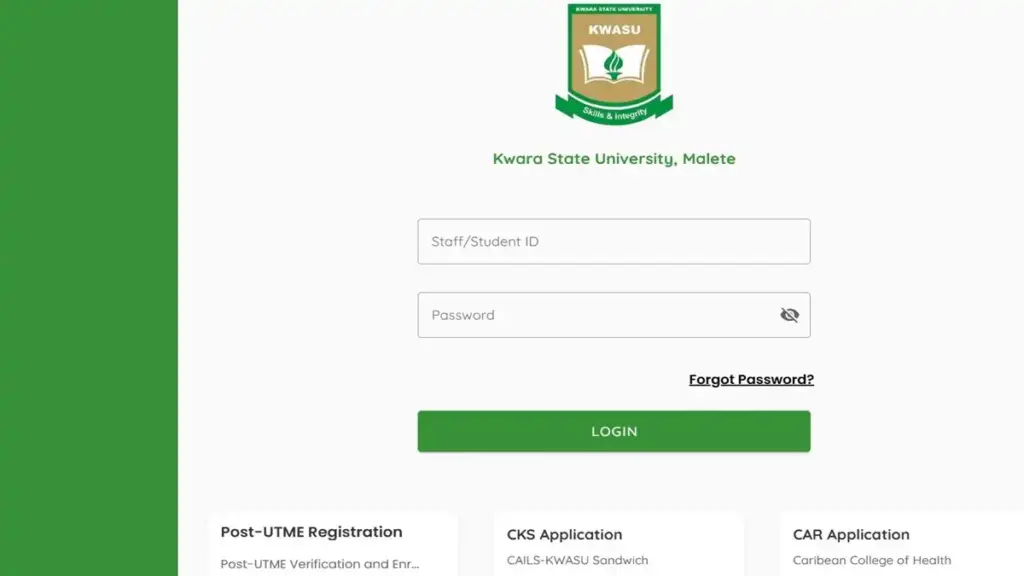
Follow these steps:
- Open portal.kwasu.edu.ng in your browser.
- Enter your username, which is often your matriculation or application number.
- Type your password, keeping in mind it may be case-sensitive.
- Select LOGIN to reach your student dashboard.
A quick note from our team. If the portal domain is slow, the general user login page at kwasu.edu.ng/user-login/ can serve as an alternate route to the same services.
Our team observed that unstable connections sometimes leave the page half-loaded. If the login button does nothing, refresh the page before assuming your account is the problem.
What Should You Do If the KWASU Portal Login Fails?
A failed sign-in rarely has one cause. It may involve a wrong username, a mistyped password, a browser issue, or landing on the wrong page.
Work through these checks first:
- Confirm your username. Use your correct matriculation or application number, not a guess.
- Check Caps Lock. Passwords may be case-sensitive.
- Try the alternate route. If the portal fails, test the user login page.
- Clear your cache. Old session data can interfere with the kwasu portal login flow.
- Verify the domain. Make sure you are on kwasu.edu.ng, not a lookalike page.
If none of that works, the issue is likely account-level, and a password reset is the next reasonable step.
MyScripps Login and Fixing Access Problems
Reset a Forgotten KWASU Portal Password?
Forgetting a password is common, especially between semesters when you log in only occasionally. The portal includes a recovery option built into the sign-in flow.
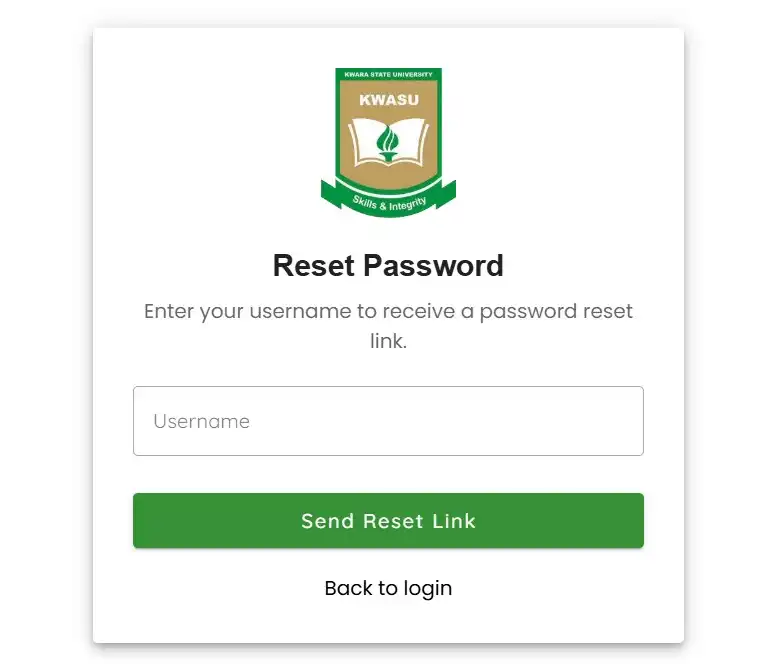
Here is the process:
- Go to the reset page at portal.kwasu.edu.ng/password/reset.
- Enter the username tied to your KWASU account.
- Select Send Reset Link so the system can process your request.
- Follow the reset link you receive to set a new password.
- Return to the login page and sign in with your new credentials.
One realistic limitation. The reset link is sent to the contact details on your record, so an outdated email may delay or block recovery.
We also recommend checking your spam folder. Reset messages are frequently filtered, and that delay is often mistaken for a broken link.
What Features Sit Behind the KWASU Portal Login?
Once inside, what you see depends on your student status. Applicants and enrolled students work with different tools.
Common features include:
- Course registration for the current academic session.
- Result checking across completed semesters.
- Fee payment and receipts for school charges.
- Admission and Post-UTME processing for new applicants.
We should be clear here. An applicant account focuses on admission steps, while an enrolled student account adds registration and result access on top.
Check Also: GoToMyPC Login, Sign Up, And Reset Your Password
Our Honest Take on the KWASU Portal Login Experience
Industry insiders are noting that university portals work well once the correct entry point is clear, but confuse newcomers at the sign-in stage. The kwasu portal login setup reflects that pattern.
The login form itself is simple. The friction, when it appears, usually comes from wrong pages, mistyped usernames, or forgotten passwords, not the portal itself.
Our advice is practical. Bookmark the real portal page, confirm your username format, and use the reset tool early rather than waiting until a deadline.
FAQs
What is the official KWASU portal login page?
The genuine portal runs at portal.kwasu.edu.ng. A second official route sits at kwasu.edu.ng/user-login/.
What username do I use for the KWASU portal?
In most cases it is your matriculation number or application number. Use the exact figure tied to your student record.
Why does my KWASU portal login keep failing?
The common causes are a wrong username, a case-sensitive password error, a browser issue, or landing on a page that is not the official portal.
How do I register on the KWASU portal?
Open portal.kwasu.edu.ng, choose the option for your stage such as Post-UTME or admissions, enter your details, and create a password. Steps can vary by student category.
How do I reset my KWASU portal password?
Go to portal.kwasu.edu.ng/password/reset, enter your username, and select Send Reset Link. Then follow the link sent to your registered contact.
What if my reset link never arrives?
Check your spam folder first, then request a new link. If your registered email is outdated, you may need to contact the university ICT or student support to update it.
If your access is still stuck after these steps, note the exact error message and the username you used, then reach out to KWASU student support with those details. That single habit saves the most time when a deadline is close.


