


Most people assume the e-kickoff login is just another sign-in box. Then they hit a wall. The portal runs on the Royal Belgian Football Association (RBFA) back-end, uses an Okta single sign-on system, and routes account creation through a completely separate website. That trips up first-time users constantly.
Our analysis suggests the confusion is not your fault. The login flow spreads across four different domains, and none of them explain the connection clearly. So we mapped every screen, button, and redirect for you.
If you’ve been following Belgian grassroots football administration, this won’t come as a surprise. Clubs, coaches, referees, and team managers all depend on the e-kickoff login to handle match sheets, player registrations, and competition data. Get locked out, and your weekend fixtures stall.
Critical Highlights
- The e-kickoff login lives at
extranet.e-kickoff.com, but authentication is handled by the RBFA’s Okta SSO at sso.rbfa.be.
- You cannot register on the login page itself. New accounts are created at a separate site:
signup.rbfa.be.
- Password resets, account unlocks, and help each have their own dedicated URL, so knowing which link to click saves you real time.
What Is the E-Kickoff Portal, and Who Actually Needs It?
The portal sounds like a fan app until you see who logs in. It is an administrative system, not a scoreboard.
Our team observed that the platform serves a specific set of users:
- Club officials managing rosters and affiliations
- Coaches submitting team selections
- Referees accessing match assignments
- Team managers and volunteers filing digital match sheets
Here is the blunt version. If you run any club-side task in Belgian football, this is your daily tool.
The main gateway sits at https://extranet.e-kickoff.com/. That URL opens the Sign In screen powered by RBFA’s identity system.
Why Does the E-Kickoff Login Redirect to RBFA?
You type in the e-kickoff address and land on an RBFA-branded Okta page. That is expected behavior, not a phishing redirect.
The RBFA consolidated authentication under one single sign-on at https://sso.rbfa.be/. Both URLs show the identical Sign In box. That is why the same credentials work across RBFA services.
Industry insiders are noting that this Okta setup is standard for large sports federations. It centralizes security. It also means your one account covers multiple RBFA tools.
E-Kickoff Sign Up for an Account?
Signup is the step people get wrong first. The login page has a Register link, but real account creation happens on a dedicated form.
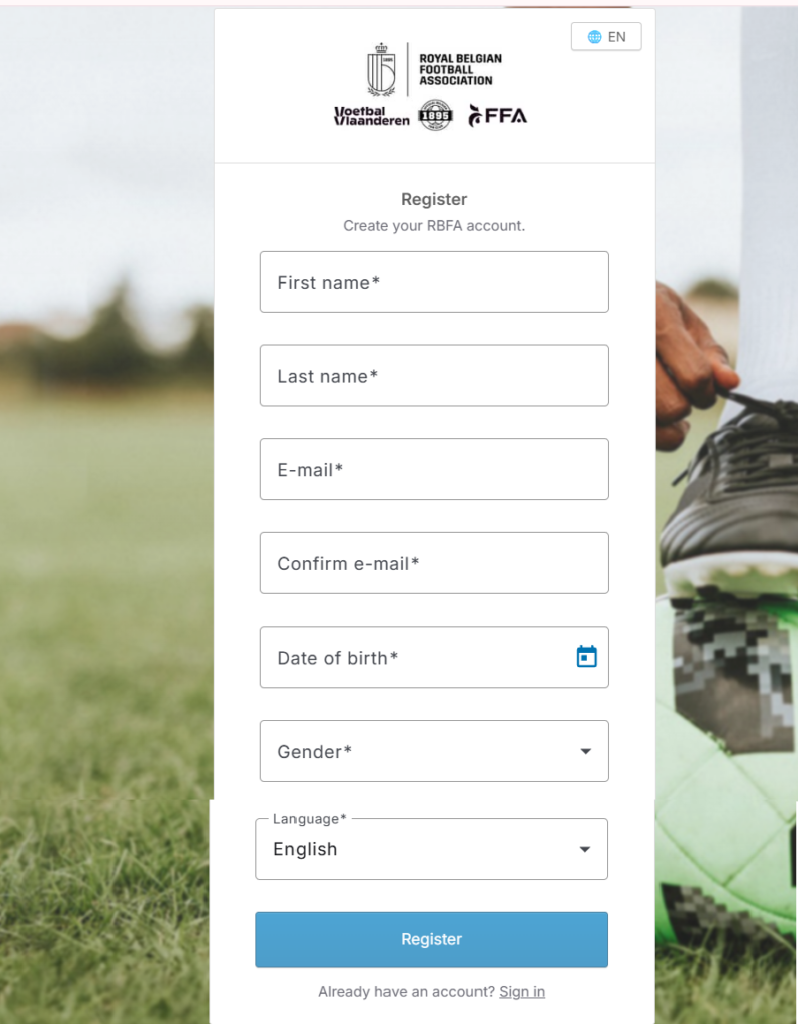
Head to the signup portal at https://signup.rbfa.be/. Then follow these steps in order.
| 1 | Open the signup page. The header reads Royal Belgian Football Association. A language selector (🌐 EN) sits at the top right. |
| 2 | Fill in your First name. Use your legal name to match club records. |
| 3 | Enter your Last name. |
| 4 | Type your E-mail in the E-mail field. |
| 5 | Re-enter it in the Confirm e-mail field. A mismatch here blocks submission. |
| 6 | Set your Date of birth. This ties your profile to age-category rules. |
| 7 | Select your Gender from the dropdown. |
| 8 | Choose your Language (default is English). |
| 9 | Click the “Register” button. The system sends account setup details to your inbox. |
Already have credentials? There is a shortcut on that same page. Click the “Sign in” link (“Already have an account? Sign in”) and it sends you straight to https://sso.rbfa.be/.
Our team observed one common failure. People try to “register” from the login screen and expect a form. It only redirects. Use signup.rbfa.be directly and skip the loop.
Complete the E-Kickoff Login?
Now that your account exists, the actual sign-in is short. The screen gives you two fields and three helper links.
Go to either https://extranet.e-kickoff.com/ or https://sso.rbfa.be/. Both open the same Sign In box.
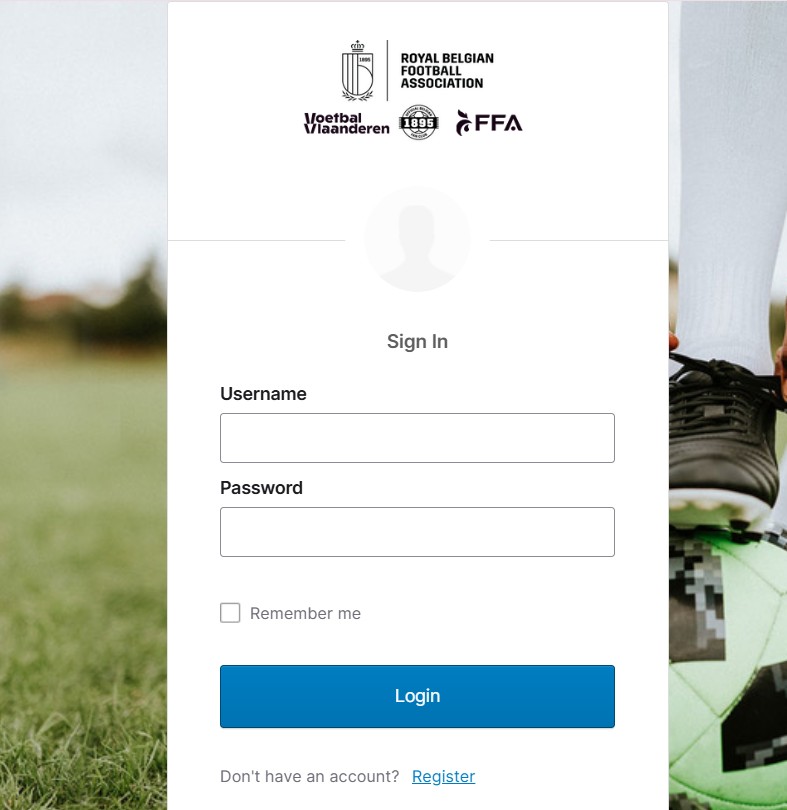
| 1 | Enter your Username. This is usually the e-mail address you registered. |
| 2 | Type your Password in the Password field. |
| 3 | Tick “Remember me” if you are on a private device. Skip it on shared computers. |
| 4 | Click “Sign In.” A correct match loads your e-kickoff dashboard. |
The screen also shows three support links below the form:
- Forgot password? — resets your credentials
- Unlock account? — clears a locked account
- Help — opens the support center at https://rbfa.zendesk.com/hc/en-gb
There is a second entry point worth knowing. The RBFA runs an alternate chooser page at https://extranet.e-kickoff.com/ast/faces/chooser. It loads a “Login with your e-mail address” option and a simple OK / Cancel dialog. Use this route if the standard e-kickoff login page fails to load on your browser.
What Do You Do When You Forget Your E-Kickoff Password?
Forgotten passwords stall more logins than wrong credentials do. The fix is a dedicated reset page, not the main login box.
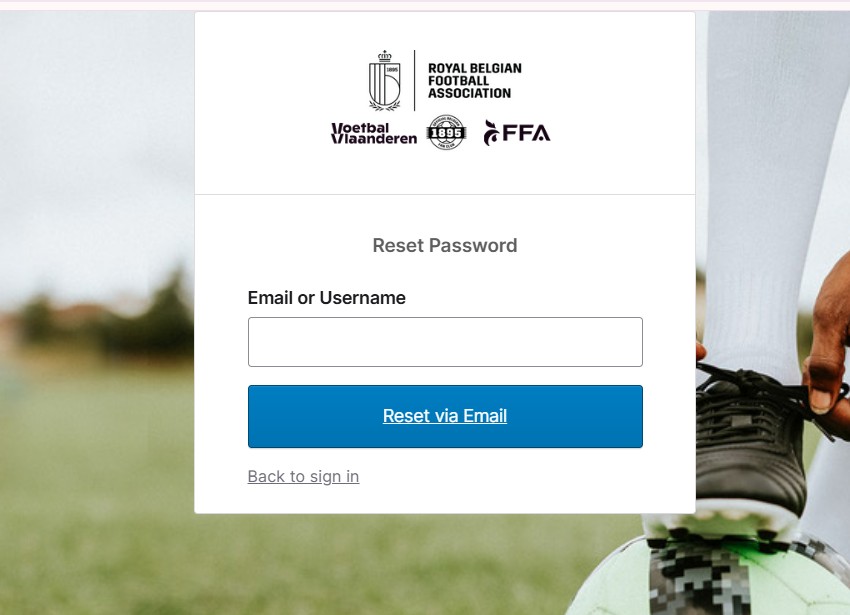
Open https://sso.rbfa.be/signin/forgot-password. The screen title reads Reset Password.
| 1 | Enter your Email or Username in the single field provided. |
| 2 | Click the “Reset via Email” button. |
| 3 | Check your inbox. RBFA sends a password reset link within a few minutes. |
| 4 | Open the link and set a new password. |
| 5 | Click “Back to sign in” to return to the main e-kickoff login screen. |
One tip from our testing. Check your spam folder before requesting a second email. Duplicate requests sometimes invalidate the first link.
Unlock a Locked E-Kickoff Account?
Too many failed attempts and the system locks you out. That is a security feature, not a bug.
The unlock flow has its own page at https://sso.rbfa.be/signin/unlock. The title reads Unlock account.
| 1 | Type your Email or username into the field. |
| 2 | Click the “Send Email” button. |
| 3 | Open the unlock email from RBFA. |
| 4 | Follow the instructions inside to restore access. |
| 5 | Return using the “Back to sign in” link. |
We found the lockout usually clears fast once the email arrives. If nothing lands after ten minutes, move straight to support.
Is There an E-Kickoff Mobile App?
Desktop covers admin work, but match-day reporting is easier on a phone. That is where the mobile side comes in.
The Kickoff app, built by Integra Solution, is available on Google Play: https://play.google.com/store/apps/details?id=app.integra.kickoff&hl=pt.
Our team observed the app focuses on live match streaming and real-time event logging. Here is what it tracks with a few taps:
- Goals and goal scorers
- Yellow and red cards
- Corners and fouls
- Goal chances and substitutions
The point is simple. Parents, coaches, and supporters follow a match live even when they cannot be at the ground. A match reporter shares a match code through channels like Spond or Facebook, and followers watch updates in seconds.
Where Do You Get Help With E-Kickoff Login Problems?Sometimes the reset and unlock pages are not enough. For anything deeper, there is a full support desk.
The RBFA Help Center sits at https://rbfa.zendesk.com/hc/en-gb. It covers popular topics including the RBFA App, RBFA Card, Competition queries, and the Club finder.
Our analysis suggests most e-kickoff login issues fall into three buckets: wrong entry URL, forgotten credentials, or a locked account. Match your problem to the right page above and you resolve it without a support ticket.
FAQs
1. What is the correct e-kickoff login URL?
Use https://extranet.e-kickoff.com/ or https://sso.rbfa.be/. Both open the same RBFA Sign In page.
2. Why does e-kickoff redirect me to rbfa.be?
The RBFA runs authentication through its Okta single sign-on at sso.rbfa.be. The redirect is normal and secure.
3. Can I register directly on the login page?
No. The login page only links out. Create your account at https://signup.rbfa.be/.
4. How do I reset my e-kickoff password?
Go to https://sso.rbfa.be/signin/forgot-password, enter your email or username, and click Reset via Email.
5. My account is locked. What now?
Visit https://sso.rbfa.be/signin/unlock, enter your details, and click Send Email to restore access.
6. Is the Kickoff mobile app the same as the e-kickoff portal?
Not exactly. The Kickoff app by Integra Solution handles live match streaming and event logging. The e-kickoff portal handles club administration.
7. Where do I report a login issue I cannot fix myself?
Contact the RBFA Help Center at https://rbfa.zendesk.com/hc/en-gb.


