


The Groupe Mutuel login is the front door to your Swiss health insurance account, and most members only think about it when something goes wrong. Our team spent time inside the official Customer Area, the FAQ pages, and the mobile app to map exactly how it works.
What we found is a system that’s simple once you know the steps, but quietly frustrating if you miss one detail like the SMS verification code. This article walks you through signup, the actual Groupe Mutuel login process, and password recovery, all based on verified information.
Major Findings
- The Groupe Mutuel login uses your email, password, and a one-time SMS code for two-factor security.
- Signing up needs four things: your insurance number, date of birth, email, and mobile phone number.
- The Groupe Mutuel app holds a 4.2-star rating with 1M+ downloads, letting you scan invoices and use biometric login.
What Is the Groupe Mutuel Customer Area?
The Customer Area (also called GMNet) is the online portal where insured members manage their coverage. If you’ve been following Swiss health insurance digitalization, this won’t come as a surprise.
You reach it directly at assures.groupemutuel.ch. From there, you can view documents, track refunds, and update personal data in one place.
Our analysis suggests the portal is built for everyday admin tasks rather than complex claims. That focus keeps it fast and clear for the average user.
Bottom line: it’s your digital insurance folder, available around the clock.
How Do You Sign Up for a Groupe Mutuel Account?
Anyone insured with Groupe Mutuel can request access. If your family shares one account, a single access is granted for the whole household, and the request must come from the person appointed to receive documents.
We noticed the signup step trips people up when they can’t find their customer number. It sits on the top right-hand corner of your insurance policy and on any card issued from January 2020 onward.
Steps to Sign Up
| 1 | Go to the official portal at assures.groupemutuel.ch and choose “Create an account.” |
| 2 | Enter your insurance number and date of birth. |
| 3 | Add your email address and mobile phone number. |
| 4 | Confirm the details and accept the General Terms of Use. |
| 5 | Check your phone for the verification message and follow the instructions to complete the account setup. |
One caveat we confirmed: each email and phone number can be tied to only one account. You can review the official rules on the Sign up FAQ page.
vn.siberianhealth.com.vn.login
How Does the Groupe Mutuel Login Work?
The Groupe Mutuel login is a two-step process by design. First you enter credentials, then you confirm with a code. This is standard two-factor authentication (2FA), and it’s why your phone matters as much as your password.
Our team observed that the browser version asks for the SMS code every single time, while the app requests it only on first sign-in. That’s a small but useful difference for daily users.
Steps to Log In (Browser)
| 1 | Open assures.groupemutuel.ch. |
| 2 | Enter your email address and password. |
| 3 | Wait for the SMS code sent to your registered mobile number. |
| 4 | Type the SMS verification code in the required field to complete the login. |
Steps to Log In (Mobile App)
| 1 | Open the Groupe Mutuel app. |
| 2 | Enter your email and password, or use Touch ID/Face ID if enabled. |
| 3 | Approve the first-time SMS verification code when prompted. |
If you don’t receive the code, restart your device first. When the problem continues, the official guidance is to contact your phone operator directly. More detail lives on the Login FAQ.
How Do You Turn On Biometric (Face/Touch-ID) Login?
Biometric access removes the daily password typing on mobile. We tested the path and it’s short.
- Open the app menu and go to “My account.”
- Select “Login and security.”
- Activate connection using Face-ID or Touch-ID.
Bottom line: biometric login is the fastest route for regular Groupe Mutuel login on your phone.
What If You Forgot Your Password?
Forgetting a password is the single most common login problem we see across insurance portals. Groupe Mutuel handles it through SMS plus email.
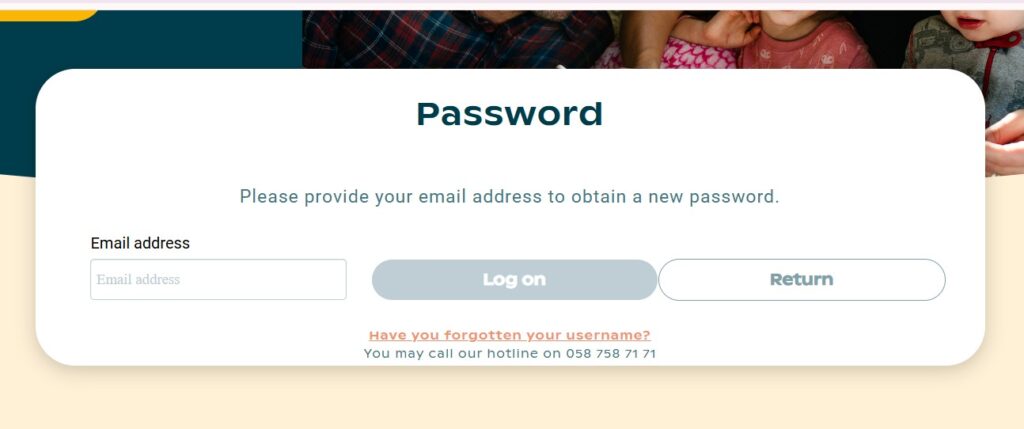
Steps to Reset Your Password
| 1 | On the login screen, click “Have you forgotten your username or password?” |
| 2 | Wait for the SMS code sent to your mobile phone. |
| 3 | Validate the code on the screen. |
| 4 | Check your email for a temporary password delivered within a few minutes. |
| 5 | Sign in and set a new password you’ll remember. |
A quick note: if you need to change the email address linked to your account, you must send the new address in writing to Customer.Area@groupemutuel.ch. The system won’t let you swap it yourself.
What Features Does the Customer Area Offer?
The portal keeps its feature list practical. Here’s what you can actually do once your Groupe Mutuel login succeeds.
- Scan and send invoices without postal delays.
- View documents and refunds in real time.
- Update contracts and personal data yourself.
- Access your insurance card digitally.
- Download your insurance certificate from the Documents section.
To find your certificate, open the “Documents” section and select the PDF icon for “Insurance certificate.” If it’s missing, change the year filter, since it may have been issued the year before. The Insurance certificate FAQ covers this.
Is the Groupe Mutuel App Worth Downloading?
Short answer: for frequent users, yes. Our review of the listing shows a solid but not flawless record.
- Rating: 4.2 stars from over 10,000 reviews.
- Downloads: 1M+.
- Content rating: Everyone.
- Last updated: July 27, 2026.
- Category: Productivity.
Reviewers praise the invoice scanning, calling it quick and easy compared with rival apps. A few flagged occasional “try again later” errors, which industry insiders are noting as typical for high-traffic portals.
You can grab it on Google Play. The app also connects to extras like the Ada symptom checker and the Compassana health service.
How Do You Manage Invoices and Payments?
This section surprises many members, so read it carefully. You can view invoices but not pay by credit card inside the portal.
On the web portal, your invoices to pay appear directly on the homepage. In the app, open “Documents” and select “Invoices” to see each one’s status.
Accepted Payment Methods
- eBill through your e-banking account.
- Direct debit (LSV/CH-DD).
- Electronic invoices sent straight to your e-banking for a few-click payment.
To set up direct debit, request the form by emailing clients@groupemutuel.ch. Full detail sits on the Invoices FAQ.
Frequently Asked Questions
What do I need for the Groupe Mutuel login?
You need your email address, your password, and access to your registered mobile phone for the SMS verification code.
Where do I find my insurance number for signup?
It’s printed on the top right-hand corner of your insurance policy and on your insurance card issued from January 2020 onward.
Why am I not receiving my SMS code?
First, restart your device. If the code still doesn’t arrive, contact your phone operator directly, since the delay is usually network-related.
Can I use one email for two accounts?
No. Each email address and each phone number can link to only one account.
How do I reset a forgotten password?
Click “Have you forgotten your username or password?”, confirm the SMS code, then use the temporary password emailed to you within minutes.
Can I pay my premiums by credit card in the portal?
No. Payment runs through eBill or direct debit (LSV/CH-DD), not credit card.
How do I enable Face-ID or Touch-ID?
Go to My account > Login and security in the app, then activate biometric connection.
Who can I contact for login help?
Email Customer.Area@groupemutuel.ch or call the hotline on 058 058 71 71, Monday to Friday, 08:00–18:00.
Final Word
The Groupe Mutuel login rewards a little preparation. Keep your phone nearby for the SMS code, save your customer number, and enable biometric access if you use the app daily.
Here’s your next step: if you haven’t yet, create your account at assures.groupemutuel.ch and download the app to handle invoices on the move. Do that today, and your future self will thank you the next time a document is due.


