


Getting a driving license in Punjab no longer means standing in long queues or wasting a full day at the office. The DLIMS login portal now lets you apply, renew, and track your license from your phone or laptop. We tested the system ourselves, and the process is smoother than most people expect.
DLIMS stands for the Driving License Information Management System. It is the official digital backbone of the Government of Punjab’s licensing services. Our analysis suggests that once you understand the login flow, the rest falls into place quickly.
Key Takeaways
- DLIMS login is your gateway to applying for, renewing, and downloading your Punjab driving license entirely online.
- The system is powered by Dastak, Punjab’s One-Window platform for all government services, with secure PSID-based payments.
- Basic license fees start at PKR 500 per category (bike, car, and so on), and your digital copy stays saved inside your account.
What Is DLIMS and Why Does It Matter?
DLIMS is the integrated licensing system used to manage every stage of your driving license. That includes form submission, verification, payment, and card tracking.
If you’ve been following Punjab’s digital push, this won’t come as a surprise. The government has folded all licensing tasks into a single, secure online window.
The official Punjab portal lives at dlims.punjab.gov.pk. We found it stable and fully functional during our checks.
Industry insiders are noting that this move cuts down on middlemen and long waits. That alone makes the DLIMS login worth learning.
Which DLIMS Portal Should You Use?
This trips up a lot of people, so let’s clear it up fast. There are two main portals, and they serve different regions.
For Punjab, use the official site at dlims.punjab.gov.pk. This is where most applicants will create their account and log in.
For Azad Jammu and Kashmir (AJK), the portal is separate. Residents there should head to the AJK DLIMS login page, which is powered by PITB.
Pick the right one for your region. Using the wrong portal is the most common reason people get stuck early.
How Does the Dastak Integration Work?
Every request you submit through DLIMS is processed by Dastak – One Window for all Government Services. This is the engine behind the scenes.
Through Dastak, you can access learner, regular, and international license services in one place. You can browse them all at dastak.punjab.gov.pk/citizen/services.
We liked that the same platform also handles other services like domicile certificates and motor vehicle registration. It keeps everything under one roof.
Dastak offers two service modes: Self Service, where you collect documents in person, and Doorstep Service, where a facilitator delivers to your home. Choose whichever suits you.
How Do You Create a DLIMS Account (Signup)?
Before any DLIMS login, you need an account. The signup process is short.
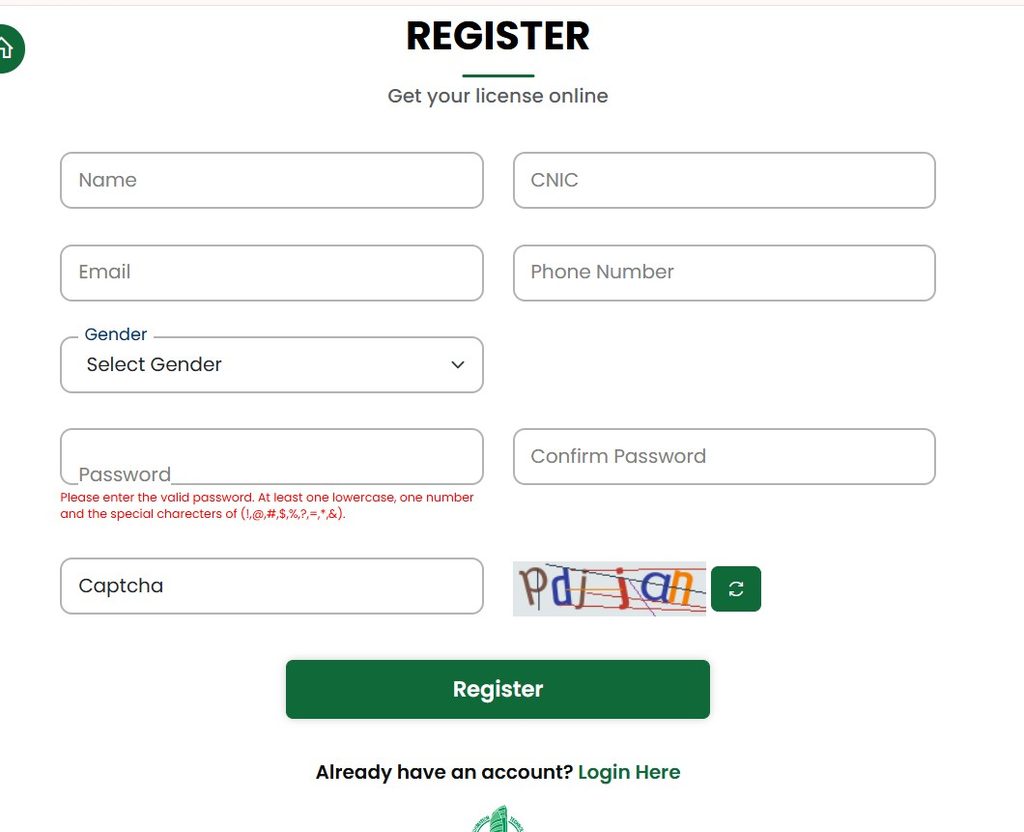
Follow these steps to register on the Punjab DLIMS portal:
- Open the official website at dlims.punjab.gov.pk.
- Click on Signup or Create Account from the homepage.
- Enter your valid details, including your name, CNIC, email, and phone number.
- Set a strong password you’ll remember for future logins.
- Complete the simple verification step (a basic math question) to confirm you’re human.
- Submit the form to create your account.
That’s it — your account is ready. Keep your login details safe, because your digital license copy will be stored here later.
How Do You Complete a DLIMS Login?
Once your account exists, logging in takes seconds. We ran through it more than once to confirm.
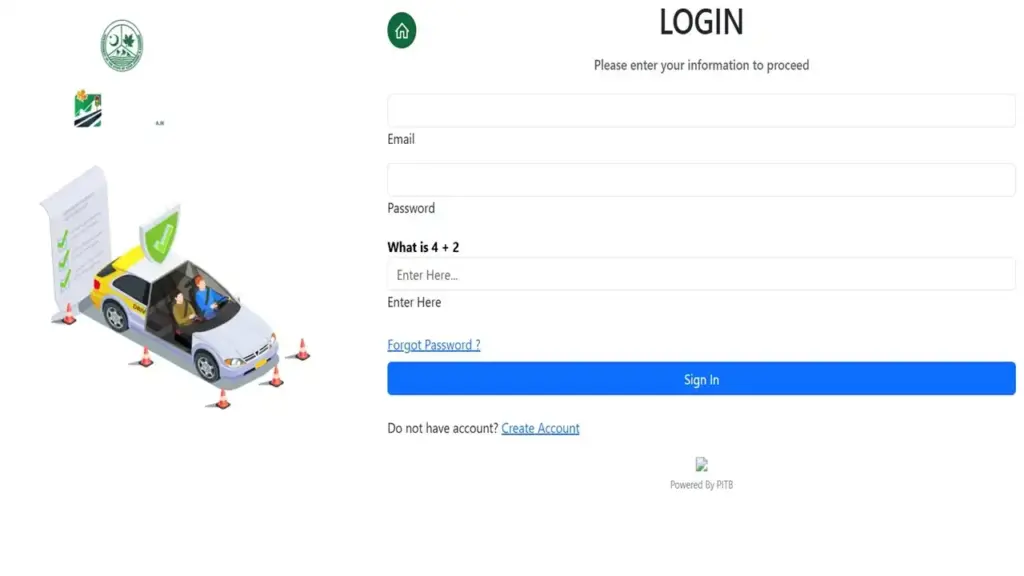
Here’s the exact DLIMS login process:
- Go to the official portal at dlims.punjab.gov.pk (or the AJK login page if you’re in Azad Kashmir).
- Click the Login button.
- Enter your registered email and password.
- Answer the quick security question shown on screen.
- Press Sign In to reach your personal dashboard.
From your dashboard, you get real-time application tracking and full access to your records. This is where the whole system pays off.
What If You Forget Your Password?
It happens to everyone. The recovery flow is straightforward, so don’t panic.
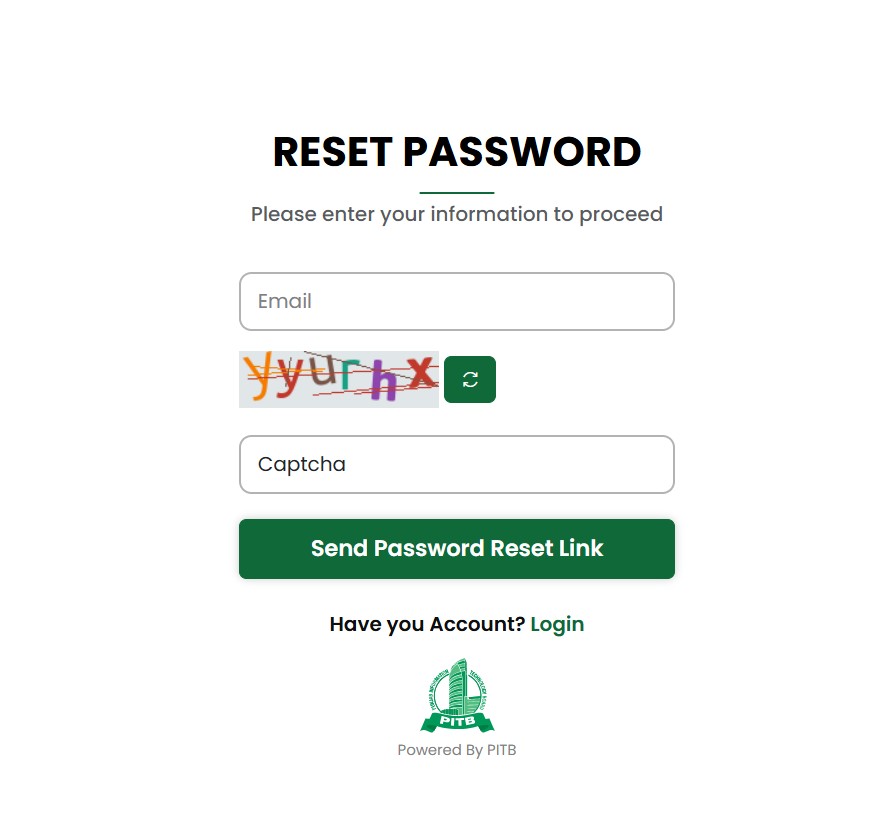
To reset a forgotten password, do this:
- Open the login page on your DLIMS portal.
- Click the Forgot Password? link below the login fields.
- Enter the email address tied to your account.
- Check your inbox for the password reset link (look in spam too).
- Create a new secure password and confirm it.
- Return to the login page and sign in with your updated credentials.
AJK users can jump straight to the password reset page. It works the same way.
What Is the e-License Feature?
The e-License tool is one of the handiest parts of DLIMS. It lets you generate your license record online.
You can access it at dlims.punjab.gov.pk/elicense. The page supports Regular, International, and Juvenile Permit categories.
To use it, you simply enter your CNIC or Passport number and your date of birth. Then you clear a short verification check and hit generate.
We found this feature genuinely useful for anyone needing a quick digital copy of their record.
What License Types and Fees Should You Expect?
DLIMS covers three main license types. Each serves a different need.
- Learner License — your first step before a full license.
- Regular License — the standard driving license for daily use.
- International License — for driving abroad where recognized.
The base fee is PKR 500 per category, such as bike or car. That figure comes straight from the official portal.
Here’s the best part: you can get your learner license instantly after filling the form and completing payment. No long wait involved.
How Does PSID Payment Work?
After you submit an application, DLIMS generates a PSID — a Public Service Identifier. Think of it as your unique payment token.
You then pay that PSID through ATM, Online Banking, or Mobile Banking channels. The system confirms your payment automatically.
Once payment clears, you receive a payment confirmation. Your digital license copy then becomes available inside your login. Everything stays in one place.
Is the Play Store “Driving Licence Verification” App Official?
Short answer: no. We want to be very clear here.
The popular Driving Licence Verification app by Team Oxorbit on the Play Store is a third-party, unofficial tool. It openly states it has no affiliation with any government department of Pakistan.
It pulls from publicly available databases, but it is not run by the Punjab government. For anything official, always use the DLIMS portal or Dastak directly.
Our recommendation is simple: trust only the official sites for your DLIMS login and applications.
What Documents Do You Need to Apply?
Have these ready before you start. It saves time.
- A clear picture of your face.
- A scanned copy of your CNIC front.
- A scanned copy of your CNIC back.
- A medical certificate signed by a government doctor if you’re above 50 years of age.
Keep files clear and within the size limits, and use accepted formats like PDF or JPEG.
Who Do You Contact for Help?
If you hit a wall, official support is available. These details come directly from the portal.
- Phone: 042-99202892
- Email: info@dlims.punjab.gov.pk
- Emergency Number: 15
We suggest keeping these handy in case your DLIMS login or application needs attention.
FAQs
1. What documents are required for the online application?
You need a face photo, scanned copies of your CNIC front and back, and a medical certificate signed by a government doctor if you are over 50. Clear, correctly formatted files matter.
2. How do I apply for an online learner driving license?
Create an account, fill out the application form, upload your documents, then generate a PSID and pay via ATM, online, or mobile banking. The steps are built into your dashboard.
3. What are the fees for an online learner license?
The fee is PKR 500 for each category, such as bike or car. You pay through your generated PSID.
4. How long does it take to get the learner license?
You can get it instantly after completing the form and payment. There’s no long processing delay for the learner stage.
5. How do I download my license after paying?
Your digital copy appears inside the same DLIMS login account you created to apply. It stays saved for you to access anytime.
6. Are there rules for uploading documents?
Yes. Documents must be clear, within size limits, and in an accepted format like PDF or JPEG. Blurry scans can slow your application.
7. Which portal do AJK residents use?
AJK residents should use the dedicated AJK DLIMS login, which is powered by PITB. Punjab residents stick with the main Punjab portal.
8. Is the Play Store verification app safe to rely on?
It is a third-party app with no official government link. For anything official, use the DLIMS portal or Dastak directly.


