
Facebook Twitter Youtube Google-plus-g Pinterest Instagram Linkedin Tumblr Newspaper Vimeo Reddit Telegram Whatsapp Soundcloud Behance Stack-overflow Medium Business-time
Login@Tutor
Donate
Search
  • About
    • Contact Us
    • Write For Us
    • Privacy Policy
    • Terms & Conditions
  • Login
  • Businesses login
    • Bank Login
    • Employee Login
    • Farmer Login
    • Healthcare Login
  • How To Login
    • App Login
    • Ai Login
  • Jobs
  • News
    • New User Login
    • Software Login
  • Students Login
  • Trends Login
    • TIAA CREF
    • USDT Login
    • TMS Login
  • Add Sites
Reading: Ewaybill Login: How to Sign Up, and Reset Your Password Without the Usual Headaches
Share
Font ResizerAa
LogintutorLogintutor
Search
Follow US
Made by ThemeRuby using the Foxiz theme. Powered by WordPress
Logintutor > Blog > Login > Ewaybill Login: How to Sign Up, and Reset Your Password Without the Usual Headaches
Login

Ewaybill Login: How to Sign Up, and Reset Your Password Without the Usual Headaches

By Login Tutor Last updated: August 17, 2026 11 Min Read
Share
Ewaybill Login
Ewaybill Login

If you move goods worth more than ₹50,000 across India, you already know the drill. No valid e-way bill, no legal transport. And every one of those bills starts at a single door: the ewaybill login page on the official government portal.

Contents
Quick SummaryWhat Exactly Is an E-Way Bill, and Why Does the Login Matter?Who Needs to Register Before They Can Log In?How Do You Sign Up on the E-Way Bill Portal?How Do You Complete Your Ewaybill Login?Forgot Your Username or Password? Here’s the FixWhy Is My Account Frozen During Login?What Are the Different Ways to Generate an E-Way Bill?Frequently Asked QuestionsThe Bottom Line

We spoke with logistics operators, tax professionals, and small business owners. The pattern was clear. Most ewaybill login problems are not complicated. They usually come down to wrong credentials, a frozen account, or a GSTIN mismatch.

Our analysis suggests that once you understand how the portal is structured, the whole process becomes routine. So let us walk through it, step by step.

Quick Summary

  • The ewaybill login portal lives at ewaybillgst.gov.in, and you need a registered GSTIN before you can create an account.
  • Registration uses OTP verification sent to your GST-registered mobile and email, after which you set your own username and password.
  • Most login failures trace back to forgotten credentials or a frozen account — both of which have clear, official fixes.

TakiAcademy Login

What Exactly Is an E-Way Bill, and Why Does the Login Matter?

An e-way bill is an electronic document required to move goods within India. It carries a unique number called the EBN (E-Way Bill Number), which is shared by the buyer, seller, and transporter.

Think of it as a digital pass for your shipment. Without it, a registered person cannot legally transport goods above the value threshold.

Each bill has two parts. Part A covers the goods and the parties. Part B covers the vehicle and transport details.

The catch is simple. You cannot generate any of this until you complete your ewaybill login. That is why the account itself matters so much.

Who Needs to Register Before They Can Log In?

Not everyone uses the portal the same way. Industry insiders are noting that the confusion usually starts here.

You will typically need an account if you are:

  • A GST-registered supplier moving goods above ₹50,000 in value.
  • A transporter carrying goods for registered or unregistered clients.
  • An unregistered transporter (URP) who needs a TRANSIN enrolment ID.
  • A recipient who causes the movement of goods and must fill Part A.

If you have been dealing with interstate shipments, this won’t come as a surprise. The e-way bill requirement for interstate goods movement has applied since 1 April 2018.

Arvea Login

How Do You Sign Up on the E-Way Bill Portal?

Registration comes first. You cannot reach the ewaybill login screen with working credentials until this is done.

We tested the flow described by tax practitioners, and here is the accurate sequence.
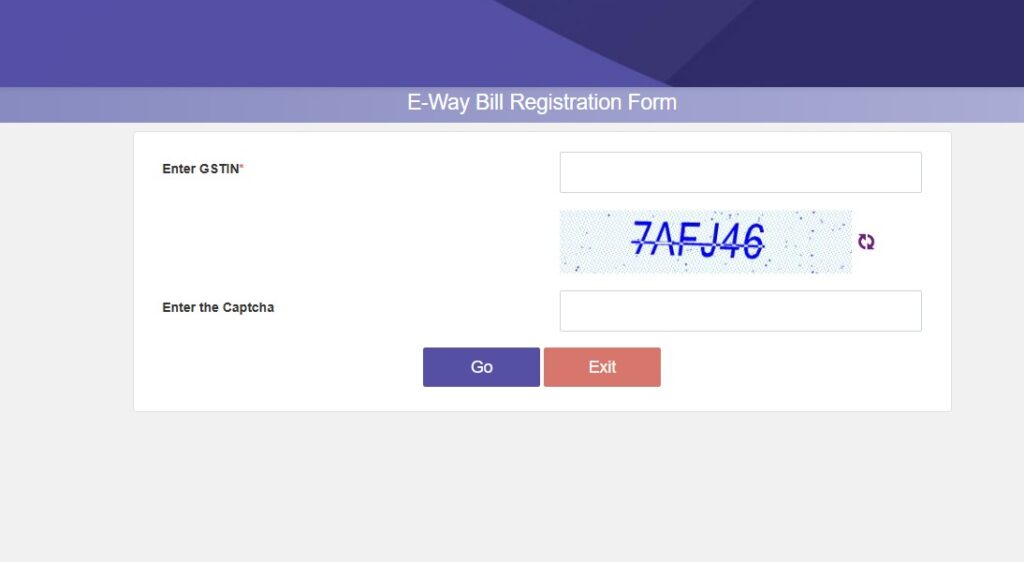
Ewaybill Register

Step-by-step: E-Way Bill Registration

1Visit the official portal at
.
2Under the Registration menu, select e-Way Bill Registration.
3Enter your GSTIN and fill in the captcha code shown on the screen.
4Click “Go”. The system automatically retrieves your business details, including trade name, address, registered mobile number, and email address.
5Click “Send OTP”. An OTP is sent to your GST-registered mobile number and email.
6Enter the OTP and verify it. This confirms that you control the registered contact details.
7Once verified, create your own username and password.
8Submit the registration form to complete the e-Way Bill registration.

One honest caution here: your details must match what is on the GST Common Portal. A mismatch can stop registration before it finishes.

How Do You Complete Your Ewaybill Login?

Once your account exists, the daily routine is short. We found this part rarely gives users trouble — provided the credentials are correct.
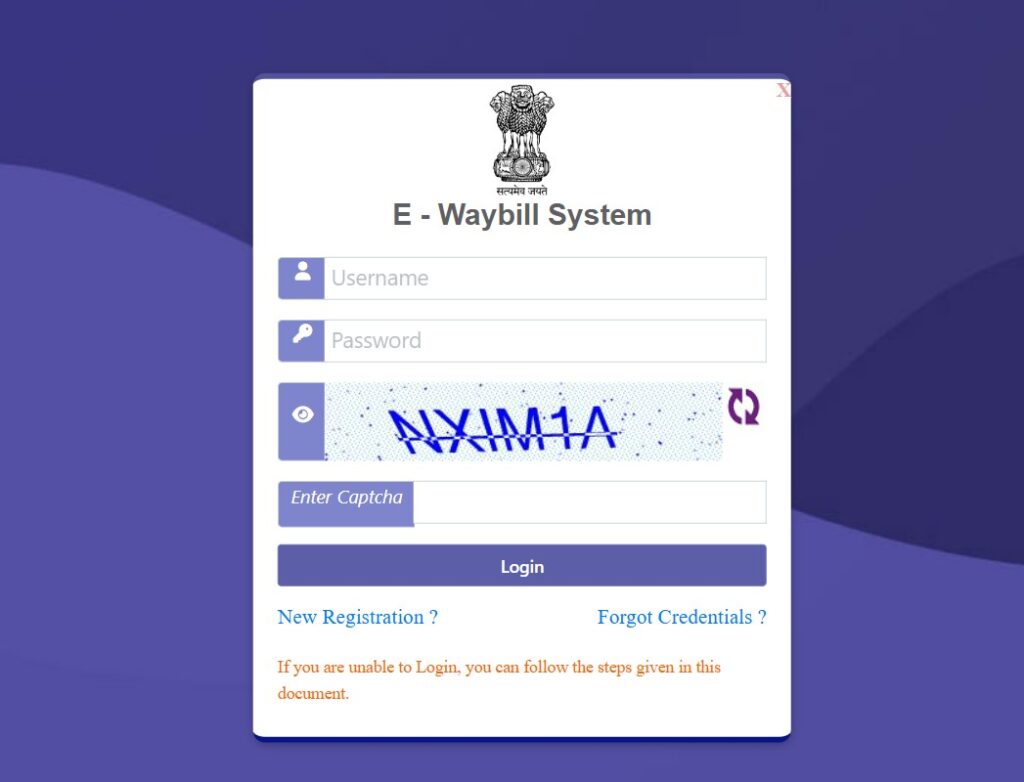
Step-by-step: Ewaybill Login

1Go to ewaybillgst.gov.in.
2Click the “Login” option on the homepage.
3Enter your username and password.
4Type the captcha code exactly as displayed.
5Click “Login” to access your dashboard.
6To create a bill, open the “E-Way Bill” tab in the top-left corner and select “Generate New”.

create a bill, open the E-Way Bill tab in the top-left corner and choose Generate New.

    From there, you fill Part A (recipient GSTIN, HSN code, taxable value, and goods description). Then you complete Part B (vehicle number, transporter ID, distance, and mode of transport).

    A quick note on the fields: boxes marked with red dots are mandatory. Green-dot fields help auto-populate your GSTR-1 later, so filling them can save time.

    Once submitted, the bill generates with a QR code that officials can scan on the road. That removes the need to carry a printed copy in most cases.

    Forgot Your Username or Password? Here’s the Fix

    This is the single most common support query we came across. The good news is that recovery is built into the portal.
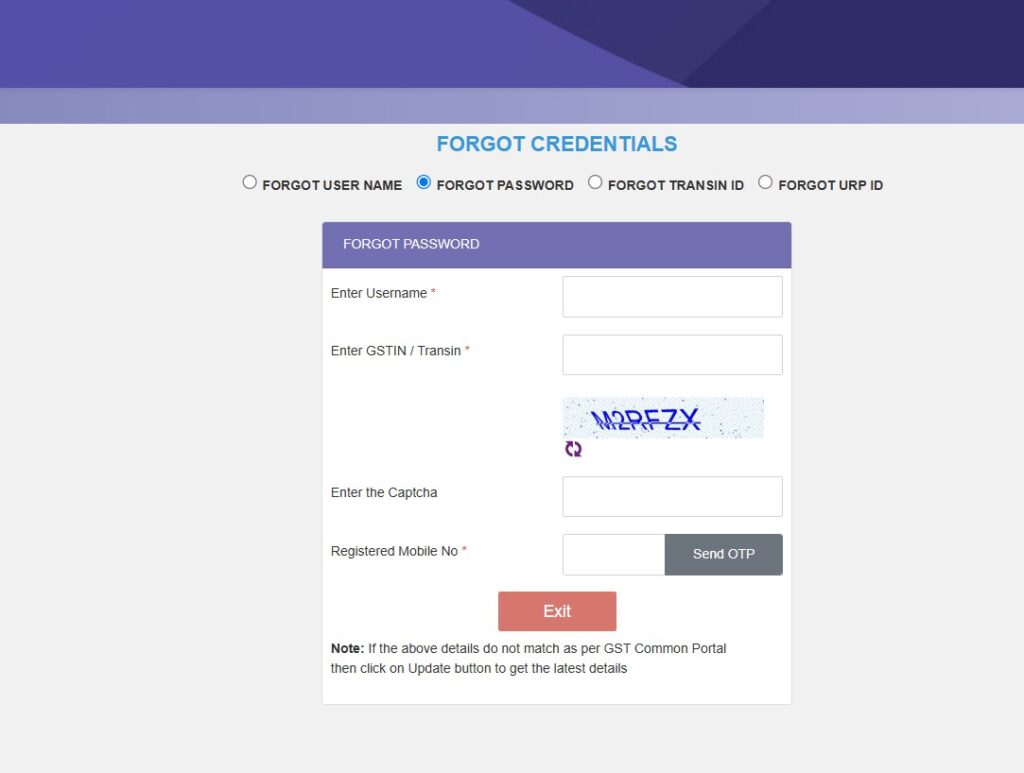
    Step-by-step: Reset Forgotten Credentials

    1Open the e-Way Bill login page at ewaybillgst.gov.in.
    2Look below the login fields for the “Forgot Credentials” options.
    3Choose “Forgot Password” if you know your username but cannot remember your password.
    4Choose “Forgot Username” if you cannot recall your username.
    5Enter the requested details, usually your GSTIN and registered mobile number.
    6Verify your identity using the OTP sent to your registered contact.
    7Set a new password or retrieve your username, depending on the option you selected.

    Our advice is practical: keep your GST-registered mobile number active. Almost every recovery path depends on that OTP reaching you.

    Why Is My Account Frozen During Login?

    A frozen account blocks ewaybill login entirely, and it worries a lot of users. In most cases, the cause sits outside the e-way bill portal itself.

    There are usually two reasons:

    • Your e-way bill registration was canceled.
    • Your GSTIN was deactivated on the GST Common Portal.

    Here is how to check and act:

    1Visit the GST Common Portal at gst.gov.in.
    2Open the “Search Taxpayer” tab and confirm your GSTIN status.
    3If you can log in to the GST portal but not the e-way bill portal, file a complaint at selfservice.gstsystem.in.

    The distinction matters. If the GSTIN is fine, the problem may just be a portal-side issue that support can clear.

    Bexio Login

    What Are the Different Ways to Generate an E-Way Bill?

    The web portal is the most familiar route, but it is not the only one. Depending on your volume, another mode may suit your business better.

    The available generation methods include:

    • Online through the web portal after your ewaybill login.
    • SMS, useful for single or urgent bills on the move.
    • Android App, handy for field staff and transporters.
    • API integration, suited to businesses with high daily volumes and their own billing software.

    Our analysis suggests that small operators do well with the portal and SMS, while larger firms often move to API-based generation to reduce manual entry.

    Frequently Asked Questions

    1. What is the official website for ewaybill login?
    The official portal is ewaybillgst.gov.in. We recommend typing the address directly rather than trusting search ads, to avoid look-alike sites.

    2. Why is an e-way bill required at all?
    It is mandated under Rule 138 of the CGST Rules, 2017. Section 68 lets authorities ask the person in charge of a vehicle to carry prescribed documents for valuable goods.

    3. The system says I have “already registered.” What now?
    That means your username and password already exist. Simply use your existing credentials to log in. If you cannot recall them, use the Forgot Username or Forgot Password option.

    4. What is TRANSIN or Transporter ID?
    TRANSIN is a 15-digit unique number generated for unregistered transporters after enrolment. It follows a format based on state code, PAN, and a checksum digit, and can be shared with clients.

    5. Do I need an e-way bill for goods moved within the same state?
    Interstate movement above ₹50,000 has required an e-way bill since 1 April 2018. Intra-state rules were rolled out in phases, so check your state’s current notification to confirm.

    6. What details go into Part A and Part B?
    Part A holds the GSTIN of supplier and recipient, invoice details, HSN codes, and goods value. Part B holds the vehicle number, transporter ID, distance, and mode of transport.

    7. Can I generate a bill without logging in?
    For most registered users, no. The ewaybill login is the gateway, though limited citizen and SMS options exist for specific cases.

    The Bottom Line

    Most ewaybill login issues are not technical mysteries. They come down to credentials, GSTIN status, or a missed OTP — all of which have clear fixes.

    Our honest takeaway: register carefully, keep your GST-registered mobile number active, and bookmark the official portal. Do those three things, and the login itself becomes the easy part.

    If your account stays frozen after checking your GSTIN, your next step is a complaint at selfservice.gstsystem.in rather than repeated login attempts.

    Login Tutor August 17, 2026 August 17, 2026
    Share This Article
    Facebook Twitter Email Copy Link Print
    Leave a comment Leave a comment

    Leave a Reply Cancel reply

    Your email address will not be published. Required fields are marked *

    Customer-Facing Apps Harden Faster Using AI Code Security
    Customer-Facing Apps Harden Faster Using AI Code Security
    Article
    Ozonetel Login
    Ozonetel Login: Which Portal Should You Actually Use?
    Login
    Smartkeeda Login
    Smartkeeda Login: What We Found After Testing Every Step From Signup to Your First Mock
    Blog Login
    Vardhaman Login
    Vardhaman Login: We Tested Every Student, Parent, Faculty and Alumni Portal
    Students Login
    DBATU Login
    DBATU Login 2026: Alumni, ERP & Samarth Portal Steps
    Login
    ETLab Login
    ETLab Login: How Students and Staff Access Every Campus Portal
    App Login Students Login
    EduBrisk Login: How Students and Teachers Get In
    EduBrisk Login: How Students and Teachers Get In
    How To Login News Students Login
    TripJack Login: How Travel Agents Sign Up, and Get Back In When Locked Out
    TripJack Login: How Travel Agents Sign Up, and Get Back In When Locked Out
    How To Login New User Login
    TeamLease Login Explained: Every Portal, App, and Password Fix You Need
    TeamLease Login Explained: Every Portal, App, and Password Fix You Need
    How To Login Login New User Login
    MLRIT Login: How Students, Staff and Parents Access Every Portal
    MLRIT Login: How Students, Staff and Parents Access Every Portal
    How To Login Login Students Login
    KSEMP Login: How Kerala Employees, DDOs and Pensioners Get Into the AG Portal
    KSEMP Login: How Kerala Employees, DDOs and Pensioners Get Into the AG Portal
    App Login Blog Businesses login
    Camsonline Login
    Camsonline Login: How to Reach Your Folio, NPS Account, and KYC Tools in 2026
    Blog
    Edumarshal Login
    Edumarshal Login: How Students, Parents and Staff Sign In (2026)
    Login
    MahaPowerPay Login
    MahaPowerPay Login & How Maharashtra Shopkeepers Register, and Earn Rs. 5 per Bill
    App Login
    RichInd Login in 2026: How to Sign Up, and Reset Your Password
    RichInd Login in 2026: How to Sign Up, and Reset Your Password
    How To Login News Students Login
    Darwinbox Login: What Every Employee Should Know in 2026
    Darwinbox Login: What Every Employee Should Know in 2026
    App Login Employee Login How To Login
    Finkeda Login
    Finkeda Login: How to Sign Up, and Reset Your Password
    App Login
    Cockfight Login
    Cockfight Login: Is CockFightBet Safe, Legal, or a Risk?
    App Login
    Asclepius Login
    Asclepius Login: Seller, Customer & App Access Explained
    App Login
    Edumarshal Login
    Edumarshal Login: How Students, Faculty & Admins Access India’s Most Trusted Campus ERP
    Blog Login
    Skolaro Login
    Skolaro Login in 2026: What Parents and Students Need to Know Before Signing In
    Students Login
    Desjardins Login
    Desjardins Login 2026: AccèsD Signup, Access & Reset Steps
    Login
    ADP Employee Login in 2026
    ADP Employee Login in 2026: Which Portal Is Yours and How to Get In
    Employee Login
    JKBOCW Login
    JKBOCW Login: How J&K Construction Workers Can Register, and Recover Access
    App Login
    Linways Login
    Linways Login: What Students, Faculty and Parents Need to Know
    Students Login
    Mobisafar Login
    Mobisafar Login: How Agents, Register, and Access India’s Leading Digital Banking Platform
    Bank Login Businesses login
    SDMS PX IndianOil In Login: Full Access Guide for Partners
    SDMS PX IndianOil In Login: Full Access Guide for Partners
    Businesses login
    Squarespace Login: How to Recover Access, and Manage Your Site
    Squarespace Login: How to Recover Access, and Manage Your Site
    Businesses login Employee Login How To Login
    CGSchool.in Login
    CGSchool.in Login: How Chhattisgarh’s Teachers and Students Register
    Employee Login
    Poshan Abhiyaan Gov In Login
    Poshan Abhiyaan Gov In Login: How to Access India’s Nutrition Data Portal in 2026
    How To Login

    Categories

    • Ai Login
    • App Login
    • Article
    • Bank Login
    • Blog
    • Businesses login
    • Employee Login
    • Farmer Login
    • Healthcare Login
    • How To Login
    • Jobs
    • Login
    • New User Login
    • News
    • Software Login
    • Students Login
    • TIAA CREF
    • TMS Login
    • Trends Login
    • USDT Login

    Check Also:

    Racksterly Login
    Direct Capital Login

    bankoncit com login
    go.high level login
    samsara login
    buildertrend login
    vitastir login
    akbar travels agent login
    keiseruniversity edu login
    unishippers login
    sodasense login
    Rutgers University Acceptance Rate
    brickhouse nutrition login
    icici prudential life insurance login
    botbro login
    Best Medical Schools in the US
    leadzolo login
    banglarbhumi login
    fiducius login
    printez login
    lashify login
    resumator login
    dockettrak login
    rocketrez login
    torahmates login
    www kongumanamalai com login
    ringcentral login
    k12 ols login
    wealthsimple login
    SEO Instant Appear Highsoftware99.com

    Follow Link

    Sarkari Job Apply

    Kerkat

    SEO Services SK

    YOU MAY ALSO LIKE

    Ozonetel Login: Which Portal Should You Actually Use?

    Ozonetel login made simple: we tested every portal and explain agent, admin, and dashboard access, plus signup and password reset…

    Login
    October 28, 2026

    Smartkeeda Login: What We Found After Testing Every Step From Signup to Your First Mock

    Our step-by-step Smartkeeda login guide covers signup, password reset, CA Mock Drills, and free mock tests for bank, SSC, and…

    BlogLogin
    October 28, 2026

    DBATU Login 2026: Alumni, ERP & Samarth Portal Steps

    DBATU login steps for the Alumni Network, Samarth ERP and recruitment portal, plus signup, password reset, results and hall ticket…

    Login
    October 27, 2026

    TeamLease Login Explained: Every Portal, App, and Password Fix You Need

    You just joined a company through TeamLease, and now you need your payslip, your PF details, or your attendance record.…

    How To LoginLoginNew User Login
    October 23, 2026
    Login@Tutor

    login tutor is one of the most visited sites in the world. logintutor.org is an information-based website and has no affiliation with the official login website logintutor.org. The best thing about this website is that it gives a solution to any login problems.

    • ABOUT
    • CONTACT US
    • Privacy Policy
    • Write For Us
    • Terms & Conditions
    • Login Tutor
    • Sarkari Job Apply
    • SEO Services SK
    • Cricket Team Match
    • Free Online Puzzle Games
    • Amazing Baradi
    💰 Footer Ads Pricing →
    • News
    • Jobs
    • Blog
    • Article
    • Ai Login
    • App Login
    • How To Login
    • Businesses login
    • Employee Login
    • Healthcare Login
    • New User Login
    • Software Login
    • Students Login
    • TIAA CREF
    • TMS Login
    • Trends Login
    • USDT Login
    • Terms & Conditions

    Follow US:u00a0

    LoginTutor

    The Business Centre 132, My Street Kingston, New York 12401 United States
    Tel: +1-541-234-3010

    Welcome Back!

    Sign in to your account

    Lost your password?