


If you’re a student, parent, or teacher in Sweden, chances are you’ve come across the unikum login page more than once. Unikum is a widely used Swedish school learning portal that connects schools, families, and educators in one place.
We found that hundreds of municipalities and private schools rely on it every single day. Whether you want to check your child’s learning, read messages, or manage documentation, the unikum login is your starting point.
we’ll walk you through every way to sign in, how to reset your password, and how the mobile app fits in.
Essential Insights
- Login URL: The official English unikum login page lives at start.unikum.net/unikum/login.jsp?__locale=en.
- No Public Signup: Accounts are created by your school or municipality — there’s no self-registration button.
- Two Ways In: You can sign in with a username/password or through your municipality SSO (BankID and similar).
What Is Unikum and Why Does the Login Matter?
Unikum is a learning platform built for preschools, primary schools, and upper-secondary schools across Sweden. Our analysis suggests it’s one of the most trusted school portals in the country.
The platform is developed by Unikum – Unikt Lärande AB, based in Stockholm. It supports both Swedish and English, which makes it friendly for international families too.
The unikum login gives each user a personal, secure entry point. Teachers plan lessons, students track progress, and parents stay informed — all from one account.
Platform Overview Table
| Detail | Information |
|---|---|
| Official Website | www.unikum.net |
| Login URL | start.unikum.net/unikum/login.jsp?__locale=en |
| Mobile App | Unikum Familj (Unikum Family) |
| Support Portal | unikum.freshdesk.com/en/support/home |
| Languages | Swedish & English |
| Developer | Unikum – Unikt Lärande AB, Stockholm |
Who Can Use Unikum?
If you’ve been following Swedish school tech, this won’t come as a surprise: Unikum serves three main groups. Each one gets a slightly different view of the platform.
We observed that access always depends on your role. Your school or municipality decides what you can see and do.
Who Can Use Unikum Table
| User Type | What They Can Do |
|---|---|
| Teachers/Staff | Plan lessons, assess students, write learning logs, send messages |
| Students | View plans, track learning, read feedback and assessments |
| Parents/Guardians | Follow child’s progress, read messages, book development talks |
How Do You Login to Unikum via the Website?
The most common route is the standard web login using a username and password. This works on any browser — computer, tablet, or phone.
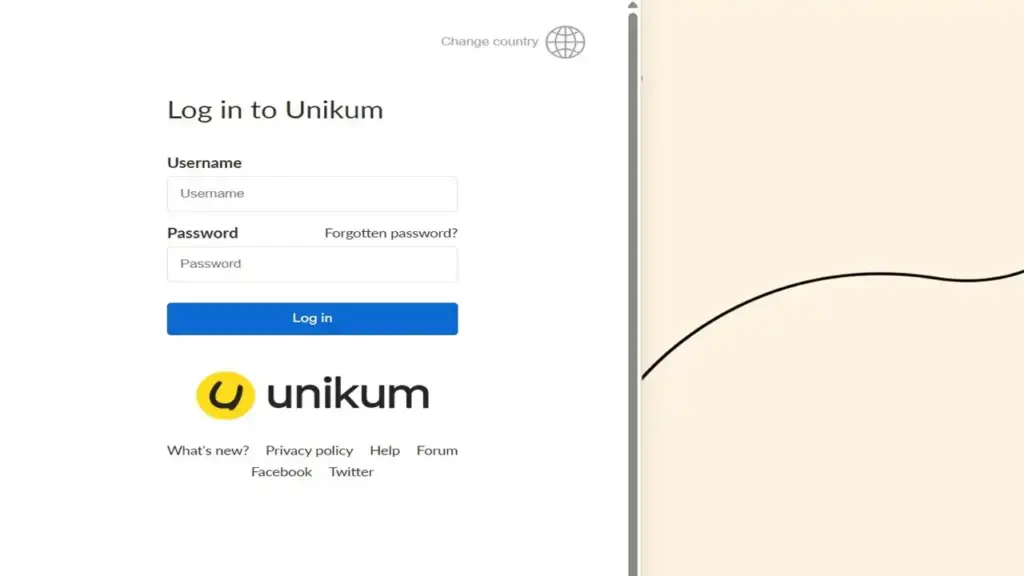
Here’s the exact process we tested:
| 1 | Open start.unikum.net/unikum/login.jsp?__locale=en in your browser. |
| 2 | Enter your Username in the first field. |
| 3 | Type your Password in the second field. |
| 4 | Click the “Log in” button. |
| 5 | You will be redirected to your personal Unikum start page. |
One quick tip: make sure cookies are enabled in your browser. We found the login can fail if session cookies are switched off.
How Do You Login Using “Other Ways to Log In” (Municipality SSO)?
Many Swedish municipalities use their own secure login systems, like BankID or a school federation account. This is where the “Other ways to log in” option comes in.
Here’s how to use the municipality SSO route:
| 1 | Go to start.unikum.net/unikum/appLogin.ahtml. |
| 2 | You will see a long list of municipalities and schools. |
| 3 | Search for and click your specific municipality (for example, “Skellefteå kommun för vårdnadshavare”). |
| 4 | You will be redirected to your local login system. |
| 5 | Sign in with BankID or your school credentials. |
| 6 | After verifying, you’re taken straight into Unikum. |
Good news: the next time you visit, your municipality often appears at the top of the list. This makes the unikum login faster on repeat visits.
How Do You Use the Unikum Familj Mobile App?
For parents especially, the Unikum Familj app (Unikum Family) is the recommended choice. It’s designed for quick, daily check-ins on the go.
The app has passed 100K+ downloads on Google Play and is rated for everyone 10+. We found it available in both Swedish and English.
Here’s how to get started:
| 1 | Open the Google Play Store (Android) or App Store (iPhone). |
| 2 | Search for “Unikum Familj” and tap “Install”. |
| 3 | Open the app once it has been downloaded. |
| 4 | Choose your login method, usually BankID or username and password. |
| 5 | Accept the Terms of Use during your first sign-in. |
| 6 | Check that your email address is correct so you don’t miss updates. |
One thing to note: the app is only useful if your child’s school actually uses Unikum. If it doesn’t yet, you can tell the principal and Unikum will help the school get set up.
Unikum Familj App vs Web Browser Table
| Feature | Unikum Familj App | Web Browser |
|---|---|---|
| Best For | Quick daily updates | Detailed work |
| Messages | ✔ Easy to read | ✔ Full view |
| Child’s Learning | ✔ On the go | ✔ Complete detail |
| Login Options | BankID / username | Username / SSO |
| Recommended For | Parents | Teachers & staff |
How Do You Reset a Forgotten Unikum Password?
Forgetting a password happens to everyone. The good news is that the reset process is simple. We walked through it ourselves to confirm each step.
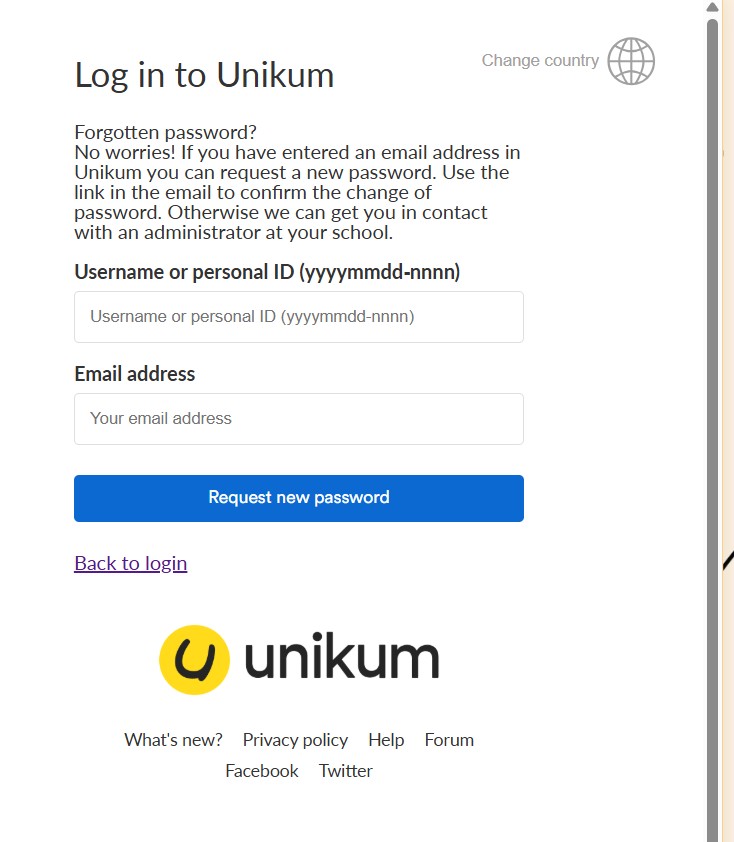
Here’s how the forgot password flow works:
| 1 | Go to the Unikum login page at start.unikum.net/unikum/login.jsp?__locale=en. |
| 2 | Click the “Forgotten password?” link next to the password field. |
| 3 | Enter your Username or personal ID in the format yyyymmdd-nnnn. |
| 4 | Enter your registered email address. |
| 5 | Click “Request new password.” |
| 6 | Open the email and use the link to confirm the change. |
A heads-up: this only works if you have an email address registered in Unikum. If you don’t, or the reset fails, you’ll need to contact an administrator at your school for help.
Can You Sign Up for Unikum on Your Own?
This is a point that confuses many new users. Unikum does not offer public self-signup. There’s no “Create Account” button anywhere on the site.
Instead, accounts are created by school or municipality administrators. Our analysis suggests this keeps student data safe and controlled.
If you need an account, the steps are clear:
- Parents/Guardians: Wait for login details from your child’s school.
- Students: Your school issues your login automatically.
- Staff: Your municipality or school admin sets you up.
In short: you can’t register yourself, but your school handles it for you.
Where Can You Get Help With Unikum?
If you hit a wall, there’s a dedicated support portal to lean on. We recommend it as your first stop for technical issues.
You’ll find guides and articles at unikum.freshdesk.com/en/support/home. It covers learning logs, messages, attendance, and personal settings.
For account-specific problems, though, the fastest fix is usually your school or municipality. They control access and can reset details directly.
FAQs
Q1: What is the official unikum login URL?
The English login page is at start.unikum.net/unikum/login.jsp?__locale=en. You can sign in there with your username and password.
Q2: Can I create my own Unikum account?
No. Accounts are made by your school or municipality. There is no public self-signup option.
Q3: How do I reset my Unikum password?
Click “Forgotten password?” on the login page, enter your username or personal ID plus your email, then confirm via the emailed link.
Q4: Is there a Unikum mobile app?
Yes, it’s called Unikum Familj. It’s free on Google Play and the App Store with 100K+ downloads.
Q5: What languages does Unikum support?
Unikum works in both Swedish and English, which helps international families use it comfortably.
Q6: How do I log in with BankID?
Go to start.unikum.net/unikum/appLogin.ahtml, pick your municipality, and sign in using BankID through your local system.
Q7: Why won’t my unikum login work?
Check that cookies are enabled in your browser. Session cookies must be on for the login to succeed.
Q8: Who develops Unikum?
It’s built by Unikum – Unikt Lärande AB, based in Stockholm, Sweden.
Q9: Where can I get technical support?
Visit the support portal at unikum.freshdesk.com/en/support/home. For account issues, contact your school administrator.
Q10: Can parents track a child’s learning in Unikum?
Yes. Parents can follow progress, read messages, and book development talks through the web or the Unikum Familj app.
We hope this guide makes your next unikum login quick and stress-free. Whether you use the website, the app, or your municipality’s BankID, you now know exactly where to go and what to do.


