


If you manage or belong to a village cooperative in Indonesia, the simkopdes id login is your daily entry point. Simkopdes is the official digital system for the Koperasi Desa/Kelurahan Merah Putih program, built by the Ministry of Cooperatives of the Republic of Indonesia.
We found that thousands of cooperatives now rely on it to record transactions, manage members, and access government programs. This is where the login truly matters.
Below, we walk you through every access route — signup, login, hub login, and password reset. Our team observed that most access problems come from small, avoidable mistakes.
Key Takeaways
Two login doors: Members use simkopdes.go.id/masuk, while cooperative management often uses hub.simkopdes.go.id/masuk.No open signup: New accounts start with account activation (klaim akun) using your NIK and Satdik details.Official app exists: The SIMKOPDES Mobile app is on Google Play with 1L+ (100,000+) downloads, developed by Kementerian Koperasi.
Platform Overview Table
Here is the core information at a glance. We verified each of these pages directly.
| Detail | Information |
| Official Website | simkopdes.go.id |
| Main Login URL | simkopdes.go.id/masuk |
| Hub Login URL | hub.simkopdes.go.id/masuk |
| Account Activation | simkopdes.go.id/daftar/aktivasi |
| Mobile App | SIMKOPDES Mobile (Google Play) |
| Developer | Kementerian Koperasi Republik Indonesia |
| Support Email | developer@satu.kop.id |
What Is Simkopdes and Why Does the Login Matter?
Simkopdes is a government digital platform. It supports the Koperasi Desa/Kelurahan Merah Putih (KDKMP) program across Indonesia’s villages and sub-districts.
The system helps modernise cooperative management, from bookkeeping to member records. Our analysis suggests it acts as an aggregator for rural economic activity.
The simkopdes id login gives each user a secure, personal entry point. Members, staff, and cooperative managers each see a different view based on their role.
If you’ve been following Indonesia’s cooperative digitalisation, this won’t come as a surprise. The login is central to almost every task on the platform.
Who Can Use the Simkopdes System?
Access depends on your role. The system does not grant every user the same view.
We observed three broad groups on the platform. Your role decides which door you use and what you can do inside.
| User Type | Primary Access Point |
| Cooperative Members | simkopdes.go.id/masuk |
| Cooperative Management | hub.simkopdes.go.id/masuk |
| SDM / Staff (Satdik) | Activation via simkopdes.go.id/daftar/aktivasi |
How Do You Sign Up or Activate a Simkopdes Account?
There is no open “create account” button. New users start with account activation, known locally as klaim akun.
Importantly, this does not mean signup is complicated. It means the system ties each account to a verified national identity (NIK) before access is granted.
Here is the activation process we tested at simkopdes.go.id/daftar/aktivasi:
- Open simkopdes.go.id/daftar/aktivasi in your browser.
- Allow location access when prompted — the page needs it to validate your NIK.
- Search for and select your Satuan Pendidikan (Satdik) from the list.
- Enter your Nomor Induk Kependudukan (NIK) in the correct field.
- Click “Validasi NIK” to verify your identity.
- Follow the on-screen steps to set your email and password.
A quick note: if you hit trouble, the page links to an official Klaim Akun PDF guide and a complaint form. Keep your NIK details accurate, as mismatched data is the most common cause of failure.
How Do You Complete the Simkopdes ID Login on the Main Portal?
The main portal is the most common route. It serves cooperative members and general account holders.
We walked through it ourselves to confirm each step. The page is protected by reCAPTCHA, so a human check is part of the flow.
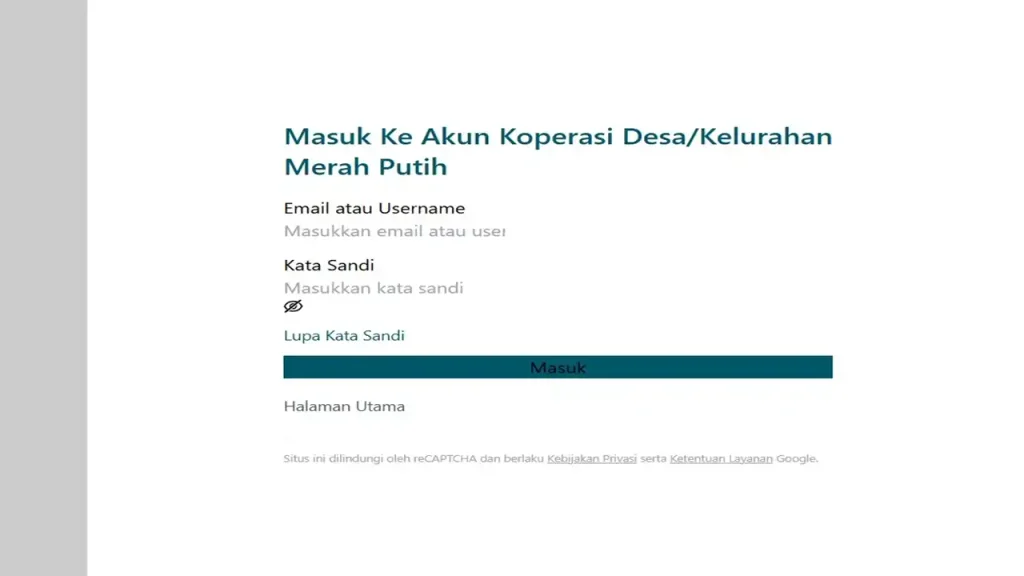
Here is the exact process for the simkopdes id login at the main portal:
- Open simkopdes.go.id/masuk.
- Enter your Email or Username in the first field.
- Type your Kata Sandi (password) in the second field.
- Complete the reCAPTCHA verification if it appears.
- Click the “Masuk” button to sign in.
- You are taken to your personal account dashboard.
One tip: make sure your browser allows cookies. We found the login can fail when session cookies are switched off.
How Do You Log In Through the Simkopdes Hub?
The Hub is a separate door. It is generally used by cooperative management rather than individual members.
The key distinction is the extra security step. The Hub adds a manual security code on top of your username and password.
Here is how the simkopdes id login works through the Hub:
- Open hub.simkopdes.go.id/masuk.
- Enter your Email or Username.
- Enter your Kata Sandi (password).
- Type the security code shown on screen into the field provided.
- Click “Masuk” to continue.
- Alternatively, choose “Masuk dengan ODS” to sign in with your ODS credentials.
Good to know: cooperatives without an account can request one through the “Buat akun koperasi di sini” link on the same page. The ODS option offers a second sign-in method where it applies.
Main Portal vs Hub Login Table
The two logins serve different needs. We compared them side by side below.
| Feature | Main Portal (/masuk) | Hub (hub./masuk) |
| Best For | Members | Cooperative management |
| Credentials | Email/Username + Password | Email/Username + Password |
| Extra Check | reCAPTCHA | Manual security code |
| Alternate Login | None shown | ODS login |
| New Account Route | Activation page | Cooperative request form |
How Do You Reset a Forgotten Simkopdes Password?
Forgetting a password happens to everyone. The reset process is short, and each portal has its own link.
The key distinction is which page you started on. Use the reset link that matches your login door.
Here is the forgot password flow:
- Go to your login page — either simkopdes.go.id/masuk or hub.simkopdes.go.id/masuk.
- Click “Lupa Kata Sandi” (Forgot Password).
- For the main portal, this opens simkopdes.go.id/akun/reset-password.
- For the Hub, it opens hub.simkopdes.go.id/akun/reset-password.
- Enter your registered email address.
- Submit the request, then check your inbox and follow the emailed link to set a new password.
A heads-up: the reset only works if you have a registered email on the account. If no email arrives after a successful account claim, the official activation page lists this as a known issue and points you to the complaint form for help.
What Does the SIMKOPDES Mobile App Offer?
There is an official mobile app. It is called SIMKOPDES Mobile, and it is free on Google Play.
We confirmed it is published by Kementerian Koperasi and has passed 1L+ (100,000+) downloads. It is rated for everyone and listed under Productivity.
Here is how to get started:
- Open the Google Play Store on your Android device.
- Search for “SIMKOPDES” or open the official app page.
- Tap “Install” and wait for the download to finish.
- Open the app and sign in with your Simkopdes credentials.
- Check that your email address is correct so you can receive updates.
The app’s main features, according to its official listing, include:
- A comprehensive cooperative dashboard that is easy to use.
- Tools for recording transactions and reporting.
- Access to financial services for the cooperative.
- Integration with government programs and support services.
- Access to digital information and training.
One thing to note: an iOS version (KDMP Mobile) is also listed on the App Store. Data is encrypted in transit, and the developer states no data is shared with third parties.
What Are the 13 Benefits of Koperasi Desa Merah Putih?
The program has clear goals. Simkopdes exists to support the wider cooperative mission.
According to the official platform, the Koperasi Desa/Kelurahan Merah Putih delivers these 13 benefits as a hub for production and distribution:
- Improving the welfare of village communities.
- Creating local job opportunities.
- Delivering services in a systematic and fast way.
- Increasing community participation in economic activity through cooperatives.
- Modernising cooperative management systems.
- Reducing prices at the consumer level.
- Raising prices at the farmer level, lifting the Farmer Exchange Rate (NTP).
- Reducing the role of middlemen (tengkulak).
- Shortening the supply chain.
- Increasing financial inclusion.
- Acting as an accelerator, consolidator, and aggregator for MSMEs.
- Reducing extreme poverty.
- Helping to control inflation.
FAQs
Q1: What is the official simkopdes id login URL?
The main login page is simkopdes.go.id/masuk. Cooperative management often uses hub.simkopdes.go.id/masuk instead.
Q2: Can I create a Simkopdes account on my own?
Not directly. You start with account activation (klaim akun) at simkopdes.go.id/daftar/aktivasi using your NIK and Satdik details.
Q3: Why does the activation page ask for my location?
The system uses location to validate your NIK. You must allow location access for the activation to continue.
Q4: What is the difference between the main portal and the Hub?
The main portal serves members and uses reCAPTCHA. The Hub serves cooperative management, adds a security code, and offers an ODS login option.
Q5: How do I reset my Simkopdes password?
Click “Lupa Kata Sandi” on your login page. This opens simkopdes.go.id/akun/reset-password or the Hub equivalent, where you enter your registered email.
Q6: I didn’t get the password reset email. What now?
This is a known issue after some account claims. Use the official complaint form linked on the activation page to report it.
Q7: Is there an official Simkopdes mobile app?
Yes. SIMKOPDES Mobile is on Google Play with 1L+ downloads, and a KDMP Mobile version is on the App Store.
Q8: Who develops and runs Simkopdes?
The platform is built by the Kementerian Koperasi (Ministry of Cooperatives) of the Republic of Indonesia. The support email is developer@satu.kop.id.
Q9: What is the “Masuk dengan ODS” option on the Hub?
It is an alternate sign-in method. You use your ODS credentials instead of the standard username and password on hub.simkopdes.go.id/masuk.
Q10: Why won’t my simkopdes id login work?
Check that cookies are enabled and that you completed the reCAPTCHA or security code. Wrong email, username, or password is the most common cause.
Q11: Can a cooperative without an account register on the Hub?
Yes. The Hub login page includes a “Buat akun koperasi di sini” link that leads to the account request form.
We hope this guide makes your next simkopdes id login quick and stress-free. Whether you use the main portal, the Hub, or the SIMKOPDES Mobile app, you now know exactly where to go and what to do.
The key distinction is simple. Members start at simkopdes.go.id/masuk, while management works through the Hub — and both begin with proper account activation.


