


Thousands of college students across India start their day with a Linways login, checking attendance, timetables, and results before their first class. Our team tested every official sign-in page we could verify, and we found that the process is simple once you know which portal is yours.
The catch? Linways doesn’t use one central login page. Each institution gets its own subdomain, and that detail trips up a lot of first-time users.
Key Takeaways
- Accounts are created by your college, not by you. There is no public self-signup. Your institution issues your username and password.
- Each college has its own Linways web address, such as presidencyuniversity.linways.com. Students, faculty, and parents each get a separate login page.
- The official Linways V4 app on Google Play and the App Store works as a mobile alternative. The web portal also supports Google and Microsoft sign-in.
What Is Linways AMS?
Linways AMS (Academic Management System) is a cloud-based college management platform built by Linways Technologies Private Limited. The company is based in Kakkanad, Ernakulam, Kerala.
We confirmed that the official website, www.linways.com, is live and working. The platform describes itself as one unified system for learning, operations, and accreditation readiness.
If you’ve been following edtech in Indian higher education, this won’t come as a surprise. Autonomous colleges and universities have been moving away from paper registers and spreadsheets for years.
Our analysis suggests Linways has positioned itself as a one-stop campus system. Instead of using separate tools for exams, fees, and attendance, everything lives on a single dashboard.
The platform serves several groups at once:
- Students check attendance, timetables, course materials, and results
- Faculty mark attendance, manage subject communities, and plan courses
- Parents track their child’s academic progress
- Administrators handle admissions, fees, exams, and accreditation reports
Linways’ customer roster includes names like Christ University, REVA University, and Saintgits. Industry insiders are noting that this kind of adoption by large private institutions gives the platform serious credibility.
How Does the Linways Login Work?
Here’s the most important thing to understand. Every Linways login happens through a college-specific web address, not a single universal page.
The format usually looks like this: [collegename].linways.com. For example, Presidency University uses presidencyuniversity.linways.com.
When you open your college’s portal, you’ll typically see three options:
- Faculty Login
- Student Login
- Parent Login
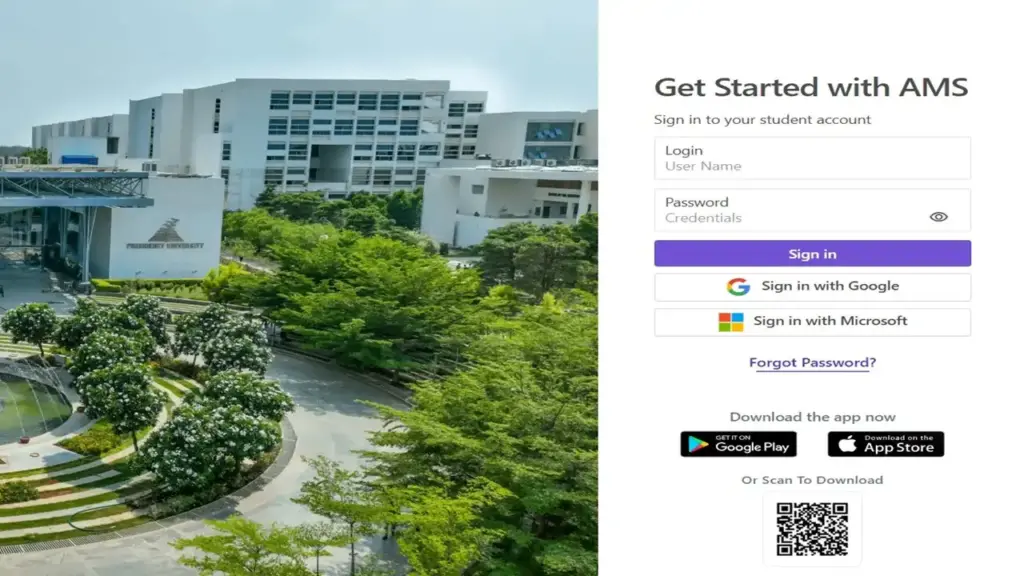
Each option leads to a page titled “Get Started with AMS.” You’ll find a Login field, a Password field, and a Sign in button.
We also found two single sign-on (SSO) options on every login page we tested:
- Sign in with Google
- Sign in with Microsoft
These SSO buttons only work if your college has linked your official email to your Linways account. If you’re unsure, stick with your username and password first.
How Do You Sign Up for a Linways Account?
This is where many users get confused. Linways has no public signup page for students, faculty, or parents.
Your college creates your account for you. We checked the official portals, and none of them offer a “Create Account” or “Register” option.
Step-by-Step: Getting Your Linways Account
| 1 | Complete your admission or joining formalities at your college. Your account is usually created during this stage. |
| 2 | Check your official email or SMS for login details. Colleges typically share a username (often your register number, admission number, or staff ID) and a temporary password. |
| 3 | Contact your college’s IT cell or admin office if you haven’t received anything. They are the only ones who can create or activate your account. |
| 4 | Find your college’s Linways web address. Ask your department or check your college website or student handbook. |
| 5 | Open the correct login page (Student, Faculty, or Parent) and sign in with your credentials. |
| 6 | Change your temporary password after your first sign-in, if your portal prompts you. This keeps your account secure. |
Parents usually receive separate credentials from the college. Your child’s student login won’t work on the parent page.
How Do You Log In to Linways? (Student, Faculty, and Parent)
We tested the Presidency University portal directly, and all three login pages are working as of our latest check. The steps below apply to most Linways colleges, since the page layout is nearly identical across institutions.
How Do Students Log In?
| 1 | Go to the student login page: https://presidencyuniversity.linways.com/student |
| 2 | Enter your username in the Login field. |
| 3 | Type your password in the Password field. Tap the eye icon to check what you typed. |
| 4 | Click Sign in. |
| 5 | Alternatively, click Sign in with Google or Sign in with Microsoft if your college supports it. |
| 6 | You’ll land on your student dashboard, where you can view attendance, timetables, and results. |
How Do Faculty and Staff Log In?
| 1 | Visit the faculty login page: https://presidencyuniversity.linways.com/staff |
| 2 | Enter your faculty username or staff ID in the Login field. |
| 3 | Type your password. |
| 4 | Click Sign in, or use Google or Microsoft SSO. |
| 5 | Access your faculty dashboard to mark attendance, manage courses, and view student profiles. |
How Do Parents Log In?
| 1 | Open the parent login page: https://presidencyuniversity.linways.com/student/parent.php |
| 2 | Enter the parent username provided by the college. This is different from your child’s student ID in most cases. |
| 3 | Type your password. |
| 4 | Click Sign in or choose Google or Microsoft sign-in. |
| 5 | View your child’s attendance, academic updates, and performance. |
Quick tip from our team: If you study elsewhere, swap “presidencyuniversity” for your own college’s subdomain. The steps stay the same.
How Do You Reset a Forgotten Linways Password?
Forgetting your password happens to everyone. We confirmed that every Linways login page includes a “Forgot Password?” link right below the sign-in button.
Step-by-Step: Forgot Password Process
| 1 | Open your login page (Student, Faculty, or Parent). |
| 2 | Click the “Forgot Password?” link. You can also go directly to the reset page using the links below. https://presidencyuniversity.linways.com/ams/student/forgot-password Faculty https://presidencyuniversity.linways.com/ams/faculty/forgot-password Parents https://presidencyuniversity.linways.com/ams/parent/forgot-password |
| 3 | Enter your username or the registered email/phone your college has on file. |
| 4 | Submit the request and check your inbox or messages for reset instructions. Look in your spam folder too. |
| 5 | Follow the link or code to create a new password. |
| 6 | Return to the login page and sign in with your new password. |
What If the Reset Doesn’t Work?
Sometimes your registered email or phone number is outdated in the college records. In that case, the reset message won’t reach you.
Our advice is simple:
- Contact your college IT cell or department coordinator
- Ask them to update your contact details
- Request a manual password reset if the automated one fails
How Does Linways Login Differ Across Institutions?
Here’s what our team observed: Linways gives each college its own branded portal. The Linways login page you use depends entirely on where you study or work.
Presidency University, Bengaluru
Presidency University runs one of the most visible Linways portals. We confirmed that presidencyuniversity.linways.com is fully working, with separate Faculty, Student, and Parent login buttons.
Students often search for Presidency University results on Linways. Results generally appear inside your student dashboard once the university publishes them.
Nirmala Group
The Nirmala Group uses a shared gateway at nirmalagroup.linways.com. This page works as a hub that links to three member institutions, each with its own Linways portal.
Our analysis suggests this multi-institution setup is growing in popularity. Groups that run several colleges can keep things organized under one entry point.
St Francis
Students and staff searching for St Francis access will need their college-specific Linways subdomain. We don’t publish an unverified link here.
Your college office or website is the right place to find the correct address.
Welingkar
Welingkar users also log in through an institution-specific Linways portal. The exact web address is shared by the institute’s administration.
Check your orientation materials or student email for the correct link.
Ramaiah
Ramaiah institutions follow the same model. Each college shares its own Linways subdomain with students, faculty, and parents.
If you can’t find it, contact the IT department directly. Avoid third-party links that claim to be official.
A word of caution: We strongly recommend using only addresses ending in “.linways.com”. Fake login pages are a real risk for students searching online.
Can You Use the Linways Mobile App to Log In?
Yes, and many students prefer it. The official app is called Linways V4, published by Linways Technologies.
We confirmed that the Google Play listing is live and working: Linways V4 on Google Play
The app is also available on the Apple App Store for iPhone users.
What Can Students Do in the App?
- Access timetables
- Check attendance
- Access course materials and collaborate
- Join subject communities
- Receive push notifications
What Can Faculty Do in the App?
- Access timetables
- Manage attendance
- Manage subject communities
- Manage course materials
- Access student profiles
- Receive push notifications
Key App Details We Verified
- Downloads: 1 lakh+ on Google Play
- Content rating: Everyone
- Last updated: 26 September 2026
- Minimum supported version: 1.10.30
- Data safety: The developer states no data is collected or shared with third parties
Pro tip: Keep the app updated. Older versions below 1.10.30 may stop working.
What Are the Key Features of Linways AMS?
We reviewed the official website in detail. Here’s what stands out in the Linways AMS feature set:
Core Academic Tools
- 45+ AMS modules covering nearly every campus function
- Outcome-Based Education (OBE) with ready-made reports
- AI-based attendance marking
- Learning Management System (LMS) and online classes
- Choice Based Credit System (CBCS) support
- Course registration and curriculum management
- Student mentoring and slow learner analysis
Exams and Assessment
- Exam management from hall tickets to results
- Question paper creation and scrutiny
- Bloom’s level and K level mapping
- Digital evaluation
Administration and Finance
- Online fee collection with installments and scholarships
- Admissions and entrance test management
- HR and leave management
- Hostel and transport management
Compliance and Accreditation
- Reports for NAAC, NBA, and NIRF
- Support for ABET, AACSB, Times, and QS rankings
- Faculty appraisal and course file management
AI and Analytics
- AI-powered analytics and predictive insights
- Conversational analytics for leadership
- AI mentor and career guidance for students
- Lesson plan and question paper generation for faculty
Security and Access
- 24/7 cloud access from anywhere
- Mobile-first design
- SSL/TLS encryption for all data in transit
- WAF and automated DDoS protection
- Redundant daily backups
- Work in progress toward ISO 27001 and DPDP compliance
Third-Party Integrations
- Microsoft Teams
- Power BI
- Tally and Koha
- Plagiarism checker tools
Industry insiders are noting that the AI features are the platform’s biggest recent shift. That puts Linways in direct competition with larger global campus systems.
FAQs
Why can’t I find a signup option on Linways?
Linways doesn’t allow self-registration. Your college creates your account and shares your login details with you.
What should I do if my Linways login isn’t working?
First, make sure you’re on your college’s correct subdomain and the right login page (Student, Faculty, or Parent). Then check your username and password, clear your browser cache, or try the mobile app.
How do I reset my Linways password?
Click “Forgot Password?” on your login page. Enter your username or registered contact details, then follow the reset instructions sent to you.
Can parents log in with the student’s credentials?
Usually not. Parents get separate credentials and must use the parent login page.
Where do faculty members log in?
Faculty use the staff login page of their college. At Presidency University, that’s presidencyuniversity.linways.com/staff.
How do I check Presidency University results on Linways?
Log in through the student portal and open your results section. Results appear only after the university officially publishes them.
Is the Linways V4 app free?
Yes. The Linways V4 app is free to download on Google Play and the App Store.
Can I log in with Google or Microsoft?
Yes, if your college has enabled it. Look for the “Sign in with Google” or “Sign in with Microsoft” buttons on the login page.
Who do I contact for login help?
Start with your college IT cell or admin office. They manage your account directly, not Linways Technologies.
What’s the Bottom Line?
Our team found that getting into Linways is easy once you know two things. You need your college’s own subdomain and the credentials your institution issued.
From there, the Linways login process takes under a minute on the web or through the Linways V4 app. Use only official “.linways.com” addresses, keep the app updated, and contact your college IT team whenever something goes wrong.


