


Many people searching for africgold login end up on afgcoin.net, a currently active crypto staking and wallet platform. The older africgold.com brand has a very different history of withdrawal complaints, so you need to know which site you are actually using.
We tested the live pages, reviewed public feedback, and mapped every step. Here’s what we found.
Key Takeaways
- afgcoin.net has working login, register, and reset-password pages, and it offers email sign-in or Google sign-in.
- The older africgold.com holds a 2.8 TrustScore on Trustpilot from just 3 reviews. All three are 1-star, and all of them describe blocked withdrawals.
- We found no verified official link between Africgold and AFGCoin, so treat them as separate platforms and do your own checks before depositing money.
Why Are So Many People Searching for Africgold Right Now?
If you’ve followed Nigerian crypto “mining” platforms, the confusion won’t come as a surprise. The Africgold name circulated widely in 2021 and 2022, and the similar-sounding AFG brand of AFGCoin now shows up in the same searches.
Similar names often lead to similar mistakes. Our analysis suggests many users assume AFGCoin is simply a new version of Africgold.
We could not confirm that. No public record we reviewed proves the two platforms share owners, funds, or user accounts.
What Is AFGCoin, and What Does the Platform Offer?
AFGCoin presents itself as a crypto ecosystem with a token on BNB Smart Chain and several companion apps. The site promotes staking, exchange, and wallet tools from a single account.
Our team observed the following features and apps listed on the live site:
- Staking Application: Available as a direct Android download and on Google Play
- Exchange Application: Offered as a direct APK and on Google Play
- Wallet Application: Also available as a direct APK and on Google Play
- AFG Games Application: Marked “Coming Soon”
- Apple App Store, Microsoft Store, and Galaxy Store versions: All marked “Coming Soon”
- Google sign-in: A “Continue with Google” button appears on both the login and register pages
The site also shows an “Approvals” panel with badges for BscScan, Norton, Namecheap, Probely, and SolidityScan.
Read those badges carefully. Most of them link to automated third-party checkers, such as security-header scans or SSL tests. They are not financial licenses or regulatory approvals.
How Do You Sign Up for an AFGCoin Account?
The signup form lives at https://www.afgcoin.net/register. We found it working at the time of writing.
Expect a longer form than most sites. You will need to supply personal details, a phone number, and a referral code.
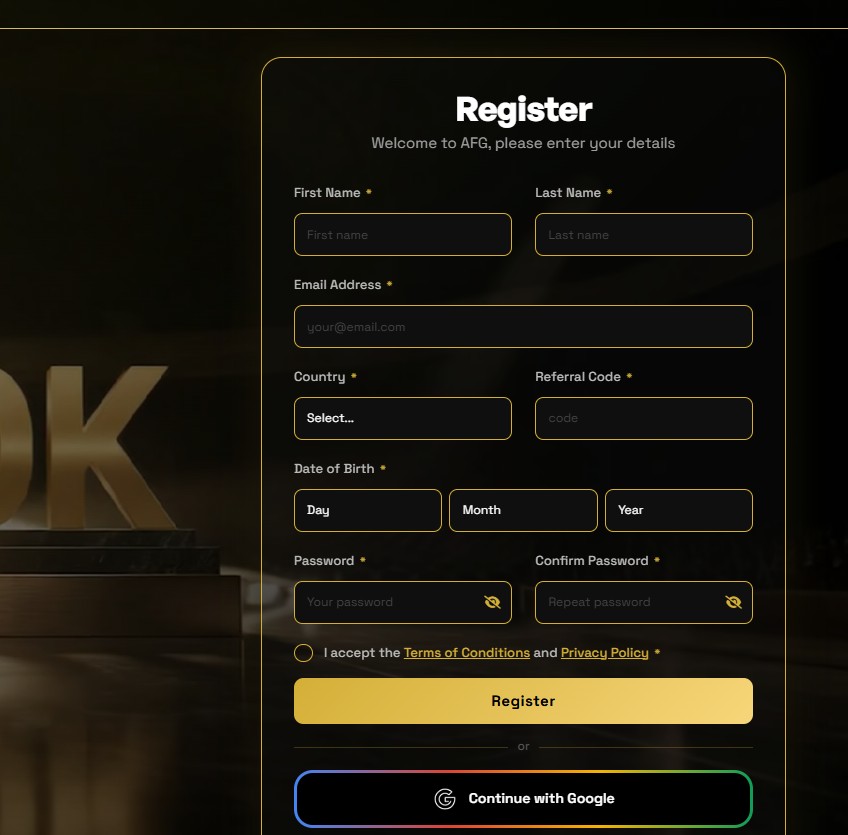
Step-by-Step Signup Guide
| 1 | Open https://www.afgcoin.net/register in your browser. |
| 2 | Enter your First Name and Last Name. |
| 3 | Enter a valid Email Address. Use an email account you check regularly, as password recovery may be sent to this inbox. |
| 4 | Select your Country from the drop-down list. |
| 5 | Enter a Referral Code. The registration form marks this field as required. |
| 6 | Enter your Phone Number, including your country code. |
| 7 | Select your Date of Birth (day, month, and year). |
| 8 | Create a strong Password, then enter it again in the Confirm Password field. |
| 9 | Tick the box to accept the Terms and Conditions and Privacy Policy. Review them before accepting. |
| 10 | Click “Register” |
Prefer a faster route? Click “Continue with Google” on the same page to sign up with your Google account.
Industry insiders are noting that required referral codes are common on platforms that grow through personal invitations. That doesn’t prove anything by itself, but it is worth factoring in.
How Does the Africgold Login Work on afgcoin.net?
The sign-in page sits at https://www.afgcoin.net/login. It greets users with “Welcome Back!” and asks for two details.
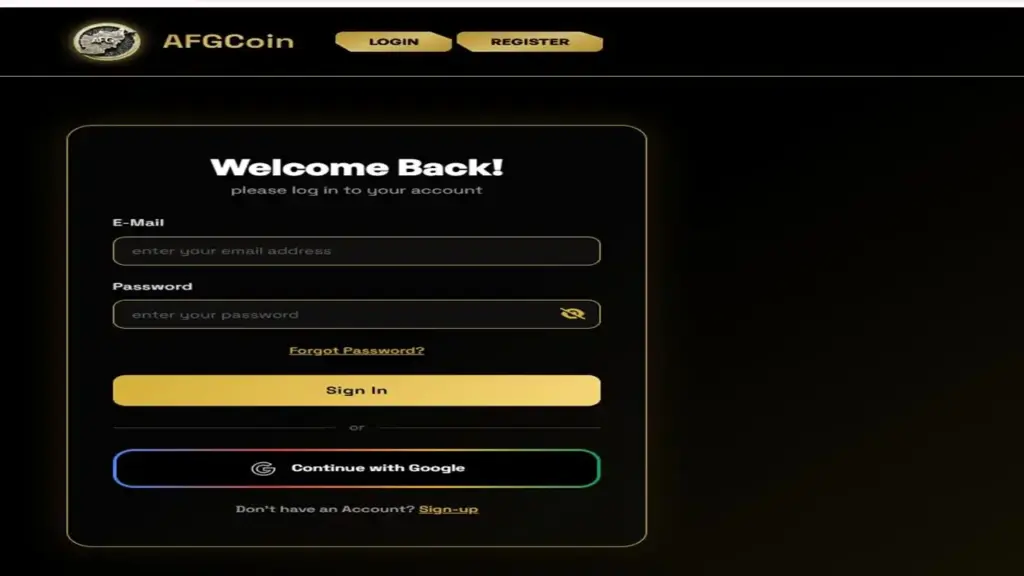
Step-by-Step Login Guide
| 1 | Go to https://www.afgcoin.net/login. |
| 2 | Enter the email address you used during registration. |
| 3 | Enter your password. Make sure Caps Lock is turned off. |
| 4 | Click “Sign In.” |
| 5 | If you registered using Google, click “Continue with Google” and select the same Google account used during signup. |
A quick tip from our team: bookmark the exact URL after your first visit. Typing it fresh each time raises your risk of landing on a lookalike phishing page.
What Should You Do If You Forget Your Password?
The recovery page is at https://www.afgcoin.net/reset-password. It works through email only, so your inbox is the key.
Step-by-Step Forgot Password Guide
| 1 | Open the login page and click “Forgot Password?”, or go straight to https://www.afgcoin.net/reset-password. |
| 2 | Enter the Email Address linked to your account. |
| 3 | Click “Send Email.” |
| 4 | Open your inbox and look for the password recovery link. Check your spam or junk folder if you don’t see it. |
| 5 | Click the recovery link and create a new password. |
| 6 | Return to the login page and sign in using your new credentials. |
| 7 | The reset page also includes a video icon that links to a YouTube tutorial explaining the password-reset process. |
The reset page also shows a small video icon that links to a YouTube tutorial on the process.
One detail stood out to us. An app-store user review complained about registering with a phone number and then being asked for an email during recovery, so always use an email you control.
What Do Trustpilot Reviews Say About Africgold?
Africgold.com has an unclaimed Trustpilot profile with a TrustScore of 2.8 out of 5. That score comes from only three reviews.
The number looks higher than it should. All three reviews are 1-star, and Trustpilot adjusts scores for profiles with very few reviews.
Here’s what the reviewers reported:
- November 2021: A reviewer called the company “scammers” and said users can’t withdraw after investing.
- March 1, 2022: Another described “fake promises that are never kept” and warned the money is “gone.”
- March 23, 2022: A third said Africgold kept changing its terms and conditions, making withdrawals “impossible.”
Trustpilot also shows a “You should know” notice stating the company may be associated with high-risk investments. The profile has zero reviews in the last 12 months.
We urge caution in both directions. Three reviews are a small sample, and Trustpilot says it does not fact-check individual claims, but the pattern is consistent and specific.
What Were Nairaland Users Saying About Africgold?
A Nairaland investment thread titled “Africgold: A Mining Platform” has drawn more than 1,500 views. It began in February 2022 with a promotional post.
The original poster described AFGOLD as a “virtual mining” platform. Members were told they could convert mining units into real money and cash out “as at when due.”
The same poster later explained the joining process:
- Buy a membership PIN from a “dispatch retailer”
- Create an account with the register option
- Start “mining” and increase mining power
- Receive “mining output” in a designated wallet
Community replies turned sharp quickly. One member noted there was no clear explanation of how the platform actually earns money.
Another called it a “ponzi.” A third member said they had nearly ₦400,000 in their account and could not withdraw it.
A separate social post from roughly four years ago promoted Africgold packages priced at ₦3,000, ₦5,000, and ₦10,000. Those registration links pointed to africgoldm.com, yet another domain.
Keep this in mind: these discussions concern africgold.com and africgoldm.com. They are not about afgcoin.net, and we found no evidence tying those complaints to AFGCoin.
Is AFGCoin the Same Platform as Africgold?
Based on our review, we can’t say it is. The names look alike, but the domains, branding, and product claims differ.
Africgold marketed virtual “mining” with PIN-based packages. AFGCoin markets staking, a token, an exchange, and wallet apps.
Similarity is not proof of connection. If anyone tells you your old Africgold balance has moved to AFGCoin, ask for written, verifiable proof before sending anything.
How Can You Protect Yourself Before Depositing Money?
Our analysis suggests a short checklist can save you a lot of trouble. Run through it before every deposit.
Steps to Take Before You Invest
- Type URLs manually or use a saved bookmark, never a link from a stranger’s message.
- Check the exact domain. afgcoin.net, africgold.com, and africgoldm.com are all different sites.
- Test withdrawals first with a very small amount before adding more.
- Read the Terms of Conditions and note any rules on withdrawal limits or lock periods.
- Search for regulatory registration. In Nigeria, check whether a platform is registered with the Securities and Exchange Commission (SEC Nigeria).
- Be wary of guaranteed returns. Promised profits are a classic warning sign.
- Question referral pressure. Platforms that rely on recruiting new members can collapse when sign-ups slow.
- Use a unique password and turn on two-factor authentication wherever it’s offered.
- Never share your password, recovery link, or wallet seed phrase with anyone, including “support” agents on WhatsApp or Telegram.
One more habit we recommend: screenshot your balances and transaction records regularly. If a dispute ever arises, you’ll have dated evidence.
Frequently Asked Questions
Is the africgold login page the same as africgold.com?
No. The working login page we tested is on afgcoin.net, which is separate from africgold.com. We found no verified official link between the two.
Where can I sign up for an AFGCoin account?
Use https://www.afgcoin.net/register. You’ll need your name, email, country, phone number, date of birth, and a referral code.
Can I log in with Google?
Yes. Both the login and register pages offer a “Continue with Google” option. Always use the same Google account you signed up with.
How do I reset a forgotten password?
Go to https://www.afgcoin.net/reset-password, enter your email address, and click Send Email. Then follow the recovery link in your inbox.
Is there an AFGCoin app for iPhone?
Not yet. The site lists Apple App Store versions as “Coming Soon.” Android users can download the Staking, Exchange, and Wallet apps from Google Play.
Why do reviews call Africgold a scam?
Reviewers on Trustpilot and Nairaland reported being unable to withdraw funds. One said the platform kept changing its terms, and forum members labeled it a “ponzi.” These complaints concern africgold.com, not afgcoin.net.
Do the “Approvals” badges mean AFGCoin is regulated?
No. Most badges link to automated security or SSL checks. They are not financial licenses, so check regulators directly.
What’s Our Final Take on the Africgold Login?
The africgold login search now leads most people to afgcoin.net, where the signup, sign-in, and password reset pages all work as described above. The process is straightforward, and Google sign-in makes it even quicker.
The bigger question isn’t how to log in. It’s whether you should deposit money at all, and that depends on your own research.
The Africgold name carries a documented trail of withdrawal complaints. AFGCoin is a separate, active platform with its own claims, and it deserves independent scrutiny.
We recommend starting small, testing withdrawals early, and checking with the SEC Nigeria or your local regulator. Your caution is your best protection.


