


If you move goods worth more than ₹50,000 across India, you already know the drill. No valid e-way bill, no legal transport. And every one of those bills starts at a single door: the ewaybill login page on the official government portal.
We spoke with logistics operators, tax professionals, and small business owners. The pattern was clear. Most ewaybill login problems are not complicated. They usually come down to wrong credentials, a frozen account, or a GSTIN mismatch.
Our analysis suggests that once you understand how the portal is structured, the whole process becomes routine. So let us walk through it, step by step.
Quick Summary
- The ewaybill login portal lives at ewaybillgst.gov.in, and you need a registered GSTIN before you can create an account.
- Registration uses OTP verification sent to your GST-registered mobile and email, after which you set your own username and password.
- Most login failures trace back to forgotten credentials or a frozen account — both of which have clear, official fixes.
What Exactly Is an E-Way Bill, and Why Does the Login Matter?
An e-way bill is an electronic document required to move goods within India. It carries a unique number called the EBN (E-Way Bill Number), which is shared by the buyer, seller, and transporter.
Think of it as a digital pass for your shipment. Without it, a registered person cannot legally transport goods above the value threshold.
Each bill has two parts. Part A covers the goods and the parties. Part B covers the vehicle and transport details.
The catch is simple. You cannot generate any of this until you complete your ewaybill login. That is why the account itself matters so much.
Who Needs to Register Before They Can Log In?
Not everyone uses the portal the same way. Industry insiders are noting that the confusion usually starts here.
You will typically need an account if you are:
- A GST-registered supplier moving goods above ₹50,000 in value.
- A transporter carrying goods for registered or unregistered clients.
- An unregistered transporter (URP) who needs a TRANSIN enrolment ID.
- A recipient who causes the movement of goods and must fill Part A.
If you have been dealing with interstate shipments, this won’t come as a surprise. The e-way bill requirement for interstate goods movement has applied since 1 April 2018.
How Do You Sign Up on the E-Way Bill Portal?
Registration comes first. You cannot reach the ewaybill login screen with working credentials until this is done.
We tested the flow described by tax practitioners, and here is the accurate sequence.
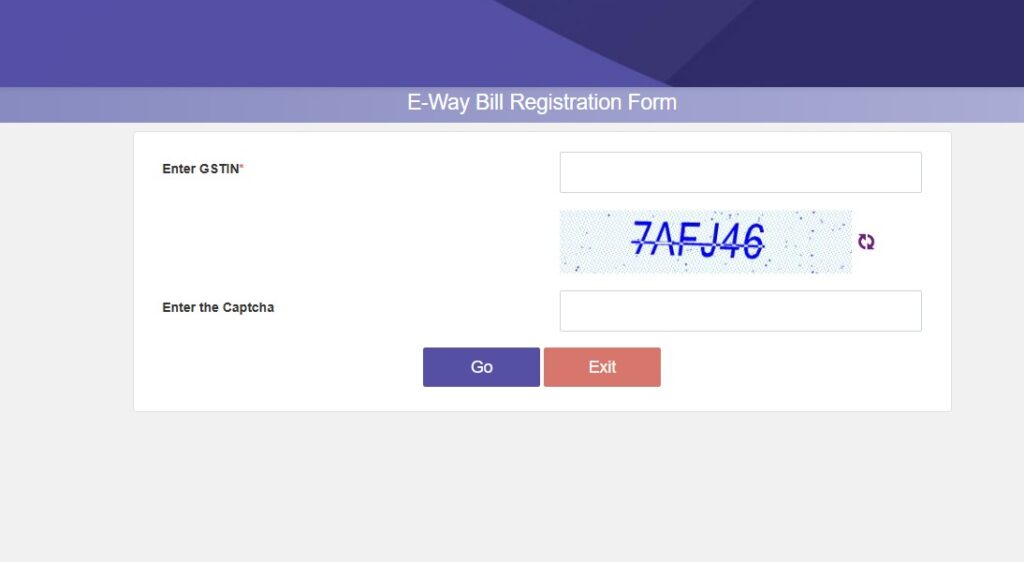
Step-by-step: E-Way Bill Registration
| 1 | Visit the official portal at . |
| 2 | Under the Registration menu, select e-Way Bill Registration. |
| 3 | Enter your GSTIN and fill in the captcha code shown on the screen. |
| 4 | Click “Go”. The system automatically retrieves your business details, including trade name, address, registered mobile number, and email address. |
| 5 | Click “Send OTP”. An OTP is sent to your GST-registered mobile number and email. |
| 6 | Enter the OTP and verify it. This confirms that you control the registered contact details. |
| 7 | Once verified, create your own username and password. |
| 8 | Submit the registration form to complete the e-Way Bill registration. |
One honest caution here: your details must match what is on the GST Common Portal. A mismatch can stop registration before it finishes.
How Do You Complete Your Ewaybill Login?
Once your account exists, the daily routine is short. We found this part rarely gives users trouble — provided the credentials are correct.
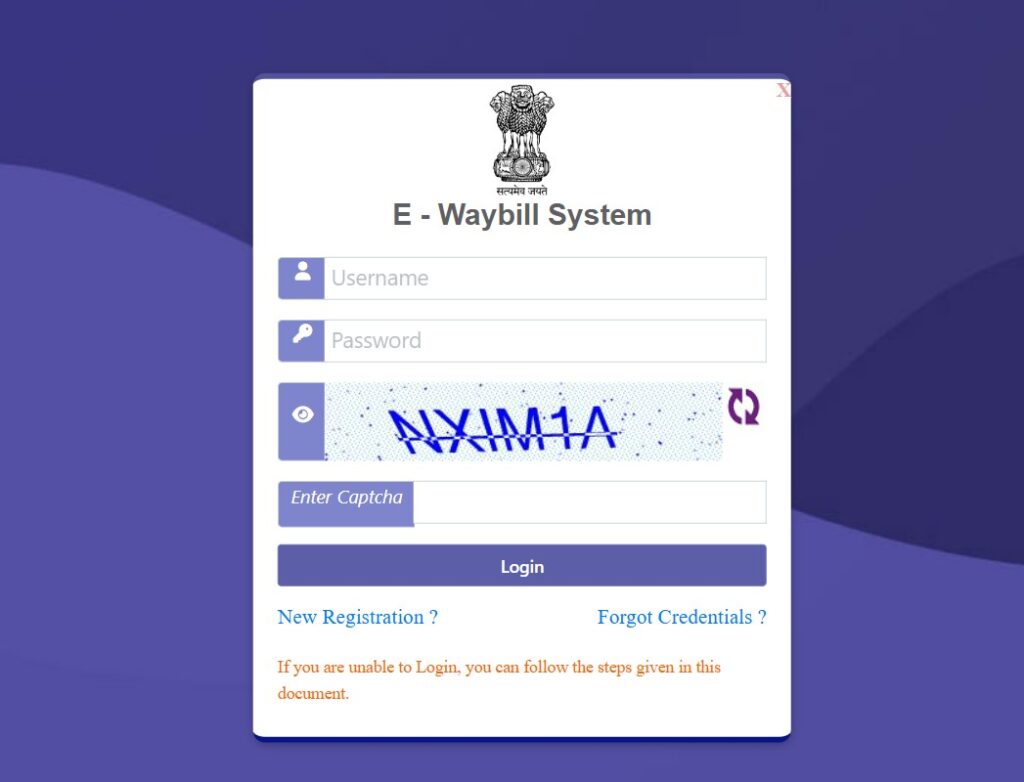
Step-by-step: Ewaybill Login
| 1 | Go to ewaybillgst.gov.in. |
| 2 | Click the “Login” option on the homepage. |
| 3 | Enter your username and password. |
| 4 | Type the captcha code exactly as displayed. |
| 5 | Click “Login” to access your dashboard. |
| 6 | To create a bill, open the “E-Way Bill” tab in the top-left corner and select “Generate New”. |
create a bill, open the E-Way Bill tab in the top-left corner and choose Generate New.
From there, you fill Part A (recipient GSTIN, HSN code, taxable value, and goods description). Then you complete Part B (vehicle number, transporter ID, distance, and mode of transport).
A quick note on the fields: boxes marked with red dots are mandatory. Green-dot fields help auto-populate your GSTR-1 later, so filling them can save time.
Once submitted, the bill generates with a QR code that officials can scan on the road. That removes the need to carry a printed copy in most cases.
Forgot Your Username or Password? Here’s the Fix
This is the single most common support query we came across. The good news is that recovery is built into the portal.
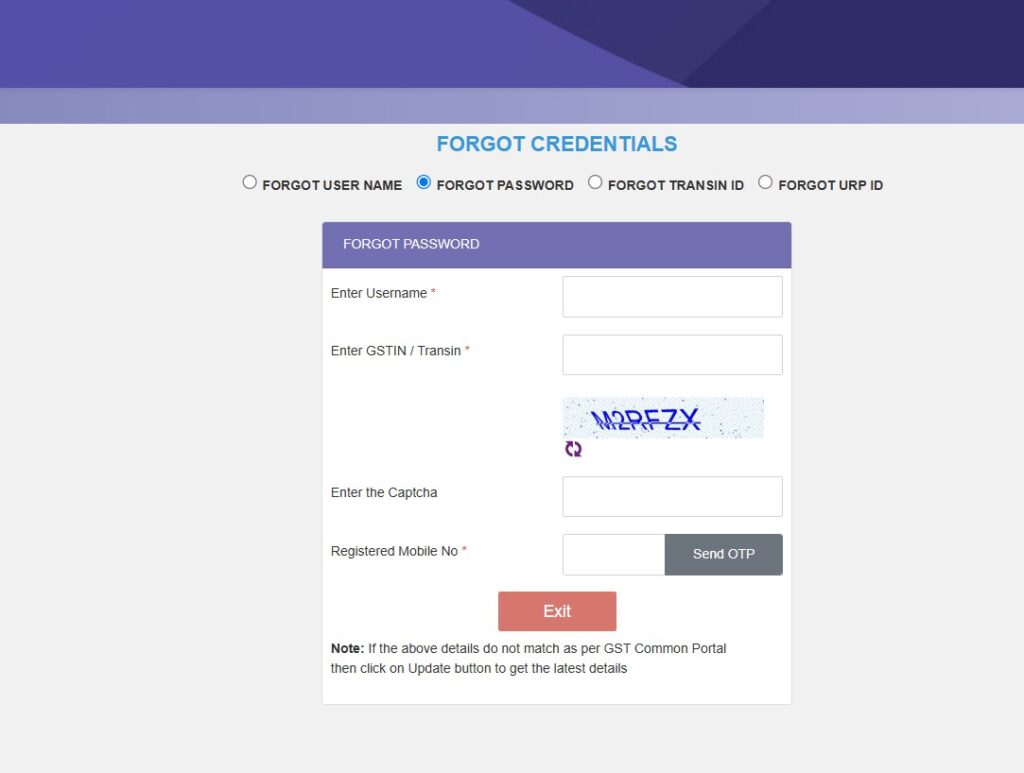
Step-by-step: Reset Forgotten Credentials
| 1 | Open the e-Way Bill login page at ewaybillgst.gov.in. |
| 2 | Look below the login fields for the “Forgot Credentials” options. |
| 3 | Choose “Forgot Password” if you know your username but cannot remember your password. |
| 4 | Choose “Forgot Username” if you cannot recall your username. |
| 5 | Enter the requested details, usually your GSTIN and registered mobile number. |
| 6 | Verify your identity using the OTP sent to your registered contact. |
| 7 | Set a new password or retrieve your username, depending on the option you selected. |
Our advice is practical: keep your GST-registered mobile number active. Almost every recovery path depends on that OTP reaching you.
Why Is My Account Frozen During Login?
A frozen account blocks ewaybill login entirely, and it worries a lot of users. In most cases, the cause sits outside the e-way bill portal itself.
There are usually two reasons:
- Your e-way bill registration was canceled.
- Your GSTIN was deactivated on the GST Common Portal.
Here is how to check and act:
| 1 | Visit the GST Common Portal at gst.gov.in. |
| 2 | Open the “Search Taxpayer” tab and confirm your GSTIN status. |
| 3 | If you can log in to the GST portal but not the e-way bill portal, file a complaint at selfservice.gstsystem.in. |
The distinction matters. If the GSTIN is fine, the problem may just be a portal-side issue that support can clear.
What Are the Different Ways to Generate an E-Way Bill?
The web portal is the most familiar route, but it is not the only one. Depending on your volume, another mode may suit your business better.
The available generation methods include:
- Online through the web portal after your ewaybill login.
- SMS, useful for single or urgent bills on the move.
- Android App, handy for field staff and transporters.
- API integration, suited to businesses with high daily volumes and their own billing software.
Our analysis suggests that small operators do well with the portal and SMS, while larger firms often move to API-based generation to reduce manual entry.
Frequently Asked Questions
1. What is the official website for ewaybill login?
The official portal is ewaybillgst.gov.in. We recommend typing the address directly rather than trusting search ads, to avoid look-alike sites.
2. Why is an e-way bill required at all?
It is mandated under Rule 138 of the CGST Rules, 2017. Section 68 lets authorities ask the person in charge of a vehicle to carry prescribed documents for valuable goods.
3. The system says I have “already registered.” What now?
That means your username and password already exist. Simply use your existing credentials to log in. If you cannot recall them, use the Forgot Username or Forgot Password option.
4. What is TRANSIN or Transporter ID?
TRANSIN is a 15-digit unique number generated for unregistered transporters after enrolment. It follows a format based on state code, PAN, and a checksum digit, and can be shared with clients.
5. Do I need an e-way bill for goods moved within the same state?
Interstate movement above ₹50,000 has required an e-way bill since 1 April 2018. Intra-state rules were rolled out in phases, so check your state’s current notification to confirm.
6. What details go into Part A and Part B?
Part A holds the GSTIN of supplier and recipient, invoice details, HSN codes, and goods value. Part B holds the vehicle number, transporter ID, distance, and mode of transport.
7. Can I generate a bill without logging in?
For most registered users, no. The ewaybill login is the gateway, though limited citizen and SMS options exist for specific cases.
The Bottom Line
Most ewaybill login issues are not technical mysteries. They come down to credentials, GSTIN status, or a missed OTP — all of which have clear fixes.
Our honest takeaway: register carefully, keep your GST-registered mobile number active, and bookmark the official portal. Do those three things, and the login itself becomes the easy part.
If your account stays frozen after checking your GSTIN, your next step is a complaint at selfservice.gstsystem.in rather than repeated login attempts.


