


Land ownership in Karnataka has moved a long way from dusty registers and Bhoomi Login queues. Today, a single online portal puts decades of property data at your fingertips. Below, we break down everything you need to know about the Bhoomi system, section by section.
What is Bhoomi
Bhoomi is Karnataka’s flagship digital land records system, launched back in 2000 by the state’s Revenue Department. The name itself means “land” in Kannada, and the project set out to convert handwritten RTC (Record of Rights, Tenancy and Crops) documents into a secure digital format.
Key facts worth remembering:
- It was one of India’s first large-scale e-governance projects for land administration.
- It is managed by the Bhoomi Monitoring Cell under the Revenue Department.
- The system stores ownership details, crop data, mutation records, and survey numbers for millions of plots.
According to the Revenue Commissionerate, the platform was built “transforming manual RTCs into accessible, efficient” records for every citizen. In short, Bhoomi made land data transparent and far harder to tamper with.
Bhoomi Login
The Bhoomi login is your gateway to registered services like mutation requests and i-RTC downloads. While many records can be viewed without an account, the login unlocks personalized features.
Here is how to sign in:
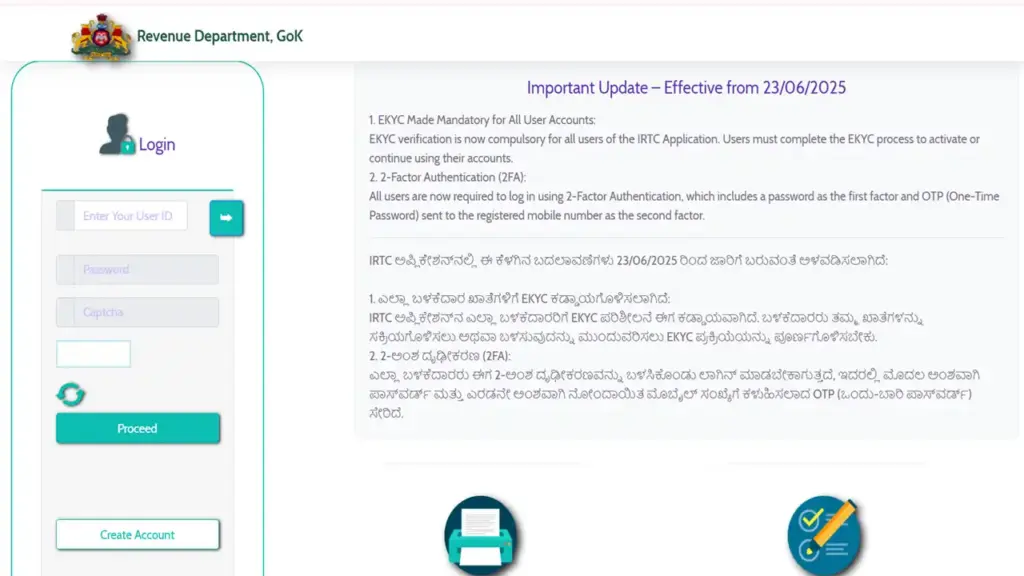
- Open the official Bhoomi RTC page at rtc.karnataka.gov.in.
- Click on the Login option on the homepage.
- Enter your registered username in the first field.
- Type your password carefully in the next field.
- Fill in the captcha code shown on the screen.
- Press the Login button to reach your dashboard.
Tip: Always check that the web address ends in karnataka.gov.in before entering your details.
RTC Bhoomi Login
The RTC Bhoomi login is specifically tied to the Record of Rights, Tenancy and Crops services. This is the most requested feature, because the RTC (also called Pahani) is the core proof of land ownership.
Steps to access RTC services after logging in:
- Sign in through the rtc.karnataka.gov.in service portal.
- From the menu, select View RTC and MR under the RTC Services heading.
- Choose your district, taluk, hobli, and village.
- Enter the survey number of the land parcel.
- Pick the surnoc, hissa, and period details.
- Click Fetch details to display the full RTC record.
Bold reminder: The RTC document lists the owner’s name, land extent, soil type, and crop information all in one place.
Bhoomi Login Wallet
The Bhoomi login wallet is a handy feature for users who download official i-RTC copies, which carry a small fee. Instead of paying each time, you load money once and spend as needed.
How the wallet works:
- Log in to your Bhoomi account on the RTC portal.
- Locate the Wallet or i-RTC section on your dashboard.
- Click Recharge Wallet and enter the desired amount.
- Complete payment through net banking, UPI, or card.
- Use the stored balance to download digitally signed RTC copies instantly.
This system makes repeat downloads quick and removes the hassle of repeated transactions.ns.
Bhoomi Login Karnataka
The Bhoomi login Karnataka service is available to every citizen of the state, from farmers to property buyers. The portal supports both English and Kannada, making it widely accessible.
What you can do with a Karnataka Bhoomi account:
- View and download RTC and mutation records.
- Track the status of mutation applications.
- Access Mojini survey services and Khata extracts.
- Verify land details before any purchase or sale.
The Revenue Department designed this as a Mission Mode Project, ensuring citizens get land information “designed and developed by Bhoomi Monitoring Cell themself”.
RTC Bhoomi Login Password
Your RTC Bhoomi login password is the key that protects your account and the sensitive land data inside it. A strong password keeps your records safe from misuse.
Best practices for setting a secure password:
- Use at least eight characters with a mix of letters and numbers.
- Add special symbols like @ or # for extra strength.
- Avoid obvious choices such as birthdays or “123456”.
- Never share your password through email, SMS, or phone calls.
- Update it periodically to stay protected.
Important: Government portals never ask for your password over the phone. Treat any such request as fraud.
Bhoomi Login Registration
New users must complete a quick Bhoomi login registration before accessing personalized services.
Follow these steps:
- Visit the official portal at rtc.karnataka.gov.in.
- Click on the New User or Register link.
- Enter your full name as per official documents.
- Provide a valid mobile number and email address.
- Verify your phone with the OTP sent to you.
- Create a strong username and password.
- Submit the form to activate your Bhoomi account.
Once registered, you can log in anytime to manage your land records.
Bhoomi Login Password Reset
Forgot your credentials? The Bhoomi login password reset option restores access in minutes.
Reset your password this way:
- Go to the Login page on the Bhoomi portal.
- Click on the Forgot Password link.
- Enter your registered username or mobile number.
- Receive a verification OTP on your phone.
- Enter the OTP to confirm your identity.
- Set a fresh, strong password and confirm it.
- Log in again with your new credentials.
Bold tip: Keep your registered mobile number active, since every reset depends on the OTP.
Access Greenshield Login Failed – Full Fix Guide 2026
FAQs
1. Is the Bhoomi portal free to use?
Viewing basic records is free, but downloading official i-RTC copies carries a small fee paid through the wallet.
2. What is the official Bhoomi website?
The main RTC service runs on rtc.karnataka.gov.in, supported by landrecords.karnataka.gov.in.
3. Can I get a legally valid RTC online?
Yes. The digitally signed i-RTC downloaded from the portal is accepted as valid.
4. Who manages the Bhoomi system?
The Revenue Department of Karnataka, through the Bhoomi Monitoring Cell.
5. What does RTC stand for?
Record of Rights, Tenancy and Crops, also known locally as Pahani.


