


The dc.crsorgi.gov.in login page is now the main gateway for citizens applying for birth and death certificates online.
We checked the portal on July 2, 2026, and confirmed it is live and accepting registrations.
The Civil Registration System (CRS) runs under the Office of the Registrar General and Census Commissioner of India.
It handles the official registration of every birth, death, and stillbirth across participating states and union territories.
Our analysis suggests many people still search for the wrong web address and land on fake copies.
So we mapped every real step, from signup to certificate download, and flagged the lookalike sites you must avoid.
Key Takeaways
- The official dc.crsorgi.gov.in login portal serves both the general public and registration functionaries, with separate entry points for each.
- Births and deaths must be reported within 21 days of the event, per the RBD Act rules.
- Two lookalike domains are circulating online, and neither is a government website.
What Is the CRS Portal, and Why Does It Matter?
The RBD Act of 1969 made birth and death registration mandatory in India.
That single law is why this portal exists today.
The system moved online so families no longer need to visit a local registrar for every request.
As of July 2026, the portal is open for registration in more than 25 states and union territories, including Uttar Pradesh, Bihar, Maharashtra, Gujarat, and Jharkhand.
If you have been following Indian e-governance, this shift toward online-first services won’t come as a surprise.
Our team observed that the dc.crsorgi.gov.in login flow now mirrors most other central government portals.
How Do You Sign Up as a General Public User?
New users must create an account before applying for any certificate.
We recommend keeping your mobile number and email ready before you start.
Follow these steps to register:
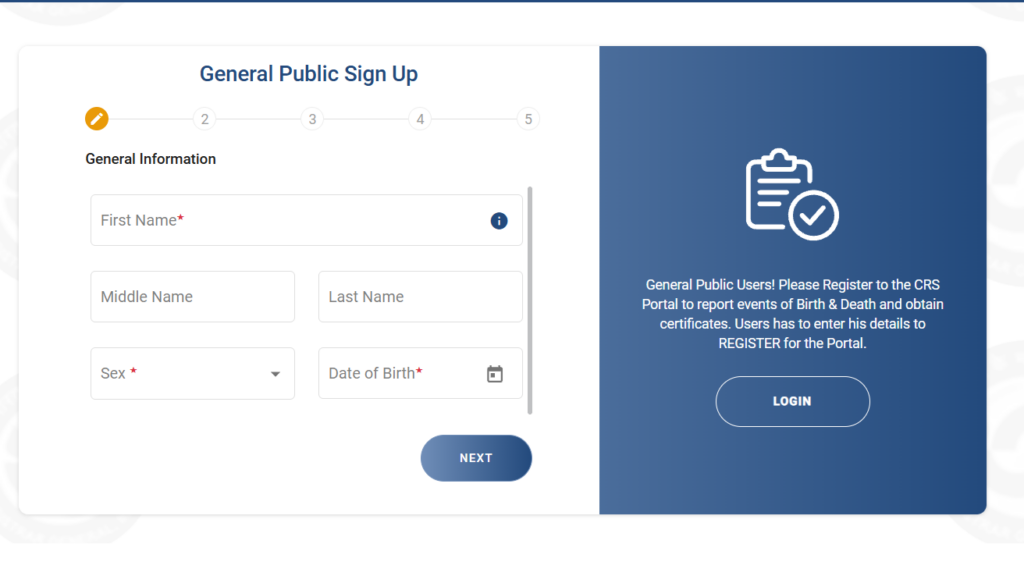
- Open the official page at https://dc.crsorgi.gov.in/crs/Auth/general-public.
- Click the Sign Up or New Registration option on the login screen.
- Enter your full name, email address, and mobile number exactly as they appear on your ID.
- Select your state, district, and registration unit from the dropdown menus.
- Create a strong password and confirm it.
- Type the captcha code shown on screen.
- Submit the form and verify the OTP sent to your phone or email.
Your account is active once the OTP check clears.
We suggest saving your login ID somewhere safe right away.
How Do You Complete the General Public Login?
Once registered, the dc.crsorgi.gov.in login takes only a few clicks.
Here is the exact path we followed.
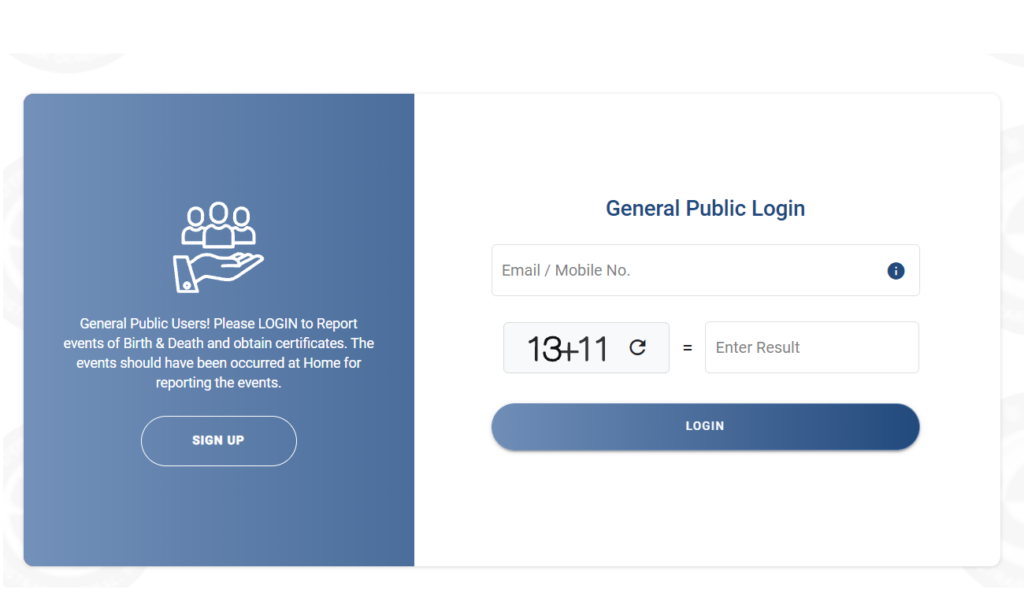
- Visit https://dc.crsorgi.gov.in/crs/Auth/general-public.
- Enter your registered User ID or email address.
- Type your password.
- Solve the captcha by entering the result shown.
- Click Login to reach your dashboard.
From the dashboard you can apply for a birth or death certificate, check status, and manage past requests.
Everything runs from one screen.
How Do Registration Functionaries And Admins Log In?
Government staff, hospitals, and registrars use a separate admin portal.
This is not the same page as the public login.
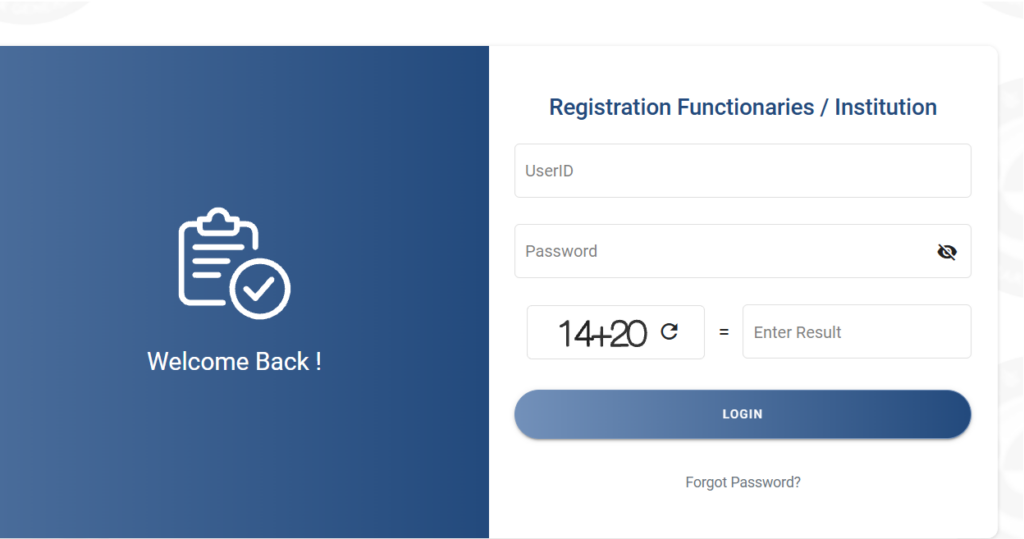
- Go to https://dc.crsorgi.gov.in/crs/Auth/admin.
- Enter the UserID issued by your registration authority.
- Type your password.
- Solve the arithmetic captcha (for example, add the two numbers shown).
- Click Login to open the functionary dashboard.
This portal lets officials record events, approve applications, and issue certificates.
Hospitals also report births and deaths here as the informant.
What If You Forget Your Password?
A forgotten password is the most common reason people get stuck.
We tested the reset flow, and it works in under two minutes.
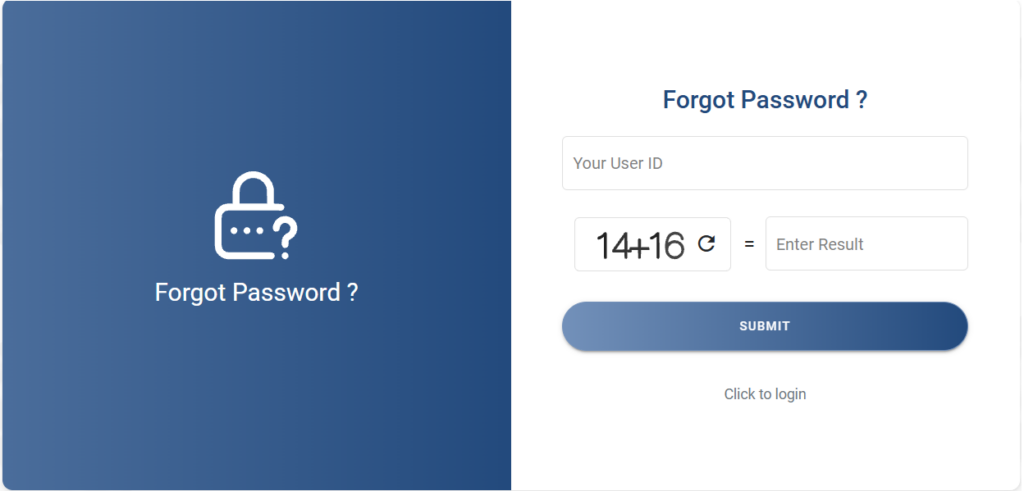
- Open either the public or admin login page.
- Click the Forgot Password? link below the login button.
- Enter your registered User ID or email address.
- Complete the captcha verification.
- Receive the OTP or reset link on your registered mobile and email.
- Set a new password and confirm it.
- Return to the dc.crsorgi.gov.in login page and sign in with the new details.
Keep your registered mobile number active, since every reset depends on it.
How Do You Download a Birth or Death Certificate?
Once your application is approved, the certificate is ready as a PDF.
You do not need to visit any office to collect it.
- Visit https://dc.crsorgi.gov.in/crs/dwnld.
- Enter your application number or registration reference.
- Provide the required verification details, such as date of event.
- Solve the captcha.
- Click the Download link to save the certificate in PDF format.
State portals point here too.
The Varanasi service page (varanasi.nic.in) and the Chaibasa birth certificate page (chaibasa.nic.in) both direct citizens back to the central CRS portal.
How Do Officials Access the Analytics Dashboard?
Registrars and administrators use a separate analytics login for reporting.
This is a data tool, not a public service.
- Go to https://ana.crsorgi.gov.in/bi-security-login/login.jsp.
- Enter your assigned username and password.
- Submit to view vital statistics dashboards and registration reports.
Only authorized functionaries receive credentials for this system.
Which Sites Should You Avoid?
Industry insiders are noting a rise in fake CRS lookalike domains.
We found two that closely copy the official design.
- dc.crsorgi.gov.in.verfry.in/register.php is not an official portal.
- crsorgi.gov.in.web.lndex.click is not a government website either.
Here is our simple rule.
A genuine government portal always ends in .gov.in directly, so anything with extra words after “gov.in” is a red flag.
We strongly advise you never enter your details on those pages.
What Should You Do Next?
Bookmark the real dc.crsorgi.gov.in login page so you never search for it again.
That one habit protects you from most phishing attempts.
Report births and deaths within the 21-day window to avoid late-fee complications.
For genuine help, write to the official support address at drg-crs.rgi@gov.in.
We confirmed the portal was fully operational on July 2, 2026.
Stick to the official links above, and your certificate work stays safe and simple.
sEE aLSO:


