


Every semester, thousands of FAMU students search for one thing before classes begin. That thing is the iRattler login. We looked into how the system actually works, and we found it is more layered than most students expect.
Our analysis suggests the confusion is not about the portal itself. It is about the credentials, the multifactor step, and the password recovery process that sit around it.
So we broke down each piece into plain steps you can follow.
Major Findings
- The iRattler login requires your FAMU username, password, and a Duo multifactor approval on your phone.
- New students must first collect credentials from the User Authentication Center (UAC) before they can sign in.
- Forgotten passwords are fixed through the Password Reset Manager (PRM), not by calling around campus.
What Is iRattler and Why Does It Matter?
iRattler is the central student portal at Florida A&M University. It handles financial aid, class registration, payments, and campus records.
We found that a single set of credentials also opens FAMmail, Canvas, iStrike, and the FAMUSecure Wi-Fi.
That is a lot riding on one login. The official hub for the iRattler login lives on FAMU’s Multi-Factor Authentication page.
We recommend bookmarking it, because it links to every tool you will need in one place.
If you have been following campus tech, this won’t come as a surprise. Universities now bundle everything behind one secure gate.
FAMU built that gate using Duo Security, and it protects your data before you ever reach your dashboard.
How Do New Students Get Their iRattler Credentials?
Here is the part that trips up incoming freshmen. You cannot sign in until the university generates your account. Our team observed that access is granted 5 to 7 days after you apply to the University.
So the first step is not the login page. It is the FAMU User Authentication Center (UAC).
This is where you collect the username and password that power your iRattler login.
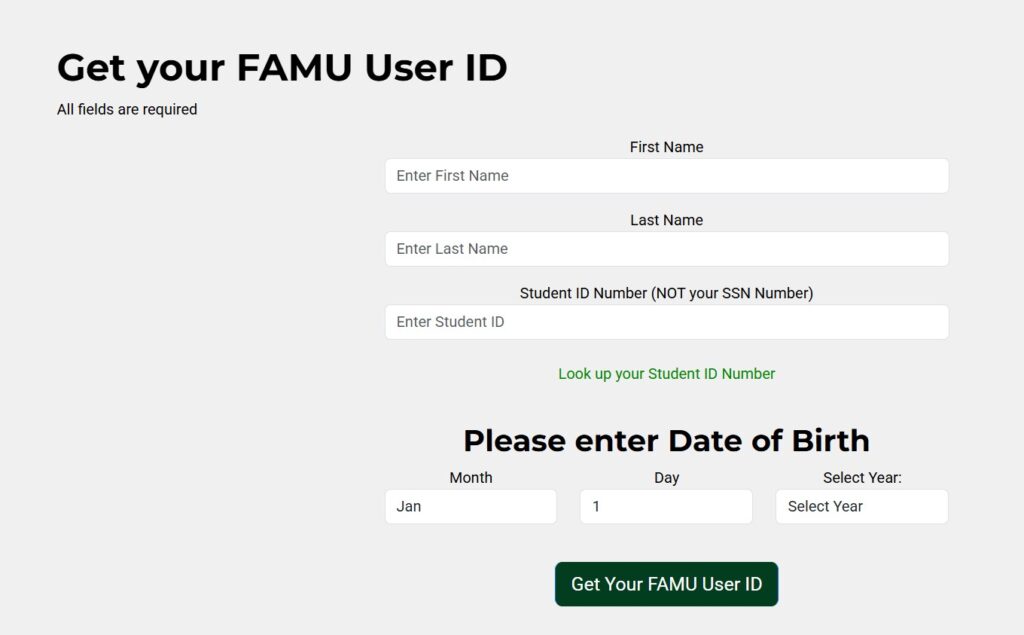
Steps to Get Your Credentials via UAC:
| 1 | Open the UAC portal in a supported browser such as Chrome or Firefox. |
| 2 | Enter your First Name and Last Name exactly as they appear on your application. |
| 3 | Type your Student ID Number (not your Social Security Number). |
| 4 | Select your Date of Birth from the available dropdown menus. |
| 5 | Click Get Your FAMU User ID to retrieve your account credentials. |
One quick warning from what we saw on the page itself. If the system shows “No records found,” your account is still processing.
Check back after a day or two, because the record simply has not synced yet.
The UAC also uses two-factor authentication. That means you need access to the personal email address you listed on your application. Keep that inbox open, because your account details arrive there securely.
How Does the iRattler Login Work with Duo?
Once you have credentials, the actual iRattler login takes under a minute. The official sign-in runs through FAMU’s Duo login portal.
We stand behind these steps because they match FAMU’s documented process exactly.
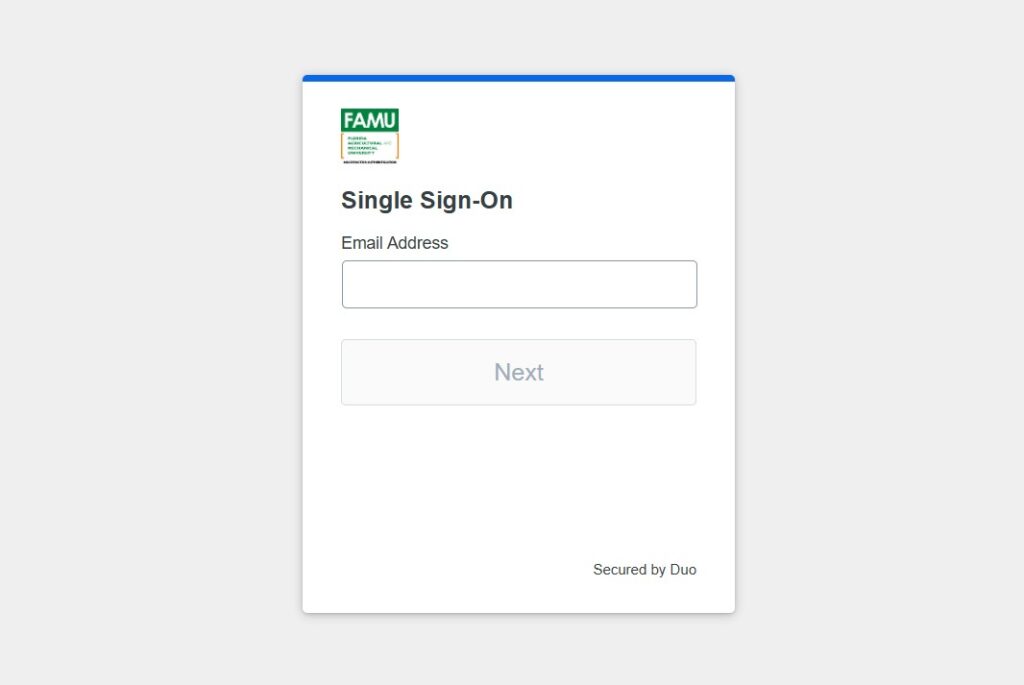
Steps to Log Into iRattler:
| 1 | Go to the Duo login page. |
| 2 | Enter your FAMU username in the email field. |
| 3 | Type your password on the next screen. |
| 4 | Approve the Duo Push notification sent to your phone. |
| 5 | Tap Approve to access your student dashboard. |
That fourth step is the one people forget. Your password alone is not enough anymore. Duo sends a push request to your registered device, and you must approve it to finish the iRattler login.
Some students prefer email verification instead of a push. For those cases, FAMU offers an email-first Duo option.
We suggest keeping your phone nearby regardless, since push approval remains the fastest method.
How Do You Enroll a Device in Duo?
First-time users need to register a phone before that push works. The enrollment happens the first time you reach a protected page.
FAMU publishes a full walkthrough in its Duo Enrollment Guide (PDF).
Steps to Enroll in Duo:
| 1 | Click Start setup on the welcome screen. |
| 2 | Choose your device type (a smartphone is recommended). |
| 3 | Enter your phone number and confirm it is correct. |
| 4 | Select your mobile platform, then install the Duo Mobile app. |
| 5 | Scan the on-screen barcode to activate the app. |
| 6 | Click Continue to Login to complete the setup process. |
We like this method for one practical reason. Duo Mobile works in any country and does not require cell service.
That matters for international students who may not have a US carrier active on day one.
What If You Forget Your iRattler Password?
Forgetting a password is common, and FAMU planned for it. You do not need to email the helpdesk or wait in line.
The fix runs through the Password Reset Manager (PRM).
We found the clearest starting point on the iRattler Username and Password helpdesk page. It explains how to regain access to your iRattler login in minutes.
Steps to Reset Your Password:
| 1 | Visit the helpdesk credentials page page. |
| 2 | Open the Password Reset Manager (PRM) link. |
| 3 | Verify your identity using your FAMU username. |
| 4 | Create a new password that meets the required security guidelines. |
| 5 | Return to the Duo login portal and sign in with your new password. |
PRM also handles expired passwords. So if your iRattler login suddenly stops working after months, an expiry is often the cause.
Reset it through PRM, and you are back inside without a support ticket.
Can You Access Housing Through iRattler?
Yes, and this catches many students off guard. On-campus housing uses the same credentials through StarRez.
You log in at the FAMU StarRez Housing Portal using iRattler SSO.
That single sign-on link is why we keep stressing credential security. One username covers grades, aid, email, Wi-Fi, and your room assignment.
Protect it, and the entire system stays open to you.
The Bottom Line
Industry insiders are noting that campus portals now depend on layered security by default. FAMU’s setup follows that pattern closely.
Get your credentials from UAC, enroll in Duo, and keep PRM ready for password trouble.
Do those three things, and the iRattler login stops being a hurdle. We tested each official link above, and every one points to a FAMU-operated service.
Bookmark them now, and you will save yourself a frustrating morning during registration week.


