


Mycnusd Login is the official digital portal for the Corona-Norco Unified School District (CNUSD), serving more than 53,000 students and thousands of teachers and staff in California. Launched in 2015, the platform is designed to centralize digital resources, streamline communication, and provide real-time access to academic and administrative tools for students, staff, and parents.
Key functions of MyCNUSD include:
- Centralized access to digital classrooms, grades, calendars, and assignments
- Integration with Google Classroom, Canvas, Edgenuity, and other educational apps
- Secure login for students, staff, and parents
- Personalized bookmarks and favorites for quick access to frequently used tools
- Support for password management and technical help
“Students can now connect to their peers and teachers through their own personal portal page. On this page, students can find everything they need to succeed,” states the district’s official student portal.
What is MyCNUSD?
MyCNUSD is a cornerstone of CNUSD’s commitment to academic achievement, equity, and digital readiness, providing a seamless online experience for all district users.
MyCNUSD Login
Accessing the MyCNUSD portal is a straightforward process, but it requires users to have their district credentials ready. Here are the steps for a successful login:
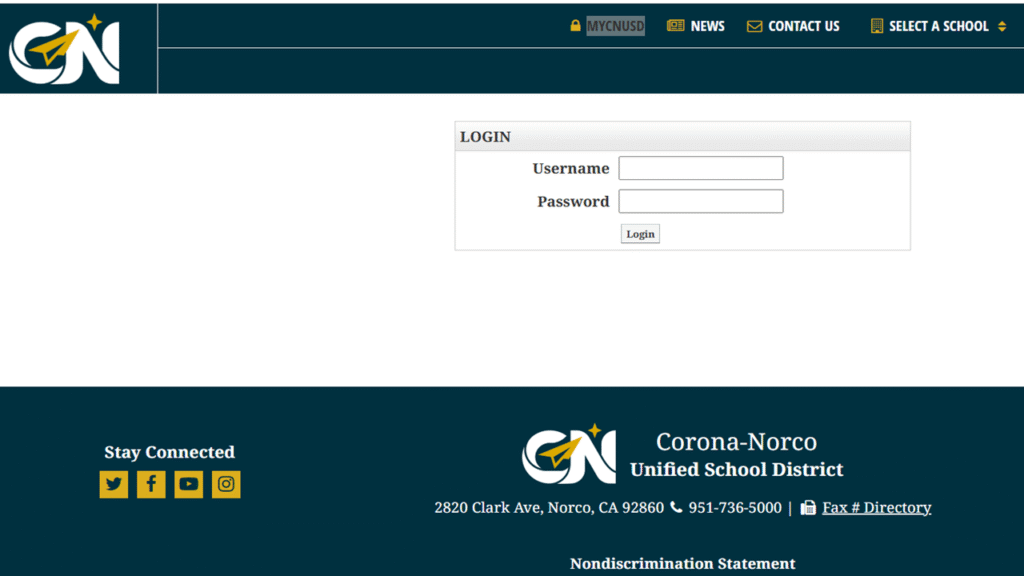
Step-by-step MyCNUSD Login:
- Go to the official MyCNUSD login page: Visit https://www.cnusd.k12.ca.us/gateway/Login.aspx or navigate from your school’s website.
- Enter your username: For students, this is typically your student ID number; for staff, it is your district-assigned username.
- Enter your password: Use your current district password. If you have forgotten it, use the password reset option or contact IT support.
- Click “Login”: This will bring you to your personalized dashboard, where you can access classroom resources, grades, and more.
- For technical issues: If you cannot log in, first try resetting your password. If problems persist, contact your school’s IT Help Desk for assistance.
“Once your password is reset, you will be able to access myCNUSD from any device, including your cell phone,” Norco High School’s tech support page advises.
MyCNUSD Login Staff
Staff members—including teachers, administrators, and support personnel—have a dedicated login process to ensure secure access to sensitive information.
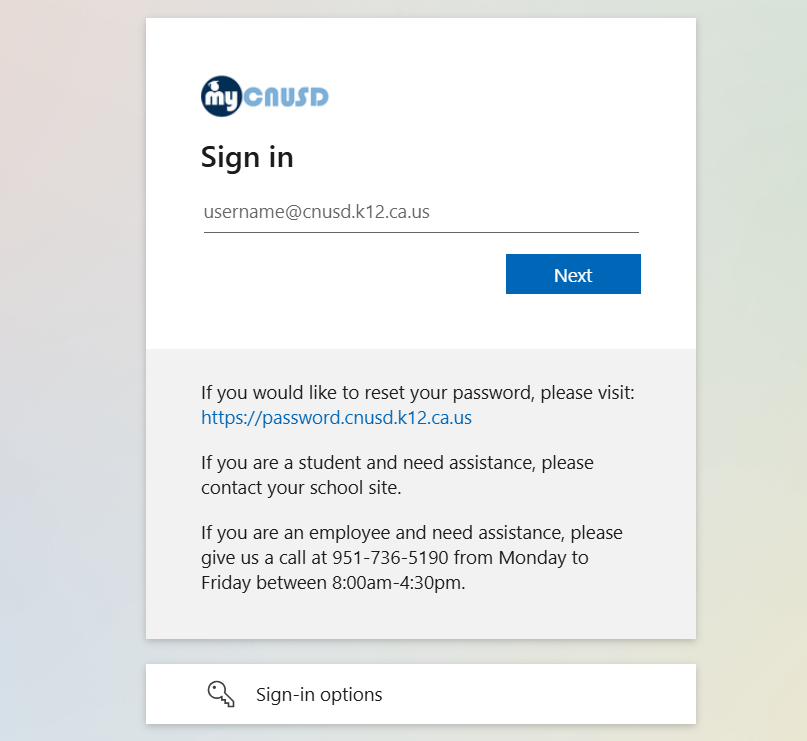
Steps for Staff Login:
- Navigate to the staff login portal: Use the main MyCNUSD login page or your school’s website, as some staff may have site-specific access points.
- Enter your staff username: This is usually your district email prefix or assigned username.
- Enter your password: Use your district password.
- Click “Login”: This provides access to administrative tools, gradebooks, communication platforms, and district resources.
- If login fails: Contact your site’s tech support or the district IT Help Desk for password resets or troubleshooting.
- Logout securely: Always log out after use, especially on shared devices, to protect student and staff data.
Staff access is governed by strict privacy and security protocols to comply with state and federal education regulations.
My CNUSD Bookmarks Sign In
The Bookmarks feature in MyCNUSD allows users to quickly access their most-used digital tools and classroom resources, streamlining the learning experience.
How to Sign In and Use Bookmarks:
- Log in to MyCNUSD: Use your student or staff credentials as described above.
- Access the “Digital Classrooms” section: Upon login, click on “Digital Classrooms” to find educational apps like Google Classroom, Canvas, and Edgenuity.
- Search for apps: If you cannot find an app, click “All Apps” and use the search function.
- Add to Favorites/Bookmarks: Click the “star” icon next to any app or tool to save it to your Bookmarks or Favorites for easy access next time you log in.
- Manage your Bookmarks: Rearrange or remove apps from your Bookmarks as your needs change.
“This is where you can select which apps/tools you want to keep in your Favorites so you have faster access to it next time you log-in,” explains the Norco High School portal.
My CNUSD Student Login
Students use the MyCNUSD portal to access all academic resources, submit assignments, and communicate with teachers.
Steps for Student Login:
- Open the MyCNUSD login page: Use the district or school-specific portal6.
- Enter your username: This is your student ID number.
- Enter your password: Use your district-provided password. If you forget it, contact your teacher or IT support for a reset.
- Click “Login”: This opens your student dashboard.
- Access Google Classroom and other apps: Click “Digital Classrooms” to reach your classes. Make sure you are not signed into a parent’s or sibling’s account.
- Sync your account: When prompted, link data and turn on sync to ensure all district extensions are available.
“Student emails are: STUDENTID#@students.cnusd.k12.ca.us. Username: ID number. Password: your district password,” according to the CNUSD email setup guide.
Student Connect CNUSD Grades
Student Connect is the official gradebook and academic tracking tool for CNUSD students, integrated within the MyCNUSD portal.
How to Check Grades in Student Connect:
- Log in to MyCNUSD: Use your student credentials.
- Navigate to Student Connect: Click on the Student Connect link from your dashboard or bookmarks5.
- Enter your login details again if prompted: Use your student ID and password.
- View your grades: The main screen displays your profile, school, and current grades for each class.
- Check “Pulse” for daily grade updates: The Pulse feature updates once per day to show your latest grades5.
- Click “Marks” for assignment-level details: See individual assignment scores, missing work (highlighted in red), and attendance records5.
- Contact your teacher for discrepancies: If you notice errors or missing grades, reach out to your teacher for clarification5.
“You’re simply going to go to Student Connect… log in with your same username and password that you log in to myCNUSD to your computer for school,” explains a CNUSD student tutorial.
FAQs
Q1: What is MyCNUSD used for?
A: MyCNUSD is the digital portal for students, staff, and parents in the Corona-Norco Unified School District, providing access to grades, assignments, digital classrooms, and communication tools.
Q2: How do I reset my MyCNUSD password?
A: Use the password reset link on the login page or contact your school’s IT Help Desk for assistance.
Q3: What should I do if I can’t log in as a student?
A: Reset your password, ensure you’re using your student ID and district password, and confirm you’re not signed into another account. If issues persist, ask your teacher or IT for help.
Q4: How do I add apps to my Bookmarks in MyCNUSD?
A: After logging in, click the star icon next to any app in the Digital Classrooms section to add it to your Bookmarks or Favorites.
Q5: Where can I check my grades?
A: Log in to Student Connect through MyCNUSD to view your overall grades, assignment details, and attendance records.
Mycnusd Student Portal
https://www.cnusd.k12.ca.us/
Search for Mycnusd Student. Corona-Norco Unified School District. MyCNUSD, News, Contact Us; Select a SchoolSchool. Elementary; K-8 Academy; Intermediate; High.
Mycnusd How do I log into myCnusd?
https://www.cnusd.k12.ca.us/cms/One.aspx?portalId=211960&pageId=3443209
Go to the Corona-Norco Unified School District website at www.cnusd.k12.ca.us • Click on the MyCNUSD logo as shown here. This Sign In page should open “Enter your student ID number and district password,” Your password is the same as what you use to log in at school.
Mycnusd bookmarks
https://workspace.cnusd.k12.ca.us/
Go to the website link https://workspace.cnusd.k12.ca.us/ then click Forgot password? Change to a different domain name.
Student Connect CNUSD portal – mycnusd
https://studentconnect.cnusd.k12.ca.us/
GMycnusd Log In. Equitas Solutions, Inc. Corona-Norco Unified SD. News Links.
CNUSD Intelligent Hub – mycnusd
https://centennial.cnusd.k12.ca.us/programs___activities/bring_your_own_device___b_y_o_d_/intelligent_hub_instructions
Students need to enroll in Intelligent Hub AT HOME by following the directions below: Go to the district BYOD webpage: https://centennial.cnusd.k12.ca.us/.
How To register for MyCnusd?
https://www.cnusd.k12.ca.us/parents/enrollment/annual_online_registration
Go to the visiting https://parentconnect.cnusd.k12.ca.us. Download this Q Parent Connection apps (available on the Apple Store and the Google Play Store) and complete online registration from your mobile device! The apps will also allow you to access your student’s grades, attendance, and more.
MyCNUSD – Find. Learn.Grow.
https://news.cnusd.net/mycnusd-find-learn-grow/
MyCNUSD Students can communicate with their teachers and fellow students to get feedback on assignments collaboratively.
See Also:


