


Cooper University Health Care patients now manage most of their care online, and the MyCooper login sits at the center of that system. Our team reviewed the official Cooper portal to map out exactly how it works.
We found a secure health record tool that connects patients to doctors, test results, and billing from one account. If you have been putting off setting up your MyCooper login, this walkthrough removes the guesswork.
Core Insights
- MyCooper is Cooper University Health Care’s patient portal, built on the widely used MyChart platform.
- You can sign up with an activation code from your enrollment letter, or request access using your personal details.
- Account recovery runs through a dedicated login help page, so a forgotten password does not lock you out for long.
What Is MyCooper and Why Does It Matter?
MyCooper is a secure, encrypted online tool that connects you to your electronic medical record any hour of the day. Our analysis suggests it does far more than store records.
Here is what the portal lets you do:
- View medical information: review medications, immunizations, allergies, and lab results from LabCorp, Quest, and Cooper without waiting for a call.
- Message your care team: contact your physician’s office directly and request prescription renewals.
- Manage appointments: schedule, confirm, or cancel visits, and check in ahead of time.
- Pay bills: view statements, request procedure estimates, and settle balances by credit card or e-check.
Industry insiders are noting that portals like this cut down on phone tag between patients and clinics.
We think that convenience is the real draw here.
MyCooper Sign Up for Account?
Signing up is the first step before any MyCooper login works. Cooper offers two clear paths, and your enrollment letter decides which one you take.
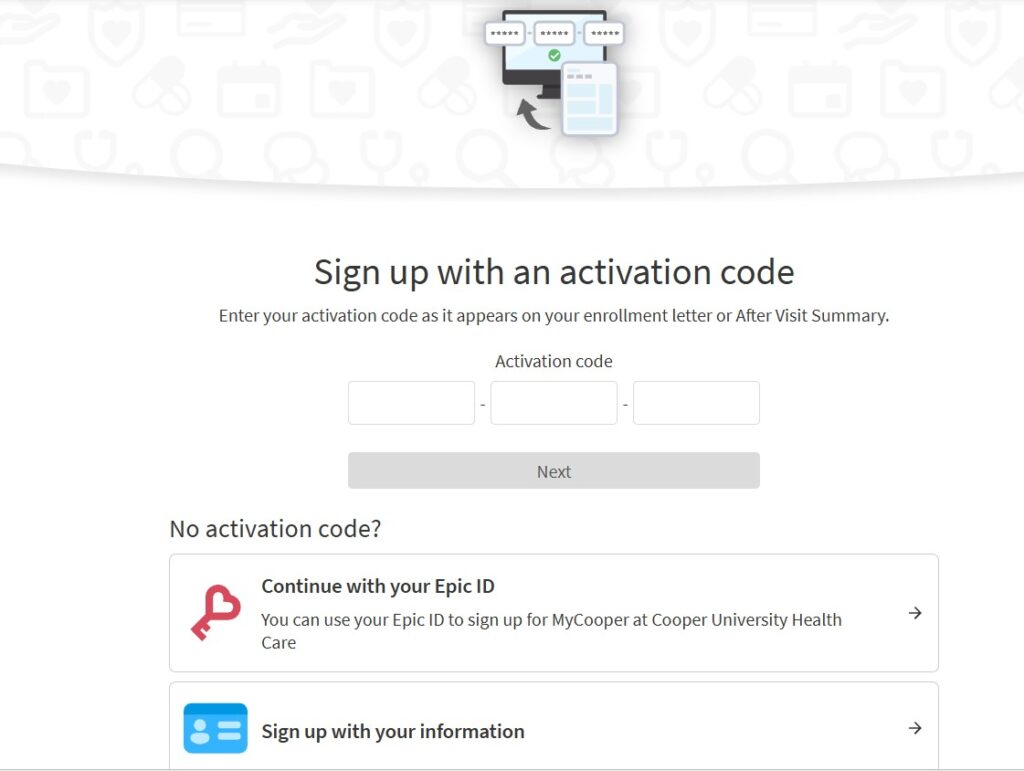
If you already have an activation code from an enrollment letter or After Visit Summary, use the activation page.
| 1 | Open the account activation page. |
| 2 | Enter your activation code in the three-part field exactly as provided. |
| 3 | Click Next to verify your identity. |
| 4 | Choose a username and password to complete the account setup. |
No activation code?
You can request access instead through the MyCooper signup form.
| 1 | Open the signup form and enter your personal information. |
| 2 | Verify your contact details and complete the identity verification process. |
| 3 | Create a username and strong password for your account. |
| 4 | Submit the registration form to complete the signup process. |
We found one detail worth flagging.
Cooper notes that processing can take up to a week, after which you receive an activation code by mail or email.
If you have questions during that wait, call 1-844-369-2667 for help.
How Do You Complete the MyCooper Login?
Once your account is active, the MyCooper login takes only a moment.
We tested the official page and confirmed the steps below.
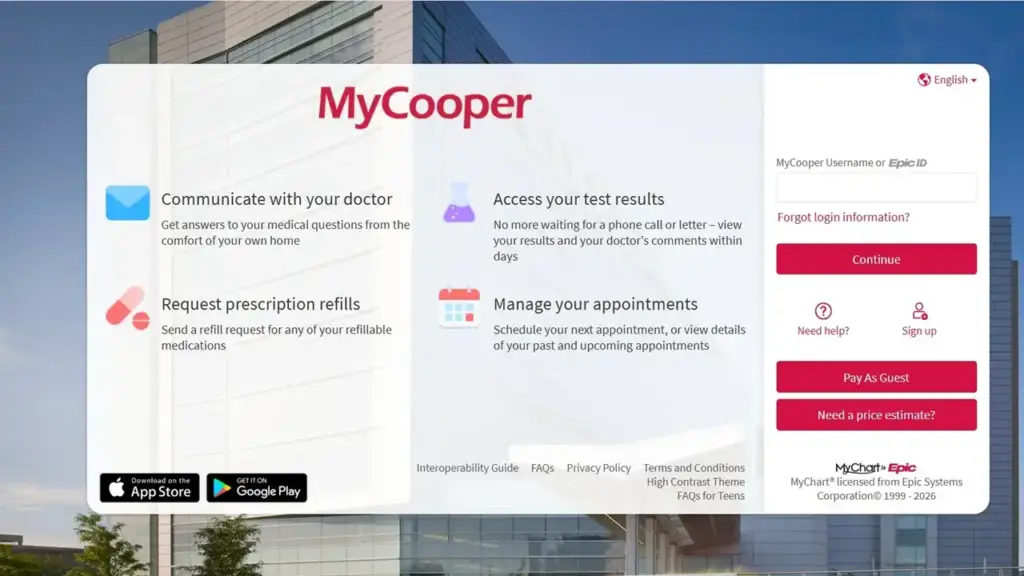
- Go to the MyCooper login page.
- Make sure cookies are enabled, since the portal blocks sign-in without them.
- Enter your MyCooper username and password.
- Select Sign In to reach your dashboard.
One quick note from our review.
If the page shows a cookie error, adjust your browser settings and refresh before trying your MyCooper login again.
What If You Forget Your Password?
A forgotten password stalls plenty of patients, so Cooper built a dedicated recovery route.
We walked through it to confirm it works cleanly.
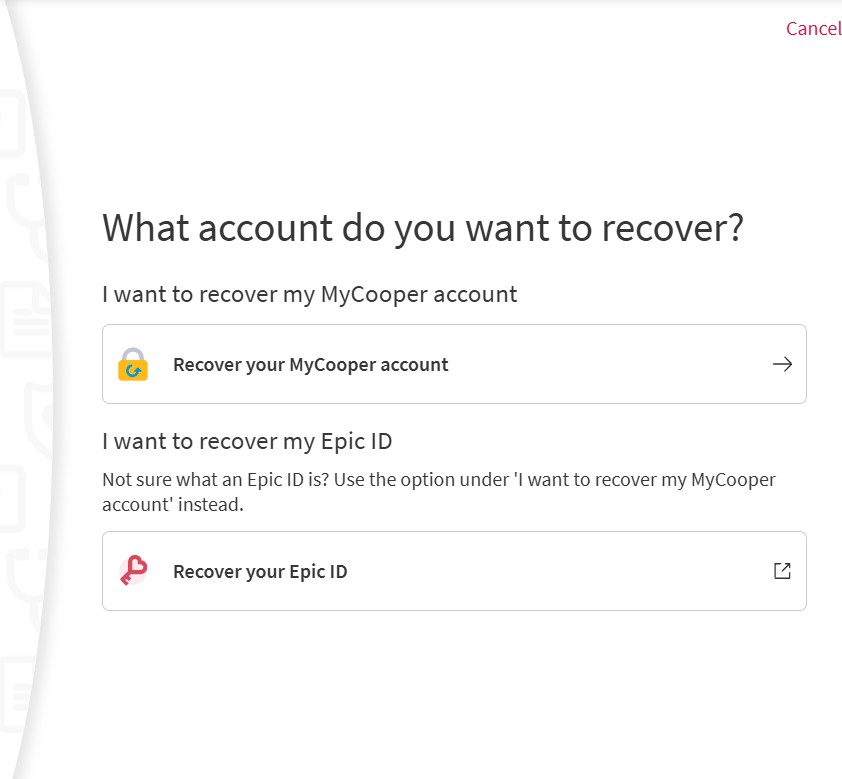
| 1 | Visit the account recovery page. |
| 2 | Choose “I want to recover my MyCooper account.” |
| 3 | Enter the email address or mobile number linked to your two-step verification. |
| 4 | Use the verification code sent to you to restore access to your MyCooper account. |
There is a second option on that page for recovering an Epic ID.
If you are unsure what an Epic ID is, our advice is simple: pick the MyCooper account option instead.
Can You Use MyCooper on Your Phone?
Cooper runs on the MyChart mobile app, so your records travel with you.
We confirmed the app is free on both major stores.
- Android users can download it from Google Play.
- iPhone and iPad users can grab it from the Apple App Store.
The app mirrors the desktop portal.
You can message providers, view results, and manage appointments from a smartphone or tablet.
Our Verdict on the MyCooper Portal
If you have been following patient-facing health tech, this setup will not surprise you.
Cooper delivers a straightforward MyCooper login backed by a full record system, direct messaging, and mobile access.
We recommend setting up your account early rather than during a health scare.
A working MyCooper login means your records, bills, and care team are always a click away.


